Suppose we have a video file some_video.
How can I get its length from a shell script (with mplayer/transcode/gstreamer/vlc/ffmpeg/whatever)?
VIDEO_LENGTH_IN_SECONDS=`ffmpeg .... -i some_video ... | grep -o .....`
Suppose we have a video file some_video.
How can I get its length from a shell script (with mplayer/transcode/gstreamer/vlc/ffmpeg/whatever)?
VIDEO_LENGTH_IN_SECONDS=`ffmpeg .... -i some_video ... | grep -o .....`


ffprobe -i some_video -show_entries format=duration -v quiet -of csv="p=0"
will return the video duration in seconds.

Something similar to:
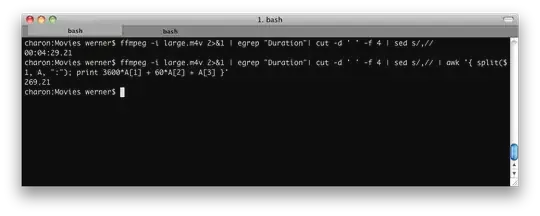
ffmpeg -i input 2>&1 | grep "Duration"| cut -d ' ' -f 4 | sed s/,//
This will deliver: HH:MM:SS.ms. You can also use ffprobe, which is supplied with most FFmpeg installations:
ffprobe -show_format input | sed -n '/duration/s/.*=//p'
… or:
ffprobe -show_format input | grep duration | sed 's/.*=//')
To convert into seconds (and retain the milliseconds), pipe into:
awk '{ split($1, A, ":"); print 3600*A[1] + 60*A[2] + A[3] }'
To convert it into milliseconds, pipe into:
awk '{ split($1, A, ":"); print 3600000*A[1] + 60000*A[2] + 1000*A[3] }'
If you want just the seconds without the milliseconds, pipe into:
awk '{ split($1, A, ":"); split(A[3], B, "."); print 3600*A[1] + 60*A[2] + B[1] }'
Example:

ffprobe -v error -select_streams v:0 -show_entries format=duration -of default=noprint_wrappers=1:nokey=1 movie.mp4
Will return the total duration in seconds. (video+audio) = 124.693091
ffprobe -v error -select_streams v:0 -show_entries stream=duration -of default=noprint_wrappers=1:nokey=1 movie.mp4
Will return only video duration in seconds stream=duration = 123.256467
ffprobe -v error -sexagesimal -select_streams v:0 -show_entries stream=duration -of default=noprint_wrappers=1:nokey=1 movie.mp4
Will return only video duration using the -sexagesimal format. = 0:02:03.256467

In case you don't have access to ffprobe, you could use mediainfo.
# Outputs a decimal number in seconds
mediainfo some_video --Output=JSON | jq '.media.track[0].Duration' | tr -d '"'`
