5

I am trying to submit a paper to an academic journal. My file is in PDF form. Unfortunately, the journal only accepts papers as JPEGs or TIFFs.

I can turn a single page into a JPEG using preview. However, I would rather not have to manually combine all the pages using image editing software.

Is there a way to do this quickly?

credford
  • 221
  • 1
  • 3
  • 11
  • 1
    Maybe a bit off topic, but which kind of journal would do that? – slhck Jan 08 '12 at 02:03
  • There are is a whole collection of Artificial Intelligence journals on Springer that specifically will not accept PDF submissions. They require Word, RTF, Powerpoint, or image files. It is extremely inconvenient for anyone not working on Windows. Word is out of the question because my Mac symbols used in equations translate to jibberish, destroying the intelligibility of the entire paper. – credford Jan 08 '12 at 13:20
  • 2
    Interesting … I'd suggest to remove your solution from the *question* and post it as an actual *answer* below using the **answer your question** button. – slhck Jan 08 '12 at 18:28
  • Agreed. My answer has been posted below. – credford Jan 10 '12 at 00:57

4 Answers4

3

Would the following imagemagick command do what you need?

convert -colorspace rgb file.pdf file.jpg

Here's some additional info as well.

Marvin Pinto
  • 142
  • 1
  • 8
  • Thanks for the suggestion. Unfortunately, that just produces a (low-quality) jpeg for each page. But this was helpful. I saw something on SO related to this program and I am checking it now. – credford Jan 07 '12 at 21:05
  • This may explain how to do the merging (I'll try it later): http://superuser.com/questions/168444/using-ghostscript-to-convert-multi-page-pdf-into-single-jpg – credford Jan 07 '12 at 21:17
  • Okay. I've tried several options and simply can't get imagemagick to convert the PDF to high-quality jpegs. I used Automator instead. I'll try the merging now. – credford Jan 08 '12 at 14:02
  • Giving up on imagemagick. It always produces low quality images for me, whether the command is `convert` or `montage`. It completely ignores any quality parameters I give it. – credford Jan 08 '12 at 14:34
  • I was looking up alternative ghostscript commands to convert but doesn't look like those will help either. – Marvin Pinto Jan 08 '12 at 14:36
3

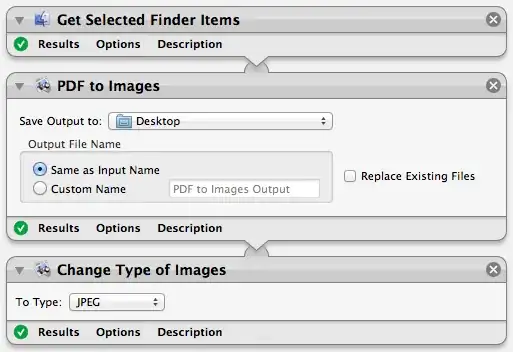
Converting to JPEGs

To convert the PDF to JPEGs, you can use this Automator flow:

Automator Image

Combining the JPEGs into a Single JPEG

No clue on this. I turns out, after some searching, that the journal will accept a zip file of the single jpegs. I ensured they were received in the correct order by naming them 01.jpg, 02.jpg, ..., 10.jpg, ..., 35.jpg. If anyone else using a Mac is submitting to a Springer journal with this issue, this appears to be the quickest solution.

credford
  • 221
  • 1
  • 3
  • 11
0

@credford

Try following command to convert pdf to high quality images.

 convert           \
-verbose       \
   -density 300   \ 
   -trim          \
    <pdf path>.pdf      \
   -quality 100   \
   -flatten       \
   -sharpen 0x1.0 \
    <jpeg name>.jpg
Geek
  • 101
  • 1
0

I don't think the free Reader will do this, but if you can find someone with the full Acrobat, they could open your PDF and save each page out as image files.

Steve Rindsberg
  • 1,817
  • 13
  • 7