26

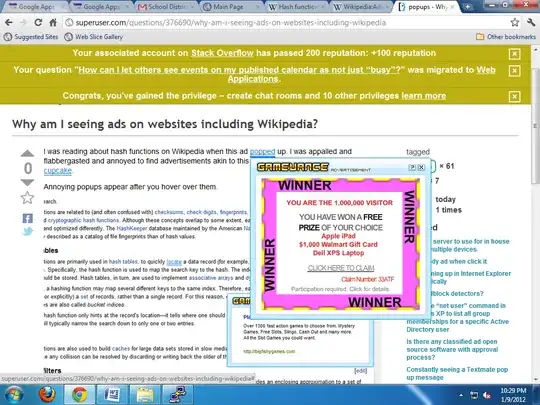
I was reading about hash functions on Wikipedia when this ad popped up. I was appalled and flabbergasted and annoyed to find advertisements akin to this one dotting my article like sprinkles on a cupcake.

Annoying popups appear after you hover over them.
Annoying ads on Wikipedia

I now notice that these ads are appearing on any web page I visit including Superuser.

Why? How can I get rid of them?


By the way, these ads have the very gall to surface on Superuser, as seen here: Ads on superuser
David Faux
  • 4,789
  • 25
  • 55
  • 71
  • 19
    Do you have any extensions installed? If so, one of them is doing this. – Paul Jan 10 '12 at 04:41
  • 6
    Wow, that was it. I had a malicious extension called "GameVance" installed. Thank you for bringing that up and solving the problem! – David Faux Jan 10 '12 at 04:44
  • 3
    Great, I have added it as an answer if you want to accept or upvote it. Or provide your own answer as you identified the extension and accept your own answer. – Paul Jan 10 '12 at 04:49
  • 10
    This is sort of obvious that "GameVance" was doing this considering there is a huge "GameVance" logo in nearly every pop-up in that screenshot. – Ramhound Jan 10 '12 at 15:07

4 Answers4

52

This is usually caused by "malicious" extensions, and removing the extension will normally solve the problem.

Paul
  • 59,223
  • 18
  • 147
  • 168
  • 35
    Some other malicious extensions: bing toolbar, ask toolbar, any toolbar. :( – Demolishun Jan 10 '12 at 08:15
  • 4
    This. Don't just remove the extension, but do an anti-virus/anti-malware scan on your computer. Most of the time, if you have something like this, there is also something else hidden on your computer. – Nicholas Jan 10 '12 at 17:45
  • 1
    @Demolishun Bookmarks toolbar? (Well, I suppose, if it has Facebook on it...) – Izkata Jan 10 '12 at 21:51
  • I think this is called [Adware](http://en.wikipedia.org/wiki/Adware). – styfle Jan 11 '12 at 06:09
19

It looks like someone downloaded a "free game" that came with some scummy advertising stuff. Just uninstalling the plugin won't get rid of everything:

Luckily, from the sounds of it, they're pretty good about actually uninstalling when you uninstall.

Plutor
  • 551
  • 1
  • 3
  • 8
3

In case the official instructions don't work, or even if they do, you might want to run an adware removal tool such as Ad-Aware. For every piece of malware that asserts its existence you are likely to have a dozen or so that do not.

fluffy
  • 646
  • 3
  • 14
-6

Can also be because that website was running short of money and decided to accept ads - Wikipedia in particular was running short of money, but I have no information on whether they decided to accept ads.

If so, an antivirus program or an antispyware program will probably NOT remove the ads.

I've found a program that claims to remove even those, but I haven't tried it:

http://simple-adblock.com/

milesrf
  • 52
  • 4
  • 7
    If you look at the screenshots, it is clear that the ads stem from adware or a rogue extension. – iglvzx Jan 11 '12 at 05:59