116

I have an image that is 100×125 pixels in size.

I'd like to create a new image by repeating the source image, five times, horizontally (so the new image is 500×125px).

The repetitions must be pixel perfect, in exactly the right place (so I'm less likely to accept an answer that requires placement by eye-balling).

What's the easiest way to do this using GIMP?

Lukasseon
  • 7
  • 4
Jon-Eric
  • 2,172
  • 5
  • 19
  • 27

3 Answers3

134
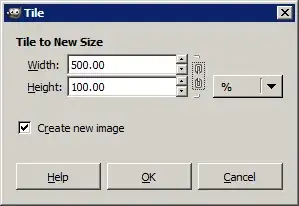
  1. In the menu, navigate: Filters → Map → Tile....
  2. Disconnect vertical and horizontal scales (break the "chain" between them).
  3. Switch the units to percentage (%).
  4. Enter 500% for the width, 100% for the height.

screenshot

Lukasseon
  • 7
  • 4
sastanin
  • 3,857
  • 3
  • 25
  • 19
  • 4
    There is no need to switch to percentage. – iglvzx Jan 31 '12 at 16:56
  • 5
    @iglvzx isnt % a cleaner option ? – Shekhar Jan 31 '12 at 17:03
  • @shark, Yes! Misread the question, I mixed up their original height and width. I will fix it! Forgive my rashness... – iglvzx Jan 31 '12 at 17:10
  • 2
    Magnificent! Even easier than I expected. Thank you! – Jon-Eric Jan 31 '12 at 18:03
  • 1
    is it normal that it takes more than 5 minutes for gimp to do the tiling from an 1x355 px image to an 1200x355 px one, on a dualcore machine ? any browser does that in <1 seconds! to answer myself: the step i skipped by accident is to "disconnect the Chain". now it takes < 5 *seconds*. :) – n611x007 Oct 04 '12 at 23:12
  • If you don't unlink the two values you may adjust the other value without realising, and for example, it might go from a 1x355px image to a 1200x426000 image. That could take over 5 minutes to process! – thomasrutter Oct 08 '18 at 06:42
  • A nice feature would be selecting a template size (like A4, A3, Letter etc.) so that we can easily create a page for printing. – Vishnu Haridas Dec 07 '18 at 15:31
7

Don't have GIMP at hand right now but have you tried: Filters > Map > Tile?

Lukasseon
  • 7
  • 4
Shekhar
  • 5,009
  • 4
  • 33
  • 49
1

Similar to sastanin's answer, you'll want to

  1. Go to the menu and click: Filters → Map → Tile....
  2. Disconnect vertical and horizontal scales by breaking the little "chain" icon between them,
  3. Set width to 500 and height to 125.
  4. Hit OK.

There is no need to set units to percentages. I actually recommend against this because if you do want to switch the height to something other than 125 px later, it can get a bit mathy (not too difficult, but it can be avoided.)

Melanie Palen
  • 179
  • 1
  • 1
  • 8