17

I have been looking for a KVM switch that I could hook up to my laptop docking station so that I could dock my work laptop at home, flip a switch, and have my laptop use my home PC's keyboard, mouse, and two monitors. I can't seem to find one on Amazon or Newegg.

No VGA ports. That's oldschool and I don't want anything to do with it. DVI or HDMI only. Can anyone provide me with a link or two?

Edit: It also most support 1920x1080 digitally (no analog) on both monitors.

oscilatingcretin
  • 5,103
  • 25
  • 82
  • 116
  • Find two regular DVI/HDMi switches and then splice the switcher wires together. – Huckle Feb 05 '12 at 01:06
  • [check this](http://www.startech.com/Server-Management/KVM-Switches/2-Port-StarView-DVI-KVM-Switch-with-Dual-Display~SV221DVIDD) or [this](http://www.overstock.com/Electronics/StarTech.com-4-Port-DVI-VGA-Dual-Monitor-KVM-Switch-with-Audio-USB/4567945/product.html) – Raystafarian Feb 05 '12 at 01:13
  • I guess I should have mentioned 1920x1080 resolution. Edit - sorry, I didn't see the second link – oscilatingcretin Feb 05 '12 at 01:34
  • That sucks. The second one only does one analog and one digital per PC which means I would need to replace one of my DVI-Ds with a DVI-I. – oscilatingcretin Feb 05 '12 at 01:45
  • If they exist, they are crazy expensive I'm sure. – surfasb Feb 05 '12 at 02:04
  • Perhaps someone can shed some light on the big technological complexity with a KVM switch that meets my criteria. I can find single-display switches supporting digital video for a decent price, but adding the capability for a second digital video cable is just too much to ask in the the year 2012? – oscilatingcretin Feb 05 '12 at 03:42
  • Not a big enough market. Users just use RDC/VNC or get another screen. – Daniel Beck Feb 07 '12 at 18:01
  • I may have misunderstood the different types of DVI. DVI-A is analog, DVI-D is digital, and DVI-I in integrated. Is the video quality from a DVI-I any less attractive because it supports digital and analog, whereas DVI-D is straight digital? If their digital streams are the same then the second one Raystafarian pointed me to would be good since it has one DVI-D and one DVI-I. – oscilatingcretin Feb 07 '12 at 18:35
  • @oscilatingcretin - Your computer likely only accepts DVI-D what does it matter what DVI-A and DVI-I are? Yes you have a fundamitel missunerstanding. – Ramhound Mar 08 '12 at 17:44
  • Incorrect. My video card actually has two DVI-I ports. – oscilatingcretin Mar 08 '12 at 18:36
  • @HuckleFeb That may be the best idea I've heard in a long time. I was looking at the price of multiple monitor kvms and they're stupid expensive. – Sidney Apr 05 '17 at 14:06
  • Did you ever find anything for this? I am looking for an HDMI dual monitor solution to switch 2 screens between Desktop and Laptop – hellyale Jan 29 '19 at 18:52

6 Answers6

7

I went down this road for a while and then decided to use Remote Desktop which is built into all versions of Windows - it gets better with more controls with Windows 7. Made sure the two devices are on the same high speed switch. No cost no switches, FAST..just as fast as sitting at the keyboard...same keyboard same mouse....AND cut and paste between regular desktop and remote (remember to check the box which says multiple monitors in the configuration of RD....Couldn't believe the answer was right there all the time.

Laptop now sits with top closed and works perfectly.

Bryyan
  • 71
  • 1
  • 1
  • Just to note on this - multi-monitor support for RD requires the "ultimate" or "enterprise" edition of Windows 7 (I believe on the host, not the client). The mere "pro" version only seems to allow one monitor. See http://windows.microsoft.com/en-US/windows7/Remote-Desktop-Connection-frequently-asked-questions. – Flyto Jul 11 '13 at 08:36
  • Actually, only requires Professional. Home can connect to Professional but not the opposite. – nicorellius Sep 08 '13 at 15:18
  • 1
    Is this fast enough to run high-end games? I'd think that performance might be affected in that scenario. – crush Sep 17 '14 at 18:49
  • 2
    @crush no, this is more of a work solution. – Brian Webster Sep 17 '15 at 21:14
6

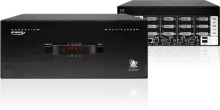
How about this one? ADDERView 4 PRO DVI Multi-Screen

The ADDERView PRO is a professional grade KVMA switch delivering ultimate flexibility for users who wish to share high resolution screens (up to 5MP) and modern USB peripherals between a multiplicity of computers.

Tamara Wijsman
  • 57,083
  • 27
  • 185
  • 256
Tom Osmond
  • 61
  • 1
  • We use these at work for switching 4 monitors, they work really well – deveneyi Feb 07 '12 at 12:06
  • Tom, where is the price for this? It seems rather elusive. – oscilatingcretin Feb 07 '12 at 18:36
  • 3
    These things typically are like Ferraris, if you have to ask... Contact their local VAR while sitting down. – Fiasco Labs Mar 08 '12 at 17:34
  • @oscilatingcretin - You want a KVM that supports HDMI you are going to pay for that functionality. You don't expand on the reason a VGA connection is bad. – Ramhound Mar 08 '12 at 17:44
  • Did I not say DVI **or** HDMI in my question?. Furthermore, how do you know I am not willing to pay it? Lastly, I do not want VGA because I want to still use my main PC for gaming, so I am only willing to go digital, not analog. The dual-monitor KVM switches I've looked at don't support using different types of cables. They're either all analog or all digital, so I need all digital. – oscilatingcretin Mar 08 '12 at 18:32
  • _Tom, where is the price for this? It seems rather elusive_ Companies like this sell through VAR partners. They list on the website how to get in touch. VAR resellers typically deal with companies, though a few are willing to do one-offs to us for pleb use. – Fiasco Labs Mar 08 '12 at 19:22
5

I just started using this from iogear at work to share two monitors, keyboard/mouse between two computers. While the product is a bit pricey, it is definitely worth it. I think you can get it on newegg for about $300.00.

I think you may find this product will do everything you need it to do.

http://www.iogear.com/product/GCS1642/

Indrek
  • 24,204
  • 14
  • 90
  • 93
Mike
  • 51
  • 1
  • 1
0

This (and other IOGEAR products on that site) seem to be what you are after...

Diogo
  • 30,192
  • 65
  • 150
  • 222
0

I typed in https://www.google.com/search?complete=0&q=dual+monitor+kvm, clicked the second shopping result, clicked Amazon and landed on http://www.amazon.com/StarTech-com-Port-Switch-Audio-SV231DD2DUA/dp/B002VY8T2Y " switching both machines across two high resolution DVI monitors" "Combined or independent switching of audio and/or USB hub ports"

chx
  • 3,633
  • 6
  • 30
  • 68
-1

i use two iogear switches between two monitors and two computers. just have to press both switches at the same time to switch to both monitors. also use the #1 cable from each switch to the other computer as the switch is powered off the keyboard cable.