43

I'd like to take a group of cells in the HH:MM:SS format, and add them up. I don't want to have the value wrap on the 24 hour clock. I just want an absolute total of the values. (The sum function seems to wrap by default).

So if I have:

20:00:00
20:00:00
00:10:00
00:00:10
00:00:10

I want to end up with:

40:10:20

A contrived example, but it gets across what I'm looking for.

mtyson
  • 689
  • 2
  • 7
  • 12

4 Answers4

55

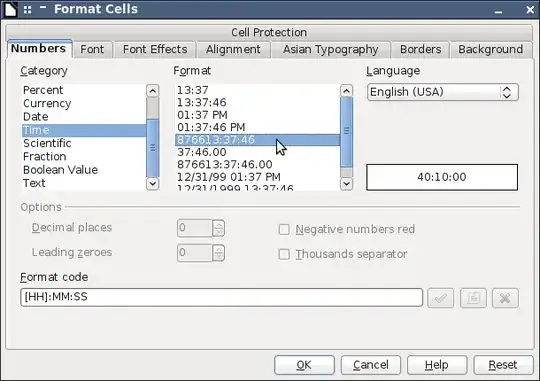
It's a matter of formatting the cells. You will have to apply the format code [HH]:MM:SS. It's already predefined:

FormatCells

(Screenshot from LibreOffice 3.4.3)

tohuwawohu
  • 10,303
  • 1
  • 35
  • 63
  • 2
    Thanks tohuwawohu - I had tried the formatting that was `13:37:46` and that didn't work. The `876613:37:46` was exactly what I needed. Thanks for the extra-clear screenshot too. – mtyson Feb 07 '12 at 17:42
  • 2
    `13:37:46` automatically restricts it to 24 hours, because it represents the 24-hour time-of-day format. – Joe Z. Mar 18 '13 at 02:50
  • Works for me. But I found another problem in my sheet: I had a time range from 23:40-00:24 (yes, should not work night shifts). Only when setting the format like that, I saw the negative value which messed up the sum. – Alex Oct 18 '15 at 10:59
14

Very often the time value is presented as a string ie. appears as '01:00:00 when formatted as time.

There are two solutions to this:

  1. To delete the single quote. This is extremely tedious if there are more values

  2. To create another cell which uses a formula to convert to timevalue. If eg A1 contains '01:00:00 then create another cell with =TIMEVALUE(A1), the formula can be dragged along to easily convert multiple values

hansfbaier
  • 260
  • 2
  • 7
  • 1
    Just an addendum to 1.: you can [delete the single quote using a regex search / replace](http://superuser.com/a/394170/84724). – tohuwawohu Jun 17 '15 at 05:57
1

Another solution that I have used is to enter 01:00 AM as 25:00 it still displays as 01:00 but the math is then performed correctly.

0

Darn problem solved: I added daily occurring periods to subtotals and all subtotals of a month to monthly totals without reliable result. Some months even became negative and it was unfathomable to me why.

By setting the cells of the subtotals, which never showed more than 24 hours, to format coding [HH]:MM:SS, the negative days became visible. It still made no sense to me. I did not and could not find a solution. So I left it and settled for the day totals. Until today, because now I have been able to solve the mystery thanks to finding this thread.

Only on those days, where a time period ended at 00:00, a negative result was output. As soon as I changed 00:00 to 24:00, the result became correct as expected. When the original periods are displayed with format coding HH:MM:SS, the table does not even show any difference. Only in the input line there is 24:00.

An input error is immediately visible thanks to a negative subtotal with format encoding [HH]:MM:SS, instead of only formatting the grand total like this.

@rufus-t-firefly, this had been a brilliant hint! From nearly 7 years ago, and I can still add to it! I have been fascinated by this problem for many months, if not years, and now it is finally clear and I can rely on the time formulas again. Thank you! Thanks to everyone in this thread!

anli
  • 1
  • 3