4

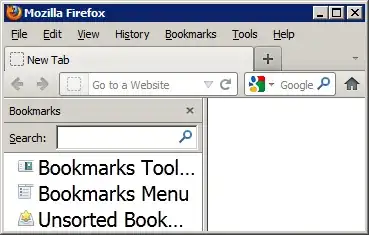
In Windows. (I know I can open Desktop > Properties > Appearance > Advanced > [and figure out which item determines it; probably Menu]. But, I don't want other things changed - just the bookmarks. This is because I have so many and I want more of them to display.

I did see the question on changing font size of items in folder, on bookmarks toolbar, and sub-folders, etc; But, I'm talking sidebar on firefox, I don't have Google Chrome and I am not a developer.

Journeyman Geek
  • 127,463
  • 52
  • 260
  • 430

2 Answers2

2

The selector for the items in the Bookmarks Sidebar is #bookmarks-view. So, for example, adding the following rule in your userChrome.css will change the font size to 20px:

#bookmarks-view
{
    font-size: 20px !important;
}

screen shot

iglvzx
  • 23,459
  • 13
  • 85
  • 122
  • Thank you! Stupid follow-up qus: must I install Chrome to do that? (But Chromoe is part of Google, not part of FF, right?) Does Chrome grab my private info? – TheClamkinator Feb 11 '12 at 23:36
  • 1
    This has nothing to do with **Google Chrome**. Follow the `userChrome.css` link in my answer for directions. – iglvzx Feb 11 '12 at 23:45
1

Here's an add-on for Firefox: Theme Font & Size Changer

Theme Font & Size Changer lets you change the global font size and font family used for the user interface in Firefox. Design your browser with your favorite font.

slhck
  • 223,558
  • 70
  • 607
  • 592
Marek
  • 11
  • 1