5

My wireless mouse (Microsoft Wireless Mobile Mouse 4000 on Windows 7) has started acting this way: When you press the middle button in a browser (expecting a link to open in a new tab) it will instead act like if you've pressed Alt+Tab, bringing up the windows with application icons for a a few seconds and then going into a random open application.

The wheel button in Control Panel's Mouse options is set to "Flip" (default). Restoring defaults and restarting the computer hasn't helped.

wonea
  • 1,817
  • 1
  • 23
  • 42
abolotnov
  • 359
  • 2
  • 4
  • 16

1 Answers1

8

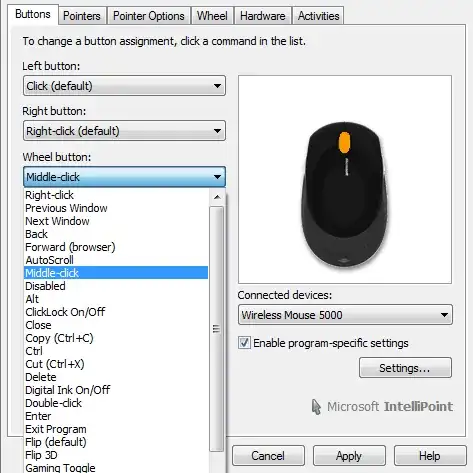
"Flip" (default) is what the thing that looks like Alt+Tab is called. Try setting the wheel button to Middle Click instead and also make sure there are no applicatiopn specific settings overriding this behavior.

This is what it looks like for my Wireless 5000 mouse, should be similar for the 4000:

Wireless 5000 mouse configuration dialog

PersonalNexus
  • 1,094
  • 3
  • 10
  • 20
  • 1
    thanks, I'm wondering if Flip is marked as default how come the mouse has been working properly since it has got installed in the first place :-). Thanks, however, your answer has saved me. – abolotnov Feb 16 '12 at 19:27
  • huh I wonder why it was working before and then it decided to "Flip"! – dashesy May 22 '18 at 20:23
  • Is there a way of doing this with a non-microsoft intellipiont mouse? My Mouse's options are fairly limited compared to what is shown on yours. – TomDot Com Jul 07 '21 at 22:19