84

I mostly like the improvements in Windows 7, but am pretty annoyed with the new Taskbar... particularly its habit of always keeping items grouped.

Is there any way to ungroup the taskbar items in Windows?

And just for the record, "Never combine" does not work. True, setting this option creates a separate button for each instance of an application... but it still groups all the running instances together. For instance, all Explorer Windows are grouped together beside each other, and they can only be dragged around as a group---not as individual items.

Ƭᴇcʜιᴇ007
  • 111,883
  • 19
  • 201
  • 268
ijprest
  • 1,245
  • 2
  • 9
  • 10
  • 13
    @TomWij: Just because two windows share the same EXE (e.g., explorer.exe, cmd.exe) doesn't mean they're used for the same purpose. I may have multiple "projects" in progress, and grouping windows by EXE (instead of allowing me to group them by project) is annoying. (I realize, of course, that the apps aren't *strictly* grouped by EXE, but for most apps this is the case.) – ijprest Sep 11 '09 at 15:19
  • 2
    @TomWijsman Apart from the good point of being trained to expect newly opened apps to appear on the right, I want this because I use 3 monitors and like to order my taskbar items from left to right according to the monitor I have their window on. I.E. If a window is on my left monitor, I put the taskbar item on the left side. If I have 3 Visual Studio projects open, one window on each screen, I can't do this in Windows 7. In Windows XP I used Taskbar Shuffle to accomplish this. – xr280xr Apr 19 '13 at 17:13
  • This forced grouping behavior essentially renders the whole draggable taskbar button feature useless. Third party programs could provide draggable taskbar buttons in past versions and implemented the feature correctly. Microsoft got jealous that others were doing what users wanted and tried to add the feature themselves and mucked it all up. If you’re going to do something, either do it right, or leave and let someone else do it right. ◔_◔ – Synetech Mar 13 '14 at 03:45
  • Regarding "why": grouped items can't be selected with win+number. If you have, say, two folders open in 3rd and 4th taskbar item, you can select only the first folder with win+3. To select second folder, you need to hit win+3 twice. Win+4 simply doesn't work. How brilliant. – rr- May 21 '15 at 07:15
  • We should all report this to MS through the feedback hub, or you could upvote my feedback post there: aka.ms/AA8kwtc – CrouZ May 31 '20 at 11:37

3 Answers3

67

There is a way.

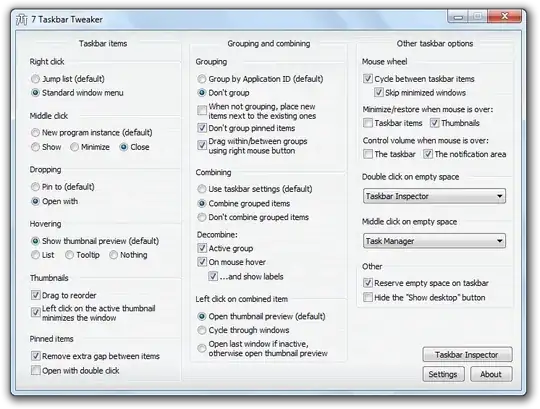
7 Taskbar Tweaker can do it.

This programs enables you to tweak your Windows 7 taskbar. The tweaks are divided into three sections:

  • Taskbar items: control taskbar items related stuff, like middle/right clicking, hovering, dropping, etc.
  • Grouping and combining: disable grouping, allow to drag windows between groups, force/disable combining, etc.
  • Other taskbar options: mouse wheel options, double/middle clicking on the empty space of the taskbar, and misc.

enter image description here

Zoltán
  • 133
  • 1
  • 1
  • 12
J F
  • 1,606
  • 13
  • 10
  • They have a Windows 8 and 10 version of this now (Win10 version is currently in beta): http://rammichael.com/7-taskbar-tweaker-for-windows-10-beta-version. I just tried the beta with Win10 Threshold 2 (v1151) and it worked as expected (for the function in question). :) – Ƭᴇcʜιᴇ007 Nov 18 '15 at 21:20
  • No longer works in the Anniversary Update. – CrazyCoder Aug 03 '16 at 06:59
7

I believe the answer is: No - You currently can't "ungroup" the taskbar items the way you and many others would like.

I hope I'm proven wrong or that it's added in the future - I'd also like this feature.

jmohr
  • 2,317
  • 2
  • 22
  • 15
4

The answer is by right clicking on taskbar select properties, select "never combine" instead of "Always combine, hide labels".

It works and not as said in number 2.

Troggy
  • 10,221
  • 7
  • 48
  • 71
Abu Abdulaziz
  • 65
  • 1
  • 1
  • 5
    Anonymous comment: NO, it doesn't work, that's not what he's talking about. For instance, if you have two excel sheets open, and want them to both be displayed on the screen at the same time so you can easily work between them without having to hover to the taskbar to open the other one, there is no way to "ungroup" similar icons/programs. – Ivo Flipse Nov 23 '11 at 22:11
  • I got mine set to "Never combine" already and it's still doping exactly what he says the problem is. Granted there are separate items for each window open. yet all my web browser windows are still grouped and all my im's are still groped and all my notepad windows are still groped and no way I can break the groups or even rearrange items within the the groups just the order of the groups. I'd downvote this if I could. – Kit Ramos Jul 23 '12 at 00:34
  • this works but now the text is displaying after the button icons . – astroanu Jun 12 '15 at 04:40