0

I'm trying to create a keyboard shortcut for the Dev1 menu:
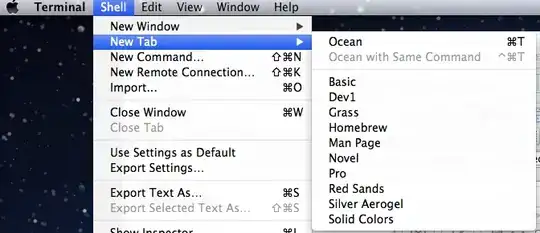
enter image description here

What should I put in the shortcut preferences? I've tried:

Dev1
New Tab>Dev1
>New Tab>Dev1
Shell>New Tab>Dev1
>Shell>New Tab>Dev1

None of those work.

According to this thread, Lion should support this.

slhck
  • 223,558
  • 70
  • 607
  • 592
erotsppa
  • 383
  • 6
  • 17
  • The tip mentioned at Apple Support Communities works for most menu items for me (like `>Format>Indentation>Increase` in Mail), but not for ones in the New Window and New Tab menus in Terminal. – Lri Feb 23 '12 at 22:39
  • Why does it work for some but not others? That's so weird... – erotsppa Feb 23 '12 at 23:11
  • possible duplicate of [Can I make Terminal.app open different profiles with shortcut like iTerm?](http://superuser.com/questions/155065/can-i-make-terminal-app-open-different-profiles-with-shortcut-like-iterm) – Daniel Beck Feb 24 '12 at 16:30
  • The Lion solution does not appear to work for dynamically created menu items. I can assign hotkeys to e.g. *File » Open » Clear Menu*, but not any of the dynamic entries. – Daniel Beck Feb 24 '12 at 16:45
  • They don't work with New Window and New Tab submenus because the menu item names are duplicates, making it ambiguous which would get the command key. If this is important to you, please file a bug report https://developer.apple.com/bugreporter/ (requires a free developer account) or provide feedback at http://www.apple.com/feedback/macosx.html . If only one of the two submenus could accept the command key(s), which one would you prefer them to work with? – Chris Page Feb 26 '12 at 13:06
  • @ChrisPage You're wrong in the general case on OS X 10.7. See the topic linked in the question. It works for me as described e.g. in TextEdit with *Format* submenu items. That's why the user provided menu item "bread crumbs" in the question, because that is the syntax that works since Lion. – Daniel Beck Feb 26 '12 at 13:50
  • @DanielBeck Correct. This question is specifically about these two menus in Terminal and that's all I intended to address. – Chris Page Feb 27 '12 at 12:20
  • No you are incorrect because clearly duplicate was not the issue. – erotsppa Feb 27 '12 at 15:58

1 Answers1

1

Based on my experience, the answer is that you should put the following in:

Shell->New Tab->Dev1
Phoebe
  • 141
  • 3