2

I've been using Autodesk's AutoCAD and other Autodesk programs on Windows 7 for quite some time. They're great programs, especially with them being free for education.

So naturally I wanted to use them in Windows 8. Unfortunately, the installer didn't work, failing to install every time I tried.

Here's the error: enter image description here
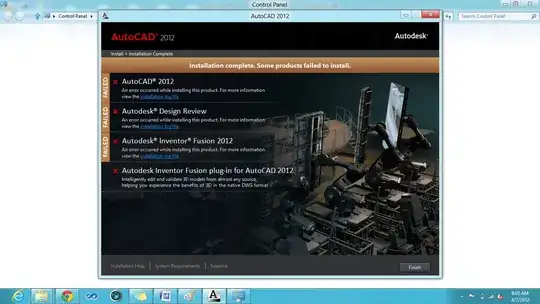
Is it possible to install these on Windows 8 Consumer Preview or should I just boot into Windows 7?

P.S. Please do not tell me that I'm using pre-release software. I know. I'm the kind of person that likes to get into the new stuff. I don't care if it eats my dog and microwaves my grandmother as long as I can try out new stuff.

JavaAndCSharp
  • 1,347
  • 1
  • 14
  • 23
  • doesn't win8 have a right click option to "run in compatibility mode" that lets you pick an earlier windows version? – jdh Mar 07 '12 at 14:13
  • What do the log files say? This screen shot shows there has been an error, but the log file links under each error will have information more helpful for determining exactly what is going on. – music2myear Mar 07 '12 at 14:21
  • @jdh: yes, but it didn't work under any of the options, unfortunately. – JavaAndCSharp Mar 07 '12 at 22:35

1 Answers1

1

open the file "setup.ini" and remove all "dotnet" references in the "prerequisites" line.

autocad will crash after "quit" command but works.

Simon Sheehan
  • 9,114
  • 12
  • 52
  • 71