I am looking to remove the Undo option from the menu.
I have looked at the similar questions on Super User, and I cannot find a method to remove this item. Please include more than just a link to some program in your answer.
I am looking to remove the Undo option from the menu.
I have looked at the similar questions on Super User, and I cannot find a method to remove this item. Please include more than just a link to some program in your answer.
Here is a hack which might do what you ask for, but is somewhat risky.
I have not tested it, for obvious reasons, but it might work.
C:\Windows\en-US and take ownership of (if required) and then copy the explorer.exe.mui to somewhere safe.
If you are running a 64-bit system you should also modify the explorer.exe.mui which is located in C:\Windows\SysWOW64\en-US.
To find all the copies: Go to Start Menu and do an extended search for explorer.exe.mui. You will need to repeat the procedure for each of them. If you have no success with saving the files you will also need to take ownership of the containing folder.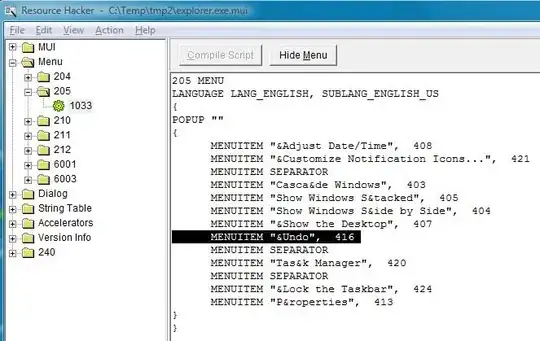
mcbuilder.I take no responsibility for the result of the above or their effects. I suggest taking good backups first and creating a system restore point, just in case.

I don't know how to remove that previous actions like undo move/ undo delete/ paste etc. But I can tell you how to prevent it from adding it to the menu option.
Once you are done with moving/cutting/copying any file/folder and you paste it to another location, the action is recorded but to remove it, just move/cut/copy that file/folder in the current folder (where you just moved your file recently) again, and a dialogue box appears, just click skip and you will see, that annoying options are disappeared.


a solution that I use: 1. right click and create a new folder 2. press ctrl+c and copy it 3. go inside the folder and press ctrl+v to paste 4. it pops an error, skip on that 5. go back and press F2 to rename the folder 6. press ctrl+c to copy the string 7. press esc and delete the folder now there is no undo copy and pate item is disabled ( which is annoying if you accidentally click it instead of refresh!!!)
The best option is program called ShellToys. It's shareware (45 day free of try). With ShellToys you can (along with many other things) or hide remove many menu items. Note that this doesn't work with Windows 8 64-bit; it will work with other versions of Windows.


