15

I'm too bored of seeing sites like Google and such show up in my native language, I would rather like them to be in English. Yet, I have to explicitly change the URL to .com and en and that kind of parameters in order for them to show up in English. Can I somehow force this?

So, how is Google configured?

However, it is set to English on the site itself so it has to be my browser:
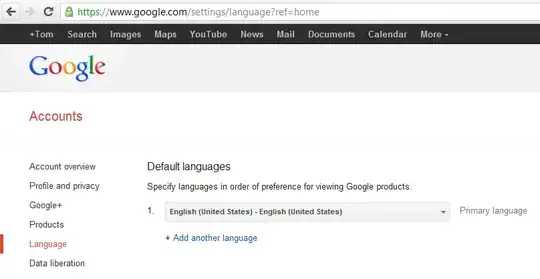
Then, how does my browser land up on non-english pages, like Google?

It usually shows up in non-English when I'm performing a search, which uses:

{google:baseURL}search?{google:RLZ}{google:acceptedSuggestion}{google:originalQueryForSuggestion}{google:searchFieldtrialParameter}{google:instantFieldTrialGroupParameter}sourceid=chrome&ie={inputEncoding}&q=%s

When performing a search, it fills these variables in with non-english values.

How can I tell my browser to fill these in with the English values?

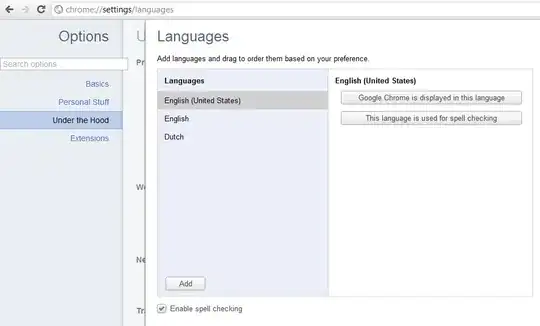
My Google Chrome options give preference to English:
Tamara Wijsman
  • 57,083
  • 27
  • 185
  • 256
  • I'm sure that this has been asked before, but I can't find the duplicate right now. – ChrisF Mar 09 '12 at 10:39
  • 1
    When you go to google.com, does it redirect you? What happens if you click the "Use google.com in English" link (or similar) at the bottom? – slhck Mar 09 '12 at 10:58
  • @slhck: It doesn't redirect me if I do that, in that case it is in English. If I click the link it doesn't remember that for the next time. It is really Google Chrome that literally fills in `{google:baseURL}` with `https://www.google.be/`... – Tamara Wijsman Mar 09 '12 at 11:00
  • [How do I revert Chrome's Google search to English after experimenting with the new Chrome feature that detects when I change country?](http://superuser.com/q/306171) – Sathyajith Bhat Mar 09 '12 at 11:14
  • It doesn't save for me – WJA Mar 17 '22 at 17:06
  • https://www.google.com/?hl=en using the [hl](https://developers.google.com/custom-search/docs/xml_results?hl=en#hlsp) parameter – cachius Apr 05 '23 at 07:25

3 Answers3

16

There are two options available for configuration:

which language should Google products use

which language(s) should be used for search results

Open Google Chrome, in address bar type in: http://www.google.com/preferences#languages

You can configure more than 1 language for search results, while only 1 can be set for Google products.

Configure appropriate settings and Save them.

enter image description here

Volodymyr Molodets
  • 1,616
  • 1
  • 13
  • 18
7

In %LOCALAPPDATA%\Google\Chrome\User Data there is a file Local State which contains the {google:baseURL} information. While temporarily closing Google Chrome, I simply filled in the URL https://www.google.com instead which resolved my problem:

{
   "browser": {
      "enabled_labs_experiments": [ "conflicting-modules-check",
                                    "extension-apis", "preload-instant-search",
                                    "print-preview" ],
      "hung_plugin_detect_freq": 2000,
      "last_known_google_url": "https://www.google.com/",
      "last_prompted_google_url": "https://www.google.com/",
      "last_redirect_origin": "",
      "plugin_message_response_timeout": 30000
   },
Tamara Wijsman
  • 57,083
  • 27
  • 185
  • 256
0

If you use Chrome, you can force all Google services to use English with this extension: https://chrome.google.com/webstore/detail/english-please/lkhoknaphajfjdcpnllakeglfpbbimhp

Update 2023: The extension is offline, but the repo is still there at https://github.com/spajus/english-please with the logic in background.js:

chrome.webRequest.onBeforeRequest.addListener(
  function (details) {
    var url = new Url(details.url);
    if (details.type == 'main_frame' && url.query.hl != 'en') {
      url.query.hl = 'en';
      return { redirectUrl: url.toString() };
    }
  },
  { urls: ["*://*.google.com/*"] },
  ["blocking"]
);

It inserts the hl param into URLs containing google.com.

cachius
  • 211
  • 2
  • 12
Spajus
  • 101
  • 2
