2

Possible Duplicate:
DD-WRT: How to allow port forwarding to apply to requests originating from inside the LAN?

I have a webserver running on my private PC at home. This PC is running Windows 7.

The PC is connected to a home router via WiFi. That home router is configured with a port-forwarding rule that makes the webserver accessible from the outside.

I can access this server just fine from the outside, so the server and the port-forwarding rule are just fine. I can also access the server from the PC itself (the same PC that is running the server) if I use localhost or 127.0.0.1, i.e. don’t go through the router.

However, it does not work fine if I try to access it from the PC itself by using the external IP or a dyndns hostname (so it connects via the router). Sometimes it doesn’t connect at all; sometimes it loads a bit of the webpage but then stalls and never finishes.

I had this problem in two different houses with different routers (but the same PC).

Anything that can be done about this problem?

Timwi
  • 1,861
  • 4
  • 19
  • 28
  • Please clarify which model(s) of router you're using. – David Mar 11 '12 at 00:28
  • @David: It’s a **D-Link DIR-615**. – Timwi Mar 11 '12 at 00:40
  • Next time, just let the system automatically insert the link for you. Cheers! – slhck Jul 29 '12 at 18:48
  • @slhck: I don’t know what you think I did to stop it from inserting the link. I didn’t stop it. But it didn’t insert it. – Timwi Jul 29 '12 at 18:52
  • I'm talking about the manual "duplicate of:" [you inserted a while ago](http://i.stack.imgur.com/SWymP.png). This isn't necessary, since the system will automatically add it, and I had to remove yours because there now were two "Duplicate" boxes after the question was closed. So, in the future, when you think something's a duplicate, just `flag` it for moderator attention :) – slhck Jul 29 '12 at 18:54
  • @slhck: It was necessary because the system **didn’t automatically add it.** (Maybe it did after you closed it, but that’s not useful *before* it’s closed.) (I didn’t think of flagging it. Maybe that’s because flagging things has not worked in the past.) – Timwi Jul 29 '12 at 19:06
  • @Timwi that's how the system works - a question isn't officially considered a duplicate until it's actually closed. It should have automatically left a comment with the duplicate link when you voted to close. That should be sufficient for anyone who happens upon it prior to the actual closing, at which point the duplicate link is added automatically and the comment is removed. – nhinkle Jul 30 '12 at 23:38

1 Answers1

0
  1. Log into the router's web interface
  2. Click the Advanced tab at the top
  3. Click the Firewall Settings tab at the left
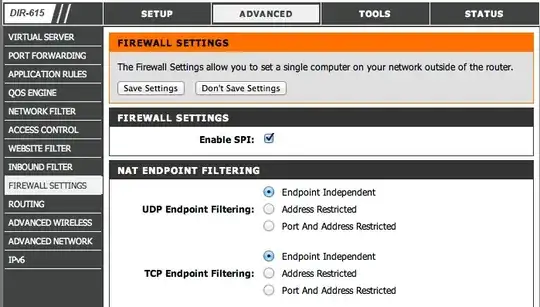
  4. Click the Endpoint Independent radio button under TCP Endpoint Filtering, as shown in the screenshot below (or see the router emulator at D-Link's website)
  5. Save changes; you're done

D-Link router web UI screenshot

If that doesn't help, some other good suggestions are listed on this ServerFault posting.

David
  • 597
  • 2
  • 8
  • Many thanks for your answer. Unfortunately that emulator seems to be emulating a different model or firmware version. Mine looks like this: http://screencast.com/t/nEJUPRYQH4a — The “status” page states that the firmware is up to date (it has a button to check) and the back of the router states that it is hardware type D4, which D-Link’s website doesn’t list... weird. – Timwi Mar 11 '12 at 02:22
  • That screenshot says the firmware version is 1.00VG. Some research (http://community.virginmedia.com/t5/Wireless/D-Link-DIR-615-D2-Firmware/td-p/15764/page/2) suggests that's a Virgin Media model that has custom firmware. Your best bet would be to replace it, or flash it with DD-WRT, since it's crippled as-is. – David Mar 11 '12 at 02:33
  • Or OpenWRT which is based on DDWRT, but I like it more. – kobaltz Mar 11 '12 at 04:41
  • I installed DD-WRT on it. The same problem persists. :( – Timwi Mar 11 '12 at 14:21
  • @Timwi is **Filter WAN NAT Redirection** off in the *Security > Firewall* screen? That's the equivalent setting in DD-WRT. – David Mar 11 '12 at 20:06
  • @David: Yes, it is off... – Timwi Mar 11 '12 at 20:56
  • @Timwi seems this used to work in DD-WRT, but is currently broken because of a bug (http://svn.dd-wrt.com/ticket/1200). Here's a workaround: http://superuser.com/questions/285699/dd-wrt-how-to-allow-port-forwarding-to-apply-to-requests-originating-from-insid – David Mar 11 '12 at 22:37
  • @David: Thanks, tried the workaround, but still doesn’t work. Here is what the screen looks like for me now: http://screencast.com/t/9Rv0LvXp — but it seems to have no effect, I still cannot access the server (but works from outside). (And yes, I did reboot the router.) – Timwi Mar 12 '12 at 10:20