I am wondering if there is a way to use the keyboard to move the current app (or at least the current window) to a new space in Lion. Currently the only method I know of is to go to Mission Control and drag the app to the new space.
Asked
Active
Viewed 5,077 times
5


-
You can also press a shortcut like ⌃→ or ⌃2 while dragging a window. It should be a bit faster than going to Mission Control, at least for moving single windows. – Lri Mar 12 '12 at 06:04
-
Thanks Lri-- both of those methods provide a way of doing exactly what I want to do. – Sean Mackesey Mar 12 '12 at 16:03
-
possible duplicate of [Move windows between Spaces in Mac OS X using only the keyboard](http://superuser.com/questions/233246/move-windows-between-spaces-in-mac-os-x-using-only-the-keyboard) – Daniel Beck Mar 12 '12 at 18:25
3 Answers
6
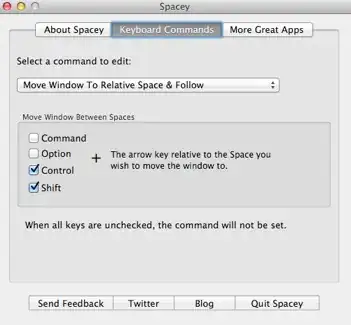
The only applications I've found that support it are SizeUp and Spacey. I couldn't get Spacey to work on 10.8, but SizeUp still works for me.


Lri
- 40,894
- 7
- 119
- 157
-
2
-
1I think that David Hollman used to be right, but it now works. I can use SizeUp to move a window left or right a space with a keyboard shortcut, on Mountain Lion. – Sean Mackesey Jan 22 '13 at 17:33
3
I know this question is a bit old at this point, but it still comes up in Google search results right up at the top.
Better Touch Tool:
It lets you move windows to different monitors, desktops, resize, etc. all with custom gestures or keyboard shortcuts. It's robust, supports the Apple trackpad, magic mouse, keyboard, regular mouse, Leap motion device and more.

heatherthedev
- 31
- 1
0
http://www.hongkiat.com/blog/osx-lion-features-shortcuts/
click within 'Shortcut to:' on OS X lion shortcuts
see 'Move between spaces on desktop (ctrl -> or ctrl <-)

Simon B.
- 140
- 5

conspiritech
- 409
- 2
- 7
-
Please include the link here. Do you assume the second link for a Google query is always the same for everyone? – slhck Mar 12 '12 at 09:19
-
http://www.hongkiat.com/blog/osx-lion-features-shortcuts/ you are right I wasn't paying close enough attention. – conspiritech Mar 12 '12 at 13:04
-
http://www.maclife.com/article/gallery/80_os_x_lion_features_you_may_have_overlooked#slide-5I suppose this isn't what you're looking for, but you can right click in the applications icon dock and assign all windows to the current space in the options submenu. but then it will open it in that space next time you start it too, and you'll have to do it again to move it. – conspiritech Mar 12 '12 at 13:16