0

I want Apple Mail to mark all spam mails as read when they come in fomr IMAP. My provider marks them already with *****SPAM**** in the subject. Therefore I created this rule (Sorry for the german screenshot, I'm happy to post this in english if someone can tell me how).

Unfortunately the rule is never executed. Why?

enter image description here

BetaRide
  • 2,359
  • 5
  • 40
  • 47
  • There are ten stars in the mail rule, only nine in your question. Might that be an issue? Try leaving out the stars completely to see whether that works. Also, your provider might additionally add custom email header fields, that's how I filter out provider-detected spam. Select *View » Message » All Headers* to see them. Change the language preference order in *System Preferences » Language & Text* and restart a program to change the language. Afterwards, you can revert the language setting. – Daniel Beck Mar 15 '12 at 06:31
  • I tried without stars, no luck. – BetaRide Mar 15 '12 at 06:54
  • Is the spam email the rule does not work on *being newly received* (not around for days before) and *in the Inbox folder*? – Daniel Beck Mar 15 '12 at 06:55
  • Yes, them mails are comming in every day (unfortunately :-) ) – BetaRide Mar 15 '12 at 07:18

1 Answers1

0

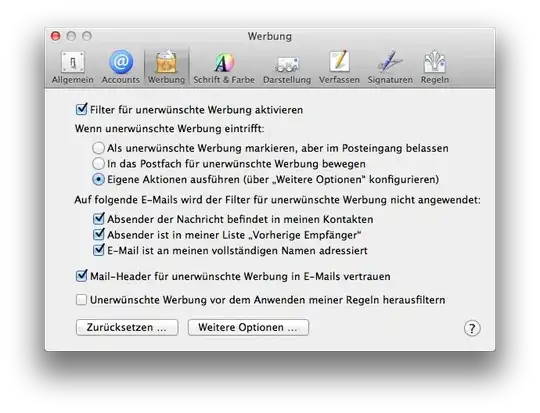
As of OSX 10.8.3 it's possible to change the default rule for spam handling in mail.

  1. Open Mail
  2. Mail -> Preferences
  3. Choose the thrid option for the spam handling
  4. Click on the "Options" Button
  5. In the new window after the last action add a new one to mark the samp mails as read.

enter image description here enter image description here

(It would be nice if some one with an english OSX could improve this :-) ).

BetaRide
  • 2,359
  • 5
  • 40
  • 47