53

I'd like to use Windows Search for searching through multiple PDFs in one go, but I see that in the Indexing Options' Advanced Options screen, PDF files don't have a registered IFilter: Registered IFilter is not found
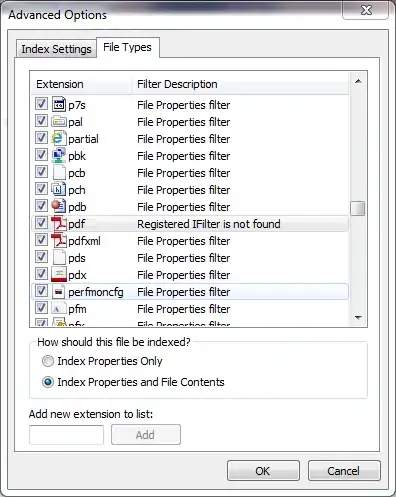
What is an IFilter, and where can I get the appropriate one?

Louis Waweru
  • 23,945
  • 39
  • 132
  • 198
  • Not answering this old question, but I found [DocFetcher](https://sourceforge.net/projects/docfetcher/) useful. – Orion Jul 26 '16 at 17:04
  • Could you drop by in Ask Different [chat](https://chat.stackexchange.com/transcript/message/53004948#53004948) about bounty on your question, please? –  Dec 22 '19 at 16:07

7 Answers7

49

IFilters allow Windows Search to search within file contents.

Here are three popular PDF IFilters:

After installing one, you should be able to search within PDF files in the same way that you can for other types of files.
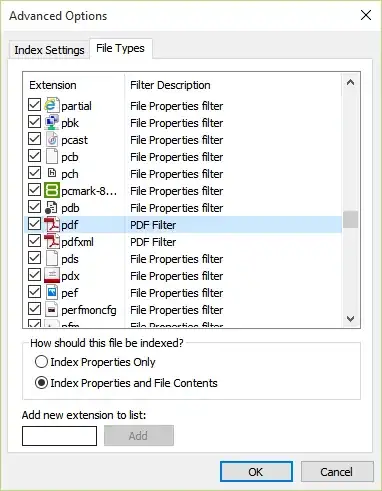
PDF Filter

†:This article from 2009 has performance numbers, but they may not apply to current versions of the filters.

Glorfindel
  • 4,089
  • 8
  • 24
  • 37
Louis Waweru
  • 23,945
  • 39
  • 132
  • 198
  • I tried this but it did not work for me. I'm on Windows 7 Professional (64-bit), with Adobe Reader X. I installed the iFilter, added it to my PATH environment variable, restarted my computer, and waiting until Windows was indexing, but I still couldn't search within my PDFs. I did have to install under my PC's administrator account, which is a different user, I wonder if that affected it. – sourcenouveau Jul 02 '12 at 17:03
  • Did Windows finish indexing? – Louis Waweru Jul 02 '12 at 19:52
  • @emddudley, if you want the PDF contents to be indexed, you should ensure that in the above screenshot, "Index Properties and File Contents" is selected for PDF files. Also, if you're searching non-indexed files, you may have to prefix your search query with `content:`. – Sam Jan 17 '13 at 23:41
  • The above referenced MSDN article that @Louis refers to is actually talking about the speed of the content indexing. This is the speed at which the Windows Search (or Search Server) crawls through the content and adds it to its data. The speed of the search is not affected at all and is the same regardless of IFilter used. So unless you are needing to index a large number of new files quickly, the speed of the indexing probably does not matter for most people. – dmarietta Dec 30 '13 at 20:43
  • Works with single words but doesn't work for sentence apparently. (I tried with and without quotes) Any advice? – JinSnow Nov 20 '16 at 13:39
  • 1
    @Guillaume Not sure. I'm now on Windows 10 which is using a filter named "Reader Search Handler" which does well with sentences for me. I'm not sure where it came from. http://i.imgur.com/rVj1EhD.png – Louis Waweru Nov 22 '16 at 03:59
  • @Guillaume I think it's from Edge. – Louis Waweru Nov 22 '16 at 04:06
  • 1
    @Louis Thanks for the feedback. Good to know. Problem solved on windows7, we just need to wait (much) longer for the pdf results (I did close the search window before it appears). – JinSnow Nov 22 '16 at 05:27
  • Am I missing something? I'd think that File Explorer would use iFilter to show the results itself, but from what I see, you have to see them through Foxit, as follows: . . . Open up Foxit Phantom, and click the yellow folder to the left of the "Find" cell. This will show the Search pane on the right side of the screen . . . Where would you like to search? "All PDF document in" . . . Select the location: Local Disk (C:) . . . What word or phrase would you like to search for? "your word" – sludge705x Dec 17 '19 at 21:24
18

An alternative way to search through PDFs is to use the search function of PDF-XChange Viewer. It does not need indexing neither. This is my choice.

You can install the portable version. Hit Ctrl Shift F to get the search dialog:
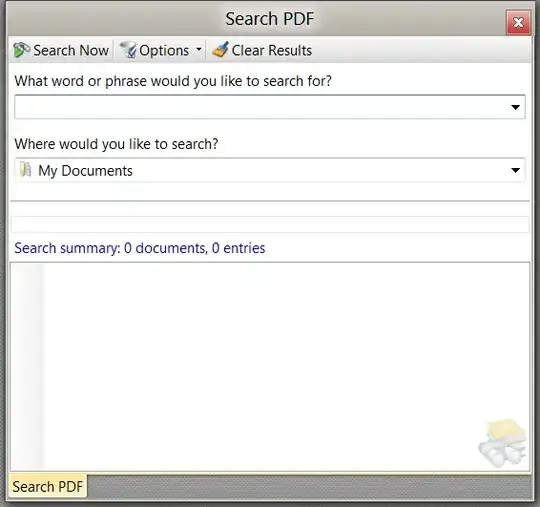
Search PDF in PDF-Viewer

Avatar
  • 2,555
  • 4
  • 36
  • 50
Michael S.
  • 3,987
  • 8
  • 42
  • 64
  • 1
    Thanks, I didn't know this feature existed in the standard Reader. Sure is dang slow though. – I. J. Kennedy Dec 26 '13 at 18:20
  • 2
    +1! Didn't know this. PDF-XChange Viewer is just **awesome**. Surprises me all the time. – Bloke Aug 30 '14 at 21:04
  • 4
    Best answer in my opinion. Portable and very fast, even with preview and word location when clicked on a search result entry. Thanks for pointing out this gem. – Avatar Jul 18 '19 at 05:24
  • Great option here, easy and very effective. Thanks – Valdemar Aug 20 '21 at 11:03
  • I don't know wether to thank PDF-XChange Viewer but I downloaded it and searched through my Pdfs on OneDrive and it fixed the windows search results to search through pdf contents. Thanks man. – WhySoSerious Sep 12 '21 at 16:23
4

You can use Mendeley; it's free.

First, add your PDF files and index them. After that, you can search them with auto-complete search.

  • You can also add notes on the PDF files with it.
  • If you have a lot a lot PDF files, sometimes RAM overflows when you try to index if this happen, just decrease count of PDF files.
  • Be careful, Mendeley actually is an academic program for reference system (yes, also you can use it for adding references to your Word document. I used it when I wrote my PHd Thesis; it was wonderful), so it will try to upload your PDF files to its server. If you want to work offline, change Mendeley's internet options and give it a wrong/offline proxy IP (like 127.3.0.1) . Then you can work with it off-line. NOT: You can also search in HTML or word files with Mendeley.
BARIS KURT
  • 196
  • 4
2

PDF XChange Viewer, which has a free version available, comes with a built-in iFilter.

Sam
  • 1,410
  • 1
  • 20
  • 33
1

Maybe little free tool Pasco from Microsoft Store?

Pasco is a software whose main task is to search for pages in a text (pdf) containing a specified phrase. As the software indexes ebooks, the search result is displayed immediately. Pasco is not only a search engine but also a convenient ebook reader.

0

Windows 10 has made great optimizations in content search, its goal is to do the search as convenient as Mac. So, if you are using Windows 10, you can build an index between to speed up the search speed, although this process is very slow and long.

For other earlier versions of Windows, you may need other third-party tools, such as: Docfetcher, Anytxt, are free and easy-to-use tools. Good luck.

Tommy
  • 1
0

You can sort, filter pdf files based on title, pages etc using this shell extenion Debenu

Additionally, this portable application extracts all data from pdf files and produces a tabluar output which you can use in your workflow pdfinfogui

Rahul
  • 583
  • 5
  • 17