20

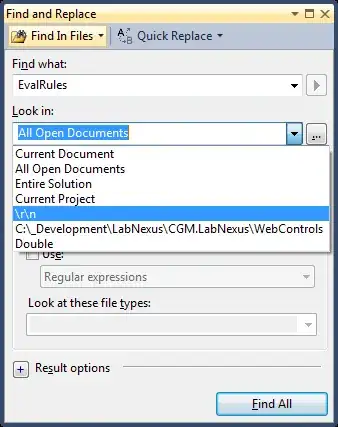
I have inadvertantly added some entries to the "Find and Replace" dialog in Visual Studio 2010. See picture below:
enter image description here

I want to remove \r\n, Double, etc.

How can I do this?

Welton v3.62
  • 565
  • 5
  • 13

2 Answers2

21

These entries are located in the following registry key:

HKCU\Software\Microsoft\VisualStudio\10.0\Find

They will be prefixed with Query and then followed by a number.

row1
  • 405
  • 3
  • 8
  • 20
Welton v3.62
  • 565
  • 5
  • 13
  • 5
    It's simply ridiculous that you need to edit the registry to remove something from the "Look in" field. Thanks for this answer though. – zzzzBov Oct 04 '12 at 15:19
  • 4
    Note that the entries came back after I deleted them using regedt32.exe, because I then closed a running Visual Studio instance, after doing a "Save All". So close VS before deleting them. And that further entries can be found in ...\Find\Named that still show up in "Look In". Did not try to remove those. – ddevienne May 06 '14 at 09:10
  • Such an entry is not present when you use VS 2017 (version 15.0). – jciloa Jun 21 '19 at 11:46
  • 2
    @jciloa Visual Studio 2017 uses its own private registry hive. See here: https://stackoverflow.com/questions/41119996/where-does-visual-studio-2017-store-its-config – Dai Jul 04 '19 at 15:02
5

The location for those entries is:

HKEY_USERS \ {user guid} \Software\Microsoft\VisualStudio\10.0\Find

where [user guid] is the guid for the current user.

really I just searched the registry for some entries that I added by accident while testing if there was another way to remove them.

Ryan_S
  • 664
  • 7
  • 15
  • Such an entry is not present when you use VS 2017 (version 15.0). – jciloa Jun 21 '19 at 11:47
  • Nitpick: Users don't have GUID, instead they have SIDs. A SID has a different format to a GUID: https://en.wikipedia.org/wiki/Security_Identifier – Dai Jul 04 '19 at 15:01