I would like to test how some websites and other services behave when using them with a slow connection, say, a maximum bandwidth of 512 kBit/s, and a delay of 500ms.
How can I do that in OS X?
I would like to test how some websites and other services behave when using them with a slow connection, say, a maximum bandwidth of 512 kBit/s, and a delay of 500ms.
How can I do that in OS X?

Use the builtin ipfw(8) utility to control the ipfw firewall and the dummynet traffic shaper to create a new pipe. This pipe will serve as a virtual link, where packets have to go through.
We can set up a limited bandwidth, propagation delay, queue size, and a packet loss rate.
Start up a Terminal from /Applications/Utilities/Terminal.app. Then, enter the following, and prepare to enter your admin password:
sudo ipfw pipe 1 config bw 512Kbit/s delay 500ms
The values used are self-explanatory here. For packet loss, add plr <n>, where <n> is a floating point number between 0 and 1 (0 meaning no loss, and 1 meaning that all packets are discarded). This will for example simulate a mobile lossy connection pretty well.
Now, let's add this pipe to any connections coming to or going to port 80 (the one used for HTTP traffic).
sudo ipfw add 1 pipe 1 src-port 80
sudo ipfw add 2 pipe 1 dst-port 80
Enjoy your slow connection. If you're done, remove these rules and delete the pipe:
sudo ipfw delete 1
sudo ipfw delete 2
sudo ipfw pipe 1 delete
Another option would be to use the Network Link Conditioner preference pane, which is installed with Xcode on 10.7 and later.
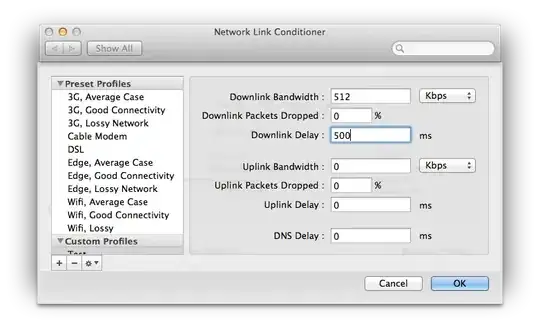

http://slowyapp.com/ is another (now free) option.
All three options - Network Link Conditioner, ipfw and Slowy - are just UIs onto the part of the OSX network stack that can shape network traffic (dummynet), so just pick the one you're most comfortable with.

