When pressing tilde in Windows 7, using a Swedish keyboard layout, the computer waits for a second key to be pressed. The reason behind the wait is to allow users the ability to construct characters such as ã and ñ, which I never type. Can I disable this so that pressing tilde once actually generates a tilde?
Asked
Active
Viewed 2.4k times
31

-
I assume you want to otherwise keep the Swedish keyboard layout though, right? Probably best to make this explicit. – Shinrai Apr 19 '12 at 16:47
-
Yes, I to preserve it otherwise. – Jonatan Apr 19 '12 at 16:48
-
read this solution : https://superuser.com/questions/890624/why-i-have-to-press-keys-two-times-to-get-the-or-%C2%B4-or-symbol-in-windows-7-an – Seghir Issam Sep 27 '22 at 09:36
3 Answers
40
First, download and install Microsoft Keyboard Layout Creator. Then, follow these steps:
- open KLC and go to File -> Load Existing Keyboard...
- select your keyboard layout and click OK
- when the layout has loaded, double-click on the key that produces the tilde character
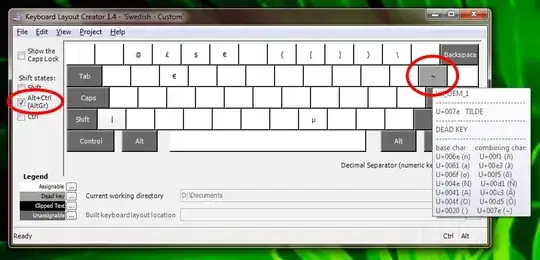
- in the new window, click "All..."
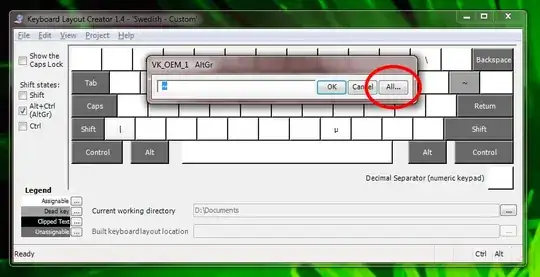
- find the combination that produces the tilde character and uncheck the "Dead Key?" checkbox

- click OK
- optional: go to Project -> Test Keyboard Layout to make sure the key behaves the way you want to
- optional: go to Project -> Properties and change the layout name and description
- go to Project -> Build DLL and Setup Package, wait for the process to complete and click Yes to open the directory where the setup files are located
- run the setup.exe file to install the new layout
- finally, go to Regional Settings in Control Panel (or use the Language Bar) to switch to the new layout

Brecht Machiels
- 224
- 1
- 9

Indrek
- 24,204
- 14
- 90
- 93
-
1
-
8Been pressing `~` twice for ages, now I can use it as it should, thank you! After applyling this fix any application running must be restarted to use new layout. – PeterM Jul 23 '15 at 09:51
-
2Under Windows 10 I had to restart the system (obviously) for the new keyboard layout option to appear. Indrek - you, sir, make the world a better place. – mikosz Jan 31 '16 at 09:02
-
2
-
I tested it in the Creator and it was working correctly and after applying changes in Windows 10 settings it doesn't work. I restarted the PC. Why? – Ap0st0l Sep 07 '20 at 14:09
-
-
5
Visit The Microsoft Keyboard Layout Creator web page and download MSKLC.EXE (10.1 MB).
Some of this program's features allow you to base new layouts off of existing ones. (This means that you can take the current Sweedish keyboard layout and remove the current character/action and replace it with a tilde.)

u1686_grawity
- 426,297
- 64
- 894
- 966

wizlog
- 13,277
- 24
- 77
- 116
1
Not an answer to your exact question, but since I see someone in the comments talking about pressing ~ twice, you can also press AltGr+~ followed by space, might be a faster way to type it without having to modify your keyboard layout.
(This is how I typed ~ for a long time on my Norwegian (works the same as Swedish for this particular thing) keyboard before eventually giving in and switching to a US keyboard)

sarahhodne
- 181
- 7