3

I'm using Aptana Studio 3 (build: 3.0.9.201202141038).

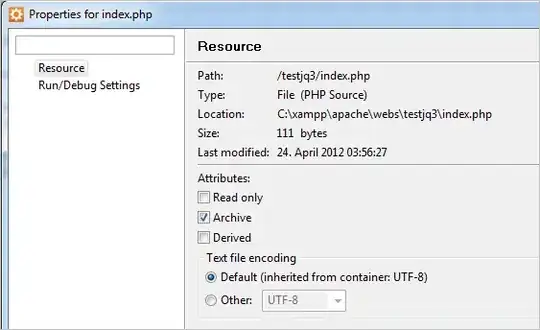
When I check to see if my file is being written in UTF-8, it shows that it is:

enter image description here

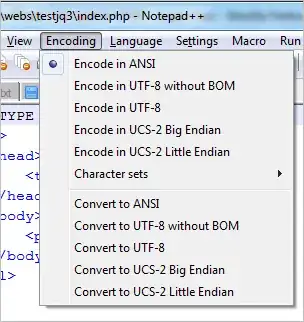
But when I create a file and save it, and look at it in Notepad++, it says it is ANSI:

enter image description here

I then have to convert it with Notepad++ to UTF-8 and continue working on it in Aptana.

How can I set Aptana Studio 3 to save files in UTF-8?

Edward Tanguay
  • 13,695
  • 37
  • 102
  • 128
  • Have you tried explicitly setting it to UTF-8 rather than letting it default to it? – James P Apr 24 '12 at 10:00
  • Yes, I explicitly set encoding in my project to UTF-8 but Notepad++ still shows newly created files as encoded in ANSI. However, when I explicitly set the encoding in my project to UTF-16, Notepad++ shows newly created files as "UCS-2 Big Endian". – Edward Tanguay Apr 24 '12 at 15:34
  • Just updated Aptana to the newest version and the problem still persists. This is a great editor for JavaScript/JQuery but not being able to save in UTF-8 is kind of a show stopper. Does this happen to others as well? – Edward Tanguay Apr 24 '12 at 15:44
  • 1
    I just installed Aptana Studio 3 on a virtual machine XP (instead of the above Windows 7 64-bit) and it has the same problem: can't save to UTF-8 even though UTF-8 is defined as the encoding. – Edward Tanguay Apr 24 '12 at 16:06

2 Answers2

2

The first 128 characters of ANSI and UTF-8 are the same, with the same encoding. If the files you create with Aptana Studio 3 only have these characters, Notepad++ isn't going to be able to tell the difference. An ANSI file and a UTF-8 file are going to appear identical.


You can observe the same behaviour using only Notepad++

If you save a file in Notepad++, that only has characters in the 0-127 range, with the encoding UTF-8 without BOM. Then re-open the file in Notepad++ it will show the encoding as ANSI.

If you're wondering why UTF-8 without BOM and not UTF-8 that is because the Unicode Standard states: "Use of a BOM is neither required nor recommended for UTF-8" Which is what I imagine Aptana Studio 3 follows when it saves files with the encoding UTF-8.
Chris Kent
  • 1,411
  • 11
  • 14
1

Go Window->Preferences, General->Workspace

Change Text encoding from Default (cp1252) to UTF-8

  • 1
    this does *NOT* solve the problem. I've done that, but I still experience the same problems as the OP – yas4891 Sep 14 '12 at 17:30