Does anyone know where to find the latest AutoIt recorder? The one here does not work. It does not find RWSettings.alg and I do not know what that is. Any help will be appreciated.
Asked
Active
Viewed 1.6k times

3 Answers
6
What I did was first download the official autoit installer and then enter the installation directory. There should be a folder named Extras. Inside this folder there should be another folder named Au3Record. This is the directory of the autoit recorder.

Arvanitis Christos
- 471
- 2
- 12
-
1Thanks @TGS. We have a saying "The child is in the lap and the mother is looking for him". The `Au3Record` program was already there as I did not check the `Extra` folder – Stat-R Apr 29 '12 at 12:13
-
2This answer is no longer correct; the recorder is no longer included in this directory for the full install of AutoIt. – TylerH Dec 08 '15 at 19:24
3
Autoit recorder has been removed from the main package as of v3.3.14.1, apparently because it was giving false positives from AV software according to this autoit thread.
It also mentions https://www.autoitscript.com/autoit3/files/archive/autoit/autoit-v3.3.14.0.zip as the the place to download the last version of autoit with the recorder. The thread also mentions the actual link may trigger off some AV software.

Journeyman Geek
- 127,463
- 52
- 260
- 430

LMarlin
- 31
- 1
-
1This should be the top answer, its the only one here that solves the problem. – dodgy_coder Jan 27 '16 at 13:09
0
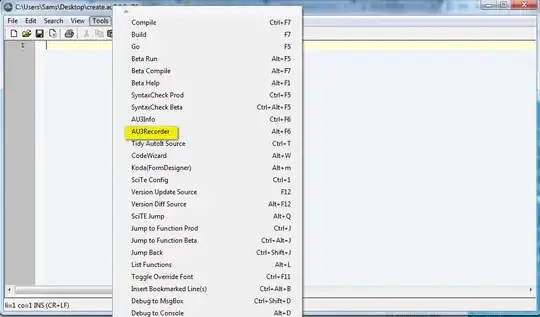
Try installing SciTE SciTE4AutoIt3.exe for alternate solution.

Prashanth Sams
- 119
- 4
-
Menu entry to recorder not present in SciTE installed today Dec 11th, 2019. – rossmcm Dec 11 '19 at 00:55