1

Please look the picture in the following link. How to get rid of these unwanted icon from desktop toolbars?
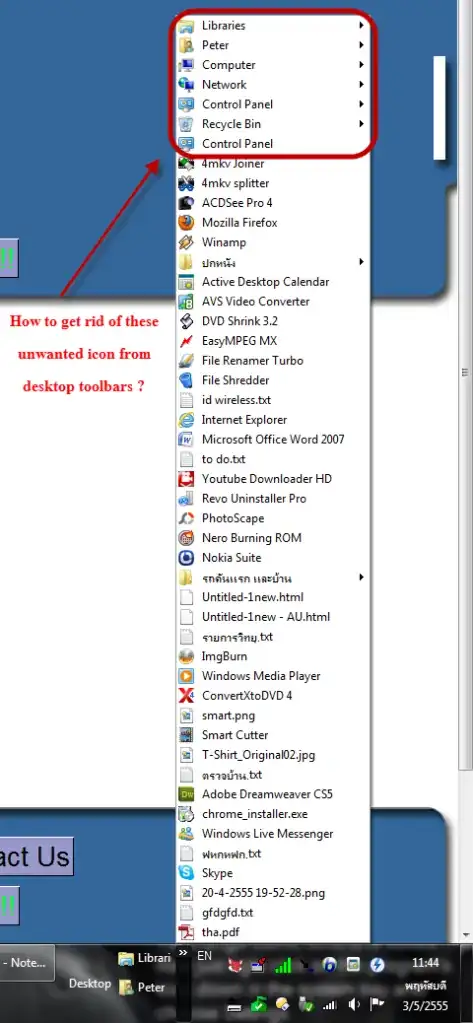
enter image description here

Sathyajith Bhat
  • 61,504
  • 38
  • 179
  • 264
peter2596
  • 41
  • 1
  • 4

1 Answers1

1

This is a bug, notice there are 2 "control panel" icons? They show up even if you disable the control panel icon in "change desktop icons"

This bug was reported in the beta version of W7, but was never fixed evidently.

Have a look at this key in the registry

HKEY_LOCAL_MACHINE\SOFTWARE\Microsoft\Windows\CurrentVersion\Explorer\Desktop\NameSpace

there will be alpha numeric keys under the NameSpace key.

{5399E694-6CE5-4D6C-8FCE-1D8870FDCBA0} is one control panel

{26EE0668-A00A-44D7-9371-BEB064C98683} is another one

. enter image description here
Not sure what the full effect of deleting any of these keys are though, back them up before you delete any.

Moab
  • 58,044
  • 21
  • 113
  • 176
  • 1
    thanks but I'm afriad to do so. I have found another solution already. Thanks all. -> http://www.pantip.com/tech/hardware/topic/HP3063926/HP3063926-10.jpg – peter2596 May 04 '12 at 15:51
  • @FungSrivong That's too easy, lol, thanks for posting the real solution. You can post that as an answer and accept as solution if you want. This will help other when searching these forums for solutions. – Moab May 04 '12 at 19:20
  • I don't know how to "post that as an answer and accept as solution" . I think this web site is very helpful but quite complicated ! Thanks – peter2596 May 04 '12 at 23:44
  • Do you see the "add another answer" button at the bottom of this page, yes it is quite a different website, took me a while to get use to it. You have to have so many reps before you can do certain things here at SU. – Moab May 05 '12 at 14:25
  • @FungSrivong Now would be a really good time/idea to post that as a full answer, especially considering the link is broken. (That's also why we prefer to have answers that work without external links.) Just click the `Answer Your Question` button at the bottom of the page, and then you can accept it by clicking the tick to the left of the posted answer. – Bob Jul 15 '12 at 06:29