6

My iPhone is synced with my home PC which is all working fine. What I want to do is plug my iPhone into my work mac and have it charge but not do any syncing.

The problem is that when I plug the iPhone into the mac it loads up iTunes. I understand that this is a good default behavior but the only reason I want to connect it is to charge so I don't want to have iTunes open up only to unmount the iPhone and close iTunes.

I have tried in the iTunes preferences checking the "Disable automatic syncing of iPhones and iPods" option but it still happens.

Does anyone know how to disable this behavior? My feeling is that is must be an OS setting not an iTunes one but I am lost as where to look.

Sathyajith Bhat
  • 61,504
  • 38
  • 179
  • 264
user11313
  • 63
  • 1
  • 1
  • 3
  • Answers {1,2,3,4} minute(s) ago! Wow! – squircle Apr 30 '11 at 20:44
  • 1
    possible duplicate of [How can you disable the auto startup of iTunes when connecting an iPhone?](http://superuser.com/questions/42035/how-can-you-disable-the-auto-startup-of-itunes-when-connecting-an-iphone) – James Mertz Apr 30 '11 at 20:45
  • possible duplicate of [Prevent iTunes from starting when iPhone is plugged in on Mac](http://superuser.com/questions/38051/prevent-itunes-from-starting-when-iphone-is-plugged-in-on-mac) – D.W. Sep 10 '14 at 04:08

6 Answers6

6

If I remember correctly there's on option that says "Open iTunes when this iPod is connected" on the screen which gives details for the connected iPod. Have you unselected this?

enter image description here

Gaff
  • 18,569
  • 15
  • 57
  • 68
David Webb
  • 11,876
  • 3
  • 43
  • 39
  • 1
    Where is this option though? I can't see it in the iTunes preferences. – user11313 Sep 16 '09 at 11:38
  • Connect your iPod and it will appear in the list on the left hand side of the iTunes window. Select it in this list and iTunes will show a screen all about the iPod. The options are at the bottom of this screen. – David Webb Sep 16 '09 at 11:44
  • I just tried this now with my iPhone, and for me it is sufficient to uncheck "Automatically sync when this iPhone is connected". I did *not* have to disable iTunesHelper in Login Items. – Jonik Sep 16 '09 at 17:36
  • I just tried this out and it was already disabled... The option below it "Sync only checked songs and videos" was checked though. If I uncheck EVERYTHING then it doesn't sync. Bingo! Thanks guys! – user11313 Sep 17 '09 at 09:47
3

Or open System Preferences -> Accounts -> Login Items and remove the "iTunesHelper" entry.

This is the answer i gave here. Which is basically the same question.

Tiago Veloso
  • 1,080
  • 1
  • 9
  • 16
2

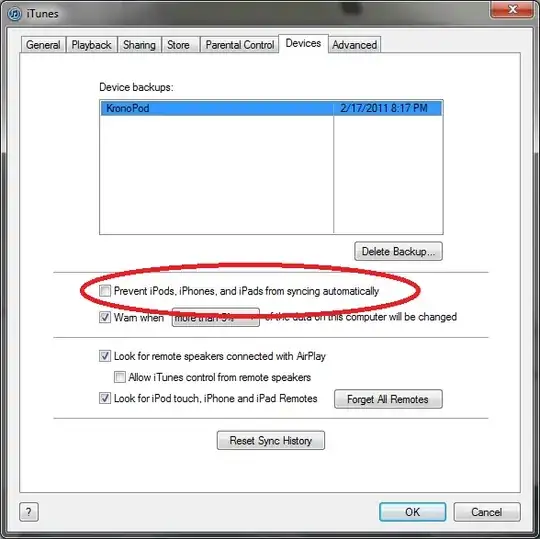
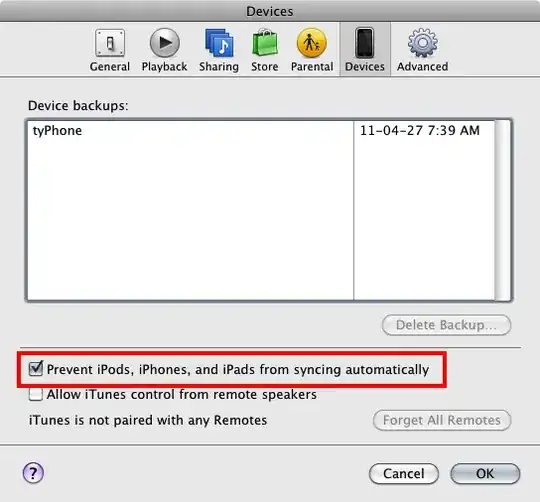
If you go into the Preferences of iTunes (iTunes -> Preferences on OS X), on the Devices tab, there is a checkbox that you can select to prevent devices from automatically synchronizing. This still allows you to manually sync the devices should you choose to do so.

Autosync

Gaff
  • 18,569
  • 15
  • 57
  • 68
squircle
  • 6,699
  • 5
  • 37
  • 68
1
iTunes->Preferences->Devices->"Prevent ... from syncing automatically"

Or if you want to just disable iTunes from popping up, in iTunes, go to your device, under Options uncheck "Open iTunes when this (device) is connected."

enter image description here

Vervious
  • 4,794
  • 4
  • 30
  • 35
0

I found a possible answer.

http://docs.info.apple.com/article.html?path=iTunesMac/9.2/en/15517.html

But once I tried it the iPhone appeared to still try to sync so I set iTunes to not sync any device automatically. That worked.

Brennan Stehling
  • 303
  • 4
  • 14
0

You can also click on the CTRL + SHIFT keys when starting iTunes and keep them pressed untill you get something from the sort of "iTunes is running in safe mode". Then click on the Continue button.

You must keep the ctrl+shift buttons pressed until iTunes detects your iDevice. Then simply untick the “Automatically sync when this iPhone/iPod/iPad is connected” option. Finally click on Apply in order to apply the changes.

Lee Thibodeaux
  • 231
  • 1
  • 9