17

File size of a CBR(Constant bitrate) audio recording can be calculated using a formula:

File Size (Bytes) = (sampling rate) × (bit depth) × (number of channels) × (seconds) / 8

E.g., a 70 minute long CD quality recording will take up 740,880,000 Bytes, or 740MB:

44100 × 16 × 2 × 4200 / 8 = 740880000 Bytes 

But it doesn't work if the audio is VBR(Variable bitrate). How to know whether an audio file is CBR or VBR?

hippietrail
  • 4,505
  • 15
  • 53
  • 86
kev
  • 12,462
  • 13
  • 59
  • 72

4 Answers4

18

Install Checkmate first (the .deb file) by double clicking it and selecting Install in Ubuntu Software Center.

Then, open up a terminal with CtrlAltT and call:

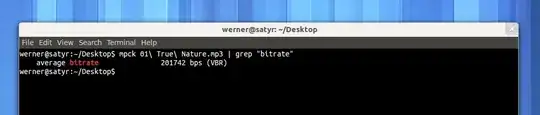
mpck input.mp3 | grep "bitrate"

This will tell you precisely whether a file is CBR or VBR. If it's CBR, you'll just see the bitrate, and if it's VBR, after the average bitrate label you'll see (VBR).

I tested this on Ubuntu 12.04, but packages for Checkmate are available for Windows as well.

slhck
  • 223,558
  • 70
  • 607
  • 592
  • Appears only to work for MP3 files. Do you have a solution for M4A? I tried `mpck *.m4a` and got output like `no MP3 file`. – Iain Samuel McLean Elder Jun 05 '15 at 18:12
  • You could try with MediaInfo maybe — not on a PC right now but it outputs a lot of information. – slhck Jun 05 '15 at 19:55
  • +1. Thanks. Here is how I installed: `wget http://checkmate.gissen.nl/mpck_0.12-1_amd64.deb`, then `sudo dpkg -i mpck_0.12-1_amd64.deb`, then `sudo apt-get install -f`, then `mpck my_storage/my.mp3 | grep "bitrate"` – Ryan Feb 18 '19 at 15:27
1

This is my trick, it works only if you have a directory containing multiple mp3 files, and you know that they have the same encoding (VBR or CBR): If the files show different bitrates then you know they are VBR encoded.

You see the bitrate indication in the file properties, or use exiftool *.mp3 | grep Bitrate.

0

When I play the audio on player that display the bit rate, for VBR you will see the bitrate always fluctuate. For CBR, the bit rate remain constant throughout the whole songs. I use Winamp to play thought.

chmod
  • 2,197
  • 1
  • 15
  • 22
  • Not entirely true. That may hold for Winamp, but the OP is using Ubuntu. Even VLC doesn't properly show whether an audio file is CBR or VBR. – slhck May 08 '12 at 10:59
  • @ slhck You are right about VLC, they don't display it correctly. Under Windows, I also check with dBpoweramp and it does display it correctly including the encoder name as well. I don't use linux so I don't know will do the job. – chmod May 08 '12 at 11:40
  • See my answer on how to reliably check it in Linux. Given that it's command line, it could even be batch-scripted for multiple files or an entire MP3 collection. (By the way, you shouldn't put a space between `@` and `username`, otherwise people won't get a notification). – slhck May 08 '12 at 11:42
0

Most players and metadata tools check for the presence of an Xing header to determine if the file is VBR or CBR. Note that you don't actually need an Xing header to have VBR, but without it, almost all players screw up and show the wrong duration. The Xing header isn't formally standardized, so you'll have to view the XMMS source code for the definition of what the Xing header should be.

Based on my tests, ExifTool doesn't actually report a file to be VBR when it's missing the Xing header, so it too is just checking for the presence of the Xing header as an indicator of if it's VBR or not.

ZiggyTheHamster
  • 409
  • 4
  • 4