18

I would like to ask if you know how to fix a corrupted USB? I've tried the diskpart command but it didn't work. The media is write protected.

Do you have any idea that is much better? I need to fix it because I have important files in my flash drive. I really need to retrieve it.

I saw that the file system is seen as RAW and is unaccessible. I tried error checking, but it requires you to format it. I tried data recovery software but all files come out corrupted. My USB is Imation 4GB. Any suggestions?

Renan
  • 7,981
  • 4
  • 39
  • 48
Erico Yan
  • 181
  • 1
  • 1
  • 6
  • Can you read _anything_ from flash drive? What happens if you try to `dd if=/dev/devNodeForDisk of=~/flashdrive.img` from Linux # shell? Does it read any bits from your disk? (just change `devNodeForDisk` to fit in...) – Sampo Sarrala - codidact.org Aug 17 '12 at 15:41
  • @Sampo I think the flash drive is already broken. It can't read anything. Never been try Linux. – Erico Yan Aug 21 '12 at 15:40
  • What you mean by _"It can't read anything"_? What have you tried? If Windows can't read it does not mean anything. And what about capacity, does Windows get _consistent_ information about its capacity? – Sampo Sarrala - codidact.org Aug 21 '12 at 16:48
  • For Linux part, there is lot of [live cd](http://www.knopper.net/knoppix-info/index-en.html)/[live usb](http://www.pendrivelinux.com/) distributions available which means that you don't need to install it to your HDD. – Sampo Sarrala - codidact.org Aug 21 '12 at 16:55
  • @Sampo: I tried your suggestion. It doesn't read any bits at all. RAW file system. With regards to the capacity, the windows unable to get the real information about the capacity. – Erico Yan Sep 06 '12 at 12:20
  • @Sampo: "If Windows can't read it it does not mean anything". Huh? What makes you think Windows is stupid about reading disks? – user541686 Dec 07 '12 at 07:01
  • @Mehrdad experience makes me think that, most of time we can read same disk without problems by using ntfs-3g for accessing fs part of disk. – Sampo Sarrala - codidact.org Dec 07 '12 at 07:18
  • @Sampo: Is that for accessing a disk corrupted when Windows was running, or when Linux was running, or some other way? I'd be impressed if ntfs-3g could read a disk corrupted when Windows was running and which couldn't be read by Windows itself even after chkdsk, but not so much if it was corrupted by ntfs-3g in the first place... – user541686 Dec 07 '12 at 07:24
  • @Mehrdad That is for accessing disks that our clients throwed at us from their machines (most of time they carry in whole machine). Most of our clients uses Windows as their OS. And to answer your next question about is that always boot disk that fails: most of time yes as many machines have only one disk but not always, first thing to try is to attach disk to machine that can run ntfs-3g filesystem drivers if Windows cannot read disk. btw: many live recovery systems use ntfs-3g... – Sampo Sarrala - codidact.org Dec 07 '12 at 07:32
  • @Mehrdad if you cant access your disk with ntfs-3g then you could always do something like [that](http://superuser.com/a/454799/132604). – Sampo Sarrala - codidact.org Dec 07 '12 at 07:35
  • @Sampo: Interesting... are those disks that Windows can't even chkdsk? Or do you go directly to ntfs-3g without trying chkdsk? – user541686 Dec 07 '12 at 08:08
  • let us [continue this discussion in chat](http://chat.stackexchange.com/rooms/6648/discussion-between-sampo-and-mehrdad) – Sampo Sarrala - codidact.org Dec 07 '12 at 10:55
  • @Sampo: I would except I'm too busy right now sorry x___x maybe later. – user541686 Dec 07 '12 at 11:43
  • 3
    Possible duplicate of [What can I do if my USB flash drive is write-protected or read-only?](http://superuser.com/questions/1125282/what-can-i-do-if-my-usb-flash-drive-is-write-protected-or-read-only) – bwDraco Sep 17 '16 at 05:12
  • Different symptom but the same answer. – fixer1234 Sep 17 '16 at 07:05

9 Answers9

10

You can try TestDisk (free, cross-platform, and open source) - it works on almost all drives on a system, regardless of whether or not the drive is internal or external. You can use TestDisk to rewrite any partition tables found on the drive - it can even find corrupted or missing partitions and then repair the partition table.

Alternatively, you can also use TestDisk to simply recover the files without repairing the partition table (if you just want to format and start from scratch). TestDisk can also overwrite/recover the MBR or boot sector if that's corrupted as well. I've had success using it to copy files off of corrupted partitons/drives.

Breakthrough
  • 34,227
  • 10
  • 105
  • 149
  • I've already used TestDisk but it didn't workout. Same problem persists. – Erico Yan May 10 '12 at 22:30
  • I've successfully used this to recover data from a 300GB USB harddrive. I did not manage to repair the partition table. It's still `RAW` although I set it to `NTFS` and a `P` or `*` partition several times. It always talks about rebooting, which does not make sense with a USB hdd I think. I've tried unplugging, safely removing in Win7 and even rebooting and turning off the computer, unplugging, booting and plugging back in, all to no avail. Still, we got the data back, so I think this is a great tool. Thanks a lot! – simbabque May 13 '13 at 17:38
  • The TestDisk download link is broken – Alan Evangelista Sep 10 '19 at 04:31
2

I encountered the same issue just a few minutes ago. My USB flash drive was working fine at home then suddenly it was not recognized by any computers in the office. When attempting to access it, I always get the prompt to reformat.

To resolve the issue, I click "Yes" on the do you want to format prompt then closed the next window (I did not click on the START button to start the format process). Received an error stating that Windows cannot format the drive. Unplugged the drive from the USB port then plugged it again.

Oliver Salzburg
  • 86,445
  • 63
  • 260
  • 306
rgr
  • 21
  • 2
1

diskpart is, in my experience, unreliable sometimes. It would show some filesystems as RAW when actually they are just not recognized, either because diskpart cannot do it, or because it didn't work, for some reason.

I suggets trying GParted. You can get it as a live-CD (or live-USB) and see if it detects your USB filesystem better.

Silver Quettier
  • 680
  • 1
  • 7
  • 20
  • I will try this one. What should I use? It said that "WARNING! Makeboot.bat must be run from your USB flash drive." Any suggestion for this one? I don't have any idea about this batchfile? pls. need to fix my flash drive asap. – Erico Yan May 10 '12 at 22:34
  • When you're setting up the live USB with the command line, you must be sure to be under your USB drive. Don't run `makeboot` on your system drive (C: ?) as it would make it unusable. Please note that this is the installation of GParted, which must take place on a **separate** disk than the one you are going to recover. – Silver Quettier May 11 '12 at 06:37
  • I would like to ask something. Should I use a Virtual Machine for this one? or Should I use the BIOS? I already burn it bootable in CD. I hope this one works. Thank you so much for your feedback. I appreciated it. – Erico Yan May 13 '12 at 14:50
  • I've already tried Gparted. I tried to used VMware workstation and also boot it in BIOS. Unfortunately, the same problem persists. Is it considered broken? The media is write protected. Is there any way we can fix this problem? So that in the long run, everyone can benefit something about this certain problem about the corrupted USB. – Erico Yan May 14 '12 at 04:20
  • I would have said "when you have created a GParted LiveCD or LiveUSB, boot on it by selecting the boot device in BIOS (no VM!), and see what it can find in there." I assume it's what you've tried. When you say "the same problem persists", do you mean GParted sees it as RAW ? – Silver Quettier May 14 '12 at 06:22
  • I also tried in BIOS. yeah. It detects the USB but Gparted cannot format the corrupted USB. I don't know why. *sigh – Erico Yan May 17 '12 at 03:57
1

On Windows, I just tried ZAR (Zero Assumption Recovery) with its free "Image Recovery" function.

All my files have been recovered, even those deleted.

It help very much but some files can't be recovered That's what I discovered when i use demo version

jkf2
  • 11
  • 1
0

Disk Drill did a decent job for me of detecting and extracting "recoverable" files. There is a limit of 500MB in the free version, but you can easily prune unwanted files to get within their limit [or upgrade to Pro - it is a good idea to support developers who create tools you find useful].

As a general rule, avoid using removable drives for business or personally critical files. And take regular backups of important files. It is time-consuming to do, but can usually be automated or started while you do something else. And when the inevitable disk failure does happen, those backups can turn into a lifesaver.

AlainD
  • 4,447
  • 15
  • 49
  • 96
0

GParted is one of my favorites....Found as an iso itseld, also part of the Parted Magic cd...

Disk Genius has also worked for me in the past for somewhat corrypt partion tables (fixed disks and usb flash drives).

DeemV
  • 111
  • 5
0

Most probably your USB device's memory unit is broken or there is problem in connection between flash memory controller IC and flash memory IC.

Operating system recognizes it as USB memory unit. This means that USB interface IC (memory controller) is working. However, operating system does not get any information about USB device's memory (capacity, partitions, any bits from flash memory).

One thing you could do is taking apart you USB device and try to examine if there is any burn marks (usually small grey or white dots/circles in IC surface). Also look for bad copper wires and for bad connections between wires and components.

If memory IC (usually biggest IC in board) in board looks okay you could try to resolder it or change it to another board. Look from google about soldering surface mounted ICs if you want to try it.

0

Try chkdsk (from within a Windows system).

Open a command prompt with administrative rights and type: chkdsk p:\ /F where p stands for the according volume letter. /F stands for the option to repair found errors.

slhck
  • 223,558
  • 70
  • 607
  • 592
GNU
  • 1
-2

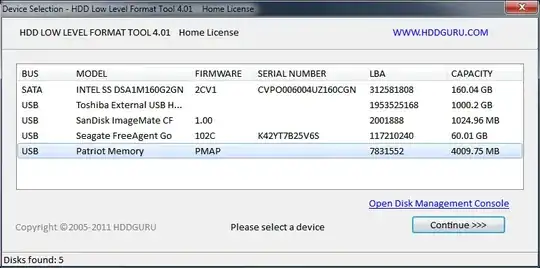
I have the same problems and have tried so many methods but finally this one is working. Use this software to low-level format the USB and it will remove write-protected.

It's called, "HDD LLF Low Level Format Tool", and the main website is here.

Screenshot

ss of tool

It's free for personal use (speed is capped at 180 GB per hour which is 50 MB/s).

slm
  • 9,959
  • 10
  • 49
  • 57
Bill
  • 1