0

I recently went and dug out one of my old HDs (the PC it was mounted in is no longer in existence...) I mounted it in my PC and used DVD2VHD to convert the whole drive to a VHD. It's an old XP drive so I wanted to load it up in a VM and go in. The VHD conversion went well, I mounted it in Virtual Box and clicked Start Windows Normally and got the following error:
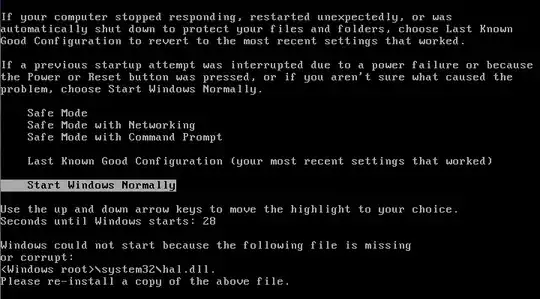
enter image description here

Does anybody know how to get this problem fixed? The only solutions I could find online involved changing some settings before unmounting the HD from it's original computer.

Freesnöw
  • 946
  • 6
  • 22
  • 45

1 Answers1

1

You have to tweak your VM's system settings to make the virtual processor look like the one on your old computer.

The important options are:

  • IO APIC
  • Number of cores
  • PAE/NX
  • The bit-version (32/64) of the OS type (this should not matter if your host OS is 64 bit)

I think Windows now automatically switches between HALs when it detects your CPU has changed, but this feature may not be there in Windows XP.

billc.cn
  • 7,099
  • 20
  • 36
  • Because I have no clue the specs of the old computer, is there a way to find what they were from something on the HD? Is there a file or some kind of way for me to determine the old specs? Thanks for the help thus far! – Freesnöw May 12 '12 at 19:13
  • 1
    You may have to manually dig into the registry hives to find out. But there are only 4 options (thus 16 cases) for you to try. It would be faster if you just go through all the combinations one by one. Some of the options like IO APIC is linked to others, so there are even fewer cases. Details can be found in the Vbox help page. – billc.cn May 13 '12 at 11:47
  • Alright, I'll check it out. – Freesnöw May 13 '12 at 12:05