7

Something happened today which caused all system dialog boxes to change the font they use to something that is almost unreadable. The link below is a snip from the System Properties dialog which shows the small text:

https://i.stack.imgur.com/gGW2b.jpg

Note that the window title is readable.

The Window Color and Appearance dialog does not allow me to change it. I can change the theme to "Basic" or any other built-in theme and it still displays incorrectly. I have another user account on this computer and that user account behaves the same way.

How can I fix this?

slhck
  • 223,558
  • 70
  • 607
  • 592
Mike
  • 73
  • 1
  • 1
  • 4

4 Answers4

8

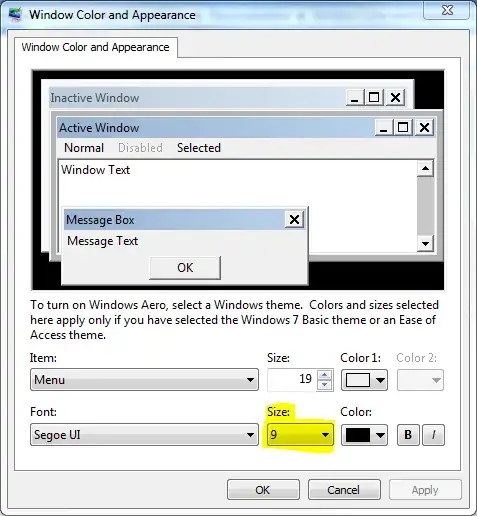
Go to Control Panel -> Personalization -> Window Color -> Advanced appearance settings.

enter image description here

Go through each item in the Item drop-down and see if anything has a very low Size set in the Font section.

Scott Chamberlain
  • 30,694
  • 7
  • 96
  • 109
4

Check the answer given on this page - it should solve your problem.

Check the values MS Shell Dlg and MS Shell Dlg 2 the following registry key:

HKEY_LOCAL_MACHINE\SOFTWARE\Microsoft\Windows NT\CurrentVersion\FontSubstitutes

On my machine, the values are:

  • MS Shell Dlg has the value of Microsoft Sans Serif,
  • MS Shell Dlg 2 has the value of 'Tahoma'.

Expanding on the purpose of these keys: They allow applications to avoid hard-coding font names for use in dialogs; the system fonts to be changed as necessary to support non-English character sets.

Alexey Ivanov
  • 4,349
  • 4
  • 26
  • 59
Geoff
  • 2,577
  • 1
  • 17
  • 17
  • 1
    Changes the font, but not the size? – Moab May 17 '12 at 01:17
  • 1
    At the same font size, some fonts are smaller; MS UI Gothic, for example, at 8 points is smaller than MS Sans Serif at 8 points. MoolBoran is tiny at that size. – Geoff May 17 '12 at 12:31
  • 2
    The above keys (MS Shell Dlg and MS Shell Dlg 2) were the same on my system. I found that the Tahoma font was missing (could not select it as a font in any app). I re-installed the Tahoma font but that still did not fix the dialog. I ran ProcessMonitor and saw that the process was accessing the 'MS Shell Dlg' registry key so I changed that from Microsoft Sans Serif to Tahoma. Now the original dialog is readable. There are still places where the text is unreadable (Notepad++ for example). I suspect that whatever 'Microsoft Sans Serif' ultimately refers to is also missing. – Mike May 17 '12 at 14:30
  • 1
    Notepad++ was using 'Courier New' which was also missing. Re-installed the font and now Notepad++ looks fine. I will just have to look for missing fonts as I find them. Thank you for pointing me down the correct path, Geoff. – Mike May 17 '12 at 15:01
0

Access other computer, go to Control Panel> Font, copy all fonts and paste them to your computer at the same path. Every font is ok. Sure!

  • Read over ["Why do I need 50 reputation to comment"](https://meta.stackexchange.com/questions/214173/why-do-i-need-50-reputation-to-comment-what-can-i-do-instead) to ensure you understand how you can start commenting. Are you 100% this is a clear answer with clear instruction and that's it's appropriately applicable for an answer? – Vomit IT - Chunky Mess Style Aug 16 '17 at 13:09
0

Mike, Download and install Tahoma font from following link http://www.fontpalace.com/font-details/Tahoma/ It will solve your problem. Nebo

Nebo
  • 1