16

I have a Wi-Fi network at the office that requires logging in with a captive portal. It requires logging in with username and password.

I would like to somehow run a script that automatically logs in as soon as I connect to the network, without having to start my browser and keep it open.

Oddly enough, I managed to find such a client for Android, CoovaAX which is no longer available, but not one for Windows. I have Windows 7, if it matters.

Does anybody have a simple solution for this? I'd rather not have to spend time to code my own tool for this.

Zoran Jankov
  • 1
  • 2
  • 4
  • 17
Assaf Stone
  • 283
  • 1
  • 2
  • 7
  • Has anyone released a program to solve this problem in the intervening two years? There exist reasonable solutions for Android (https://play.google.com/store/apps/details?id=co.uk.syslynx.wifiwebloginapp&hl=en) and iOS). – Jess Riedel Apr 24 '14 at 19:35
  • Also, Meta: how do I draw attention to this question? I can't ask my own version since it would be a duplicate, but the answer here is completely out of date and I would like fresh eyes to take a look. – Jess Riedel Apr 24 '14 at 19:36
  • @JessRiedel I've posted a [new answer](http://superuser.com/a/1150731/459895) that works now and includes a link to a [complete guide](https://peromsik.com/blog/how-to-set-up-automatic-wifi-captive-portal-login/). – Menasheh Nov 28 '16 at 20:19

4 Answers4

7

I don't know about simple... I use a tool called webinject.pl in order to test web sites. It's a perl script that allows you to specify inputs and expected results and could easily be configured for this. It might take you an hour to make it work.

As for how to automate it. The Windows Task Scheduler is pretty robust and can trigger on a myriad of events. You could tie it to a logon event or event log entry, or simply have it run every 5 minutes (that's a bit painful). For instance, I get an event 32 in the system log when I establish a network connection. That might do it.

uSlackr
  • 8,955
  • 31
  • 48
  • Thanks. I don't know if this solves my issue completely, I guess it could connect to the site and send my credentials, but I'd still need to automatically fire it up when I connect to the company's wifi network. Any idea how to do that? Could I catch an event with Scheduler, perhaps? – Assaf Stone May 31 '12 at 12:49
  • I added more detail on triggering it. – uSlackr May 31 '12 at 14:31
  • @uSlackr Would you be able to provide the code you used for this? – Cameron Mar 16 '16 at 11:31
  • @Cameron Which code? The webinject.pl is available for download. the XML config file will be specific to your use case. – uSlackr Mar 17 '16 at 15:27
  • Yeah could I see the XML as an example? Thanks – Cameron Mar 17 '16 at 20:58
6

You can use lynx (the version with SSL support) - a text based browser - with a cmd_args script file containing the commands needed to log in. You can generate such a script file by logging in to the wifi with lynx once and logging the input. Do this by calling lynx with the following argument:

lynx.exe -cmd_log=%USERPROFILE%\lynxlog.txt`

Then you can rename that file and use it by calling lynx as follows:

lynx.exe -cmd_script=FILENAME_HERE

Put this in a batch file. (Either use the full path to the lynx executable or set that path in the PATH environment variable.)

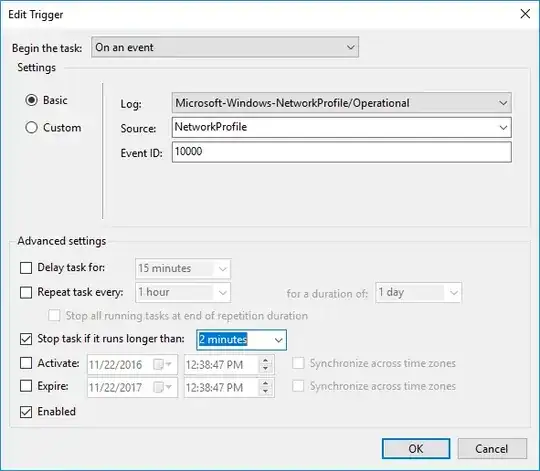
Once you get that working, make a scheduled task triggered by event id 10000 in source NetworkProfile of log Microsoft-Windows-NetworkProfile/Operational which calls it:

Task Scheduler trigger example

Personally, I bundle that with iexpress.exe to run it hidden in the background and make sure the scheduled task is set to run even if I'm not logged on. I just set this up on my computer a few weeks ago and it's been working great!

Source: My article on How to Automate Captive Portal Login.

The_Pingu
  • 14
  • 3
Menasheh
  • 190
  • 1
  • 10
  • Wow. Truly universal answer. In my case it was events with id 4004, which, in contrast to 10000 was more consistent with network change. But in my case something lagging network badly in daytime, so... I just defined trigger to do it once a hour – 57ar7up Mar 04 '23 at 14:24
1

I've done this in the past with Windows task scheduler and a php+mysqllite script. The php+mysqllite script just checked to see if it could reach google, if it got redirected, it checked to see if it had a routine for the domain it got redirected to, if so, it ran it. The mysqllite was to keep the cookies for the headless browser I implemented in php. It would probably be a lot less work to just use a greasemonkey equivalent to do the log-in. (with the down side being the browser would pop up and do things every time your scheduler gets tripped.)

The task scheduler trigger will vary from machine to machine. I had one laptop that would log wifi connections as events and they included the ssid so I could filter to only trigger on the ones I cared about.

On my current laptop, it seems the only event that reliably gets fired is the DHCP client connect. Of course, this fries every time I get an IP address and doesn't tell me an SSID.

You can check what events are available for you to trigger off of with the windows event viewer. I just turned on and off my wifi 3 times and checked what events were triggered 3 times in the last hour.

Rick
  • 274
  • 1
  • 9
0

Depending on the specific implementation of the portal, you might not even need any additional software.

Note: this solution requires basic knowledge of HTTP and the dev panel of your browser. The second link is for Chrome; if you use other browsers a quick search should take you there easily. You should also be not afraid to use the command line interface, although you certainly do not need to be an expert.


Fundamentally, the captive portal is just a HTML webpage. When you enter your authentication details and submit, your browser is simply sending a HTTP request (likely either GET or POST) with your credentials to a preconfigured URL. This of course can be achieved using command line tools, and thereby automated using Windows Scheduler as other answers have mentioned.

Fortunately, since 2018 Windows 10 has shipped with the curl utility, which allows you to send arbitrary HTTP requests. So what you can do is inspect the request your browser sends when you submit your credentials through the portal, and compose a curl command that sends the same request. See how to send a POST request using curl here. Then you can save the command in a .bat file, and set it to run when you connect to a network using the Task Scheduler. @Menasheh has provided a simple guide so I won't repeat this part.

However this solution is not guaranteed to work on every network, since a more sophisticated portal could be performing various checks on the request such as timestamping or tokening. But it's worth a try nonetheless.


A potential attack vector of this solution is that since the Task Scheduler does not care which network you are connecting to, it will run this script when you connect to ANY network. This makes it so that there is a non-zero chance that an opportunistic attacker can set up a phishing attack on their own network. It has to be noted that the possibility of this is very small though, given that very few people run an automatic login setup like this. And there are mitigation techniques for this, such as setting up an HTTPS portal with a workplace-internal certificate, but this is out of the scope of this question.

cyqsimon
  • 739
  • 1
  • 9
  • 20