21

Is there any way for me to use Windows 8 in a dark environment? For a long time I had headaches that I couldn't fid their cause. Now, I'm using a dark visual style for my Windows 7 and since then, I haven't have any problems. Now I want to use Windows 8 release preview but I cannot find any way to use it in a dark theme/visual style. I've seen the files needed are patched but couldn't find any visual style. I also searched for 3rd party apps, nothing. I would very much appreciate if you could help me. Thanks.

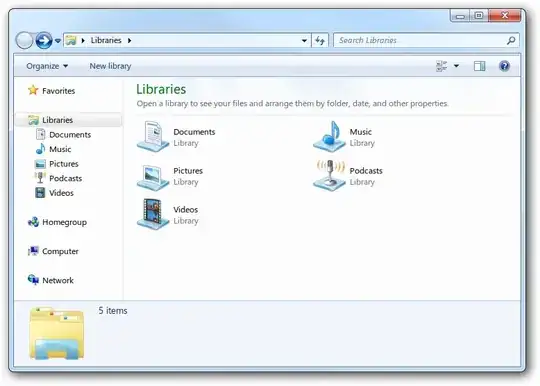
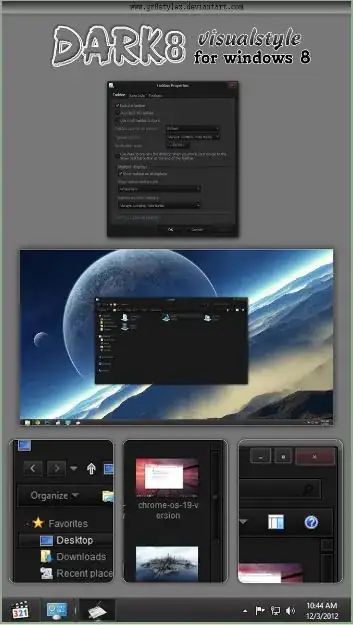
Pictures below compare Explorer both in dark and Aero visual styles.

Dark Visual Style

Aero

Alireza Noori
  • 1,179
  • 4
  • 17
  • 30
  • 4
    How about dimming the monitor? – Moab Jun 02 '12 at 17:05
  • 2
    Not gonna help that much. I have it dimmed at max. – Alireza Noori Jun 02 '12 at 17:13
  • How about [This one](http://firefoxdude.deviantart.com/art/Windows-8-Dark-Metro-Theme-259191685) – avirk Jun 02 '12 at 17:24
  • Does the windows 7 patch work on 8? – Simon Sheehan Jun 02 '12 at 17:34
  • @avrik That is for Win8's Metro (not desktop). Links are dead though :( – Alireza Noori Jun 02 '12 at 18:30
  • @SimonSheehan No, but a patch for Windows 8 is released. Take a look [here](http://forums.mydigitallife.info/threads/32735-Windows-8-Consumer-Preview-x86-Theme-Patch) – Alireza Noori Jun 02 '12 at 18:32
  • You could conceivably do the same thing to the windows 8 explorer that you did to the windows 7 one, except that it wouldn't affect the main Metro interface (only the desktop view). Keep in mind that you'd have to change the bootloader (OS select) theme too; it's almost a separate OS (in terms of complexity)! – WindowsEscapist Jun 02 '12 at 22:10
  • I want to only change desktop, but how would I do that? – Alireza Noori Jun 02 '12 at 23:51
  • 1
    Have you tried the High Contrast themes in the Personalize settings? Particularly #1, #2 and black. However they change metro too (IMO, for the worse). But these are more for disability and physical reasons, not beauty. I guess you fit under the physical reasons category. It might get you by until a real theme comes out. – Ryan Clarke Jun 03 '12 at 12:50
  • @RyanClarke No I don't have any phisycall condition. I just use my PC a lot. I use it for at least 10 hours a day. If you're using it too much, you might want to consider changing your OS too and after a few days, you'll see the difference. The thing with the HighContrast themes is that they remove all the beauty of the OS. I'm not THAT desparate. – Alireza Noori Jun 03 '12 at 15:10
  • @AlirezaNoori I wasn't calling you crippled. I had headaches a few years ago from a bad CRT monitor. So I know how it can be. I just didn't know how serious this was and if an ugly look was worth it. The metro interfaces really take a hit in high contrast theme. – Ryan Clarke Jun 03 '12 at 22:01
  • No, not at all. I just thought you might think I had a seriuos condition. I think everybody who works a lot with computers, has this problem. Some just may don't know it. Anyway, I think by changing Windows colors and using some 3rd party apps, I might be able to work. Now I'm just looking for a Explorer replacement. I'll ask it here in another question though. – Alireza Noori Jun 03 '12 at 22:54
  • 1
    @AlirezaNoori I experienced the same problems after looking at a monitor for several hours a day. This software helps A LOT: http://stereopsis.com/flux/ – 에이바 Jun 04 '12 at 18:58
  • How did you do it in Win7? – pratnala Nov 12 '12 at 17:20
  • @PratyushNalam I modified a theme which is available [here](http://jaycee13.deviantart.com/art/Mango-XB-K-Visual-Style-7-244943275) – Alireza Noori Nov 12 '12 at 17:24

2 Answers2

11

Excerpt from my blog at http://anoori.me/

Las week, I mentioned I tried to switch over to Windows 8, but I couldn’t do so because it was so bright for me. After a couple of days, I upgraded some parts of my PC and since I wanted to check out the UEFI booting speed of Windows 8, I figured I’d give it another shot.

After installation, I knew that I have to make my OS dark, so, after installing drivers and basic software, I set out to make my OS as dark as possible.

The "Advanced Color and Appearance Settings" dialog isn’t there, but there are programs that are using it, so I head over to the beloved regedit and changed it through Windows Registry. Here is the key:

[HKEY_CURRENT_USER\Control Panel\Colors]
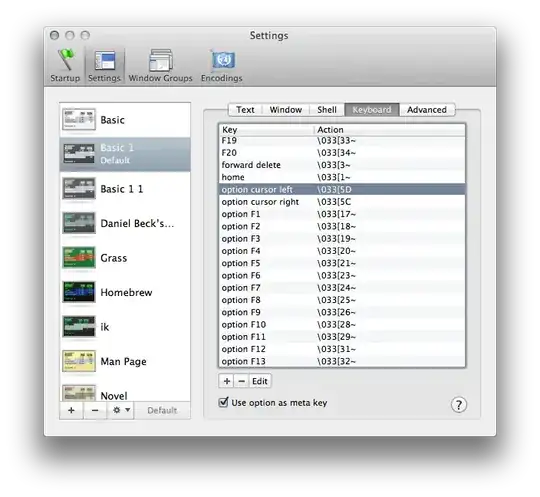
enter image description here

I changed some colors, logged off and logged on again, started Microsoft Words and voila! It was dark. Good.

I started Photoshop and checked the best background for both dark and bright foreground texts. Turns out, it’s [55,55,57] in RGB format. Here’s the photo I’ve created:
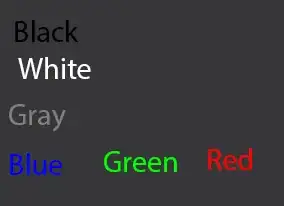
enter image description here

As you can see, it tests the background against all kinds of foreground. I changed my all keys in the regedit and in case you’re interested, here's a copy for you to download. Just double click on it and restart your windows. (It works on Windows 7 too).

This made most of my OS dark, after that I set my Aero color to black and changed all the font size settings in

Control Panel\All Control Panel Items\Display

to 11, clicked Apply to get a bigger font my OS.

I changed my Office theme to "Black", my Visual Studio to "Dark" theme, the Notepad++ to "Obsidian", etc.
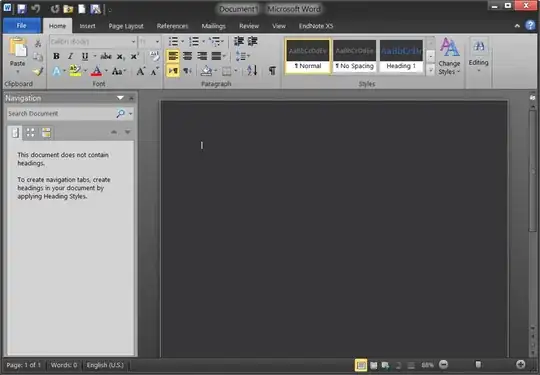
enter image description here

The only remaining part was my Windows Explorer. I couldn’t change it without a Visual Style so for now, I’ve customized the NexusFile and using it as my primary file manager. It’s simple, has a black theme, it’s customizable and it has tabs. Here is a screenshot of it.

enter image description here

In addition to all these changes, I use f.lux for a while now. It changes your monitor's light depending on time of day. It's so awesome. I strongly recommend it. It is free and also available for Mac/Linux and iOS.

I'm using my Windows 8 for a week now. I just have some minor issues with it but in general I LOVE IT, more than Windows 7. It’s blazing fast. You should definitely try it.

Source
Alireza Noori
  • 1,179
  • 4
  • 17
  • 30
  • @AzulShiva trusted who? Me? You can download the `.reg` file and see the contents of it before applying. It won't change your Windows in any way that it's unusable. Not sure what you're implying. I just backed up a couple of keys using regedit itself. – Alireza Noori Jan 12 '18 at 05:29
7

Themes for Windows 8 is a free website dedicated to changing the appearance of your PC or Tablet with different visual styles, themes, skin packs etc.....

http://windows8themes.ms/

Alternatively I have found this dark theme for Windows 8 on DeviantArt entitled Dark 8:

enter image description here

Available from: http://gr8stylex.deviantart.com/art/dark8-vs-for-windows-8-340960613

Skin Pack is another website to visually alter the appearance of your Windows 8, an example of a dark theme available called Equinox Skin Pack

enter image description here

Available from: http://www.skinpacks.com/modules.php?name=News&file=article&sid=89

This is just examples of two dark themes I found from those sites, but i'm sure a variety of others probably exist on them as well.

Simon
  • 4,437
  • 8
  • 39
  • 51