5

I've tried Googling but can only find guides for the other way around.

I have a few flac files from an album, all properly tagged. I'd like to make them into a single flac file with a cuesheet automatically (ie not pasting into Audacity and making the Cue myself).

Is this possible?

Ivy
  • 769
  • 3
  • 10
  • 23

5 Answers5

8

Use shntool, a multipurpose, multiformat command-line tool for manipulating lossless audio files.

shntool join -o flac *.flac

This generates a file joined.flac which contains the audio content of each of the files in *.flac. Note that you might want to specify the names of the FLAC files, rather than leaving it to *.flac. This lets you be sure that the files are joined in the correct order, and that no unwanted FLAC files get included.

shntool cue *.flac > joined.cue

This generates a CUE file joined.cue, a simple text file listing tracks and timings. The same caution about specifying names of the FLAC files applies. (If you are trying these commands in order, joined.flac will now be one of the files caught up in *.flac.)

Jim DeLaHunt
  • 265
  • 1
  • 11
eadmaster
  • 1,177
  • 1
  • 14
  • 31
  • Although note that this will include `joined.flac` in your cue file, which you probably do not want. – mattdm Nov 17 '13 at 18:55
  • Thanks for the tip about `shntool`. I was looking to do the opposite (split a single file) and this was perfect. – suprjami Jun 16 '16 at 10:59
1

I tried the foobar2000 route, but unfortunately, it didn't accurately print the INDEX variable for each track. I couldn't get the other solutions to work, either. I did a lot of trial and error (with some big assistance from ChatGPT) and wrote a bash script that does exactly this.

#!/bin/bash

#if this doesn't work, you may need to install flac:
#sudo apt install flac
#written with significant help from ChatGPT

#INSTRUCTIONS: 1) Save this code as create_cue.sh
#                           2) Place it in the same folder as the .flac files you want to create a .cue sheet for
#                           3) Run the bash script (you may need to mark it as executable)
#                           4) Voila! Instant .cue file. Enjoy

# Get the first FLAC file in the directory
flac_file=$(ls *.flac | head -n 1)

# Get the header information from the FLAC file
PERFORMER=$(metaflac --show-tag=ARTIST "$flac_file" | cut -d= -f2)
TITLE=$(metaflac --show-tag=ALBUM "$flac_file" | cut -d= -f2)
DATE=$(metaflac --show-tag=DATE "$flac_file" | cut -d= -f2)
COMMENT=$(metaflac --show-tag=COMMENT "$flac_file" | cut -d= -f2)

# Set variables for the cue file
CUEFILE="$PERFORMER - $TITLE.cue"

# Initialize variables for cumulative time
HOURS=0
MINUTES=0
SECONDS=0

# Start writing cue file
echo "REM DATE $DATE" >> "$CUEFILE"
echo "REM COMMENT $COMMENT" >> "$CUEFILE"
echo "PERFORMER \"$PERFORMER\"" >> "$CUEFILE"
echo "TITLE \"$TITLE\"" >> "$CUEFILE"

# Loop through each flac file in the current directory
for flacfile in *.flac; do
    
    # Get track number, performer, and title from file tags
    TRACK=$(metaflac --show-tag=TRACKNUMBER "$flacfile" | sed 's/.*=//')
    PERFORMER=$(metaflac --show-tag=ARTIST "$flacfile" | sed 's/.*=//')
    TITLE=$(metaflac --show-tag=TITLE "$flacfile" | sed 's/.*=//')

    # Write track info to cue file
    printf "FILE \"$flacfile\" WAVE \n" >> "$CUEFILE"
    printf "  TRACK %02d AUDIO\n" "$TRACK" >> "$CUEFILE"
    printf "    TITLE \"%s\"\n" "$TITLE" >> "$CUEFILE"
    printf "    PERFORMER \"%s\"\n" "$PERFORMER" >> "$CUEFILE"
    printf "    INDEX 01 %02d:%02d:%02d\n" "$HOURS" "$MINUTES" "$SECONDS" >> "$CUEFILE"

    # Get length of track in seconds
    LENGTH=$(metaflac --show-total-samples "$flacfile")
    LENGTH=$((LENGTH/44100))

    # Update cumulative time
    SECONDS=$((SECONDS+LENGTH))
    if [ $SECONDS -ge 60 ]; then
        MINUTES=$((MINUTES+SECONDS/60))
        SECONDS=$((SECONDS%60))
    fi
    if [ $MINUTES -ge 60 ]; then
        HOURS=$((HOURS+MINUTES/60))
        MINUTES=$((MINUTES%60))
    fi

done
Rohit Gupta
  • 2,721
  • 18
  • 27
  • 35
Jub
  • 11
  • 3
1

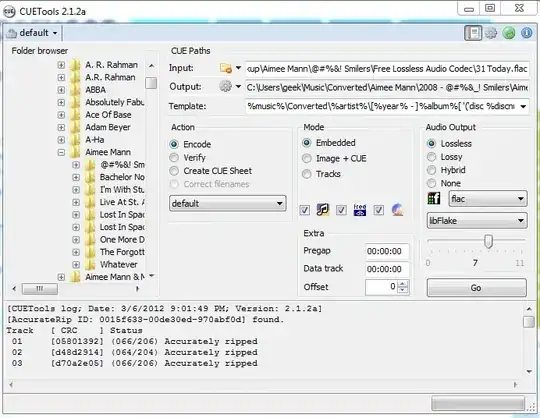
Cuetools should let you do this - You can select the whole folder the files are in, and select "Embedded" for mode (embedded refers to album art, not the flac file. Select image+cue for a seperate album art image) and "Encode" For action. Select flac for filetype and libflake for the encoder

enter image description here

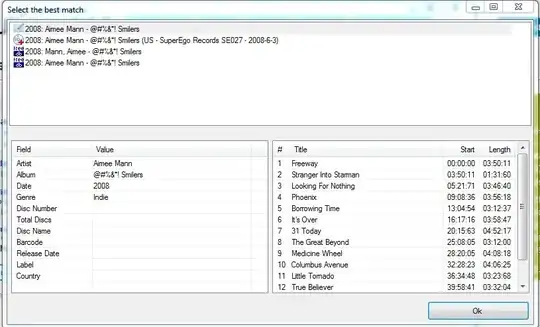
This will pop up a window that will have several sets of data for the cue sheet - the first one is based off your data, the others off freedb and other sites.

enter image description here

This should give you a single flac file with a cue file.

Journeyman Geek
  • 127,463
  • 52
  • 260
  • 430
  • Thanks, I already have CueTools, so I don't know why I didn't try poking around in there first. Is it common to use an embedded cuesheet? Is there not better support for having a separate one? – Ivy Jun 03 '12 at 13:10
  • 1
    embedded dosen't refer to the cue sheet, it refers to album art – Journeyman Geek Jun 03 '12 at 13:39
0

Nope. According to the CueTools Wiki page "embedded" refers to the cue sheet. You have the option to embed it into the flac file, to create two separate flac+cue files, or to create different flacs for each track in the cue. (Though I'm unaware of a software player which actually supports embedded cue sheets, you may know of one.)

WindowsEscapist
  • 2,266
  • 3
  • 21
  • 40
FCanc
  • 9
  • 1
  • [Max](http://sbooth.org/Max/) convertor supports embedded cue sheets. It can convert FLAC (and other formats) to Apple Lossless and import files to iTunes. – Alexey Mahotkin Mar 10 '13 at 18:22
0

Have a look at Foobar2000 it can create single file with embedded cue sheet and can also embed art work and can play the resulting file as well http://www.foobar2000.org/

nigel
  • 1
  • 2
    Welcome to Super User! Generally we like answers on the site to be able to stand on their own - Links are great, but if that link ever breaks the answer should have enough information to still be helpful. Please consider editing your answer to include more detail. See the [FAQ](http://www.superuser.com/faq) for more info. – slm May 03 '13 at 12:54
  • Please read [How do I recommend software](https://meta.superuser.com/questions/5329/how-do-i-recommend-software-in-my-answers/5330#5330) for some tips as to how you should go about recommending software. You should provide at least a link, some additional information about the software itself, and how it can be used to solve the problem in the question. – DavidPostill Apr 25 '17 at 09:41