21

Is there any way to keep programs from using the My Documents folder (on Windows 7)? Some programs put their stuff in %USERNAME%\My Documents, and I would rather this go to some place like %APPDATA%.

I know I could manually symlink each folder a program decides to create, but I would rather not have to do that for each program. Another alternative is to put my stuff in a different location than My Documents, but then I wonder why Microsoft named it 'My Documents' and not 'Applications: put all your stuff here'... probably because filenames cannot have colons on them, but still.

'Hiding' the folders is not an option; I always keep "See Hidden Folders" enabled.


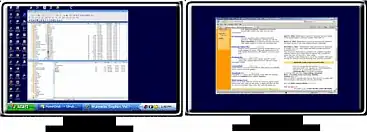
In other words, I want to transform this:

My Documents on my Vista desktop.

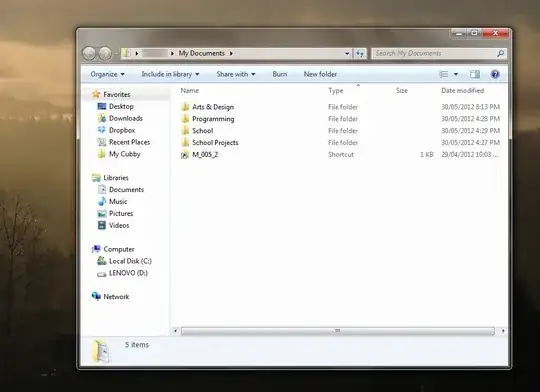
Into this:

My Documents on Windows 7.

Mateen Ulhaq
  • 3,452
  • 6
  • 35
  • 56
  • 1
    You can change the registry entries that point to the folder to point to somewhere else. – Synetech Jun 04 '12 at 02:19
  • It's a little had to understand what your problem is. Can you elaborate more on what is happening and what you want to happen? – Scott Chamberlain Jun 04 '12 at 02:20
  • 2
    http://meta.stackexchange.com/questions/66377/what-is-the-xy-problem . What problem are you actually trying to solve? – ChimneyImp Jun 04 '12 at 02:24
  • 8
    The problem that he is having is that his 'My Documents' folder is filled with folders that applications create. such as settings, savegames (for games of course), etc. It is indeed a very big problem. Just go to your 'My Documents' and see it for yourself. – MasterMastic Jun 04 '12 at 02:28
  • On a side note `Applications: put all your stuff here` Is also known as `%AppData%` and `%LocalAppData%` try typing either of those in to the address bar of explorer and see where it takes you. – Scott Chamberlain Jun 04 '12 at 02:33
  • @Ken, I don’t see what the “very big problem” is. That is where your application-settings, saved games, pictures, etc. are supposed to be stored. – Synetech Jun 04 '12 at 02:46
  • @Synetech Perhaps for a user that doesn't use documents so much. Personally I do, and when I want to save/load documents, I have to go to an incredible messy folder and search between many files and folders what I'm looking for (not pleasant as you can imagine). Not to mention how the save/open file dialog takes his time to load the files. – MasterMastic Jun 04 '12 at 02:50
  • Muntoo, can you please indicate the exact path that you are talking about? For example, is it `C:\Users\Muntoo\`, `C:\Users\Muntoo\Documents`, `C:\Users\Muntoo\AppData`, etc.? – Synetech Jun 06 '12 at 15:46
  • 1
    @Synetech `C:\Users\Muntoo\Documents`. – Mateen Ulhaq Jun 07 '12 at 23:12
  • @muntoo, what exactly is in there that’s a problem? I just examine my “dirtiest” Documents folder and there is nothing that bad in there. Aside from things I want and expect to be in there, there are some logs and a few settings. If you have *that* many misbehaving programs, then you may want to use a separate account for testing programs so that you can nuke the whole thing every now and then. – Synetech Jun 08 '12 at 00:39
  • 1
    @Synetech On my Vista, there's a big disparity between [My Documents](http://i.imgur.com/U6Zq7.png) and [My Actual Files](http://i.imgur.com/zECG1.png). – Mateen Ulhaq Jun 08 '12 at 02:22
  • I gave up and just store my files elsewhere. The root cause is too many developers misuse "My Documents" to store program data. Configuring Windows won't do anything. – kevin Jul 11 '18 at 02:49

4 Answers4

7

Here is a guide from MS, I'm pretty sure it's what you're looking for:

http://support.microsoft.com/kb/242557

Explanation from me, if it makes things simpler:

  1. Press Winkey + R, or go to Start and write in the search Run and press Enter.
  2. Enter: regedit.
  3. Navigate using the folders to the left to: HKEY_CURRENT_USER\Software\Microsoft\Windows\CurrentVersion\Explorer\User Shell Folders.
  4. [Backup] Select the Personal registry, and at the Registry Editor's menu go to File -> Export. Save it where you like. if you'll ever want to get the old settings back again, you could just double click this file.
  5. Double click on the Personal registry, and change the Value Data to the location you prefer. For myself (I also suffer from this issue) I created a folder at %appdata (makes sense) and called it My Documents to avoid mixing files up. the location using macro is: %USERPROFILE%\AppData\Roaming\My Documents.

    • As you can see, Personal refers to My Documents.

. enter image description here

Good luck.

Moab
  • 58,044
  • 21
  • 113
  • 176
MasterMastic
  • 375
  • 6
  • 15
  • Should I use `Roaming\My Documents` or `Local\My Documents`? – Mateen Ulhaq Jun 04 '12 at 02:39
  • @muntoo Roaming. I edited the answer to make things more clear. – MasterMastic Jun 04 '12 at 02:41
  • 3
    This simply moves the Documents folder to a new location. From what I understand, the OP only wants to redirect programs that dump their settings, savegames etc. in the Documents folder to a new location, while keeping the Documents folder for what it's actually meant for. How does your answer accomplish that? – Indrek Jun 04 '12 at 07:14
  • @Indrek, do you have any better ideas? – Synetech Jun 06 '12 at 15:48
  • @Synetech I do not. If I did, I would have posted them as an answer. – Indrek Jun 06 '12 at 15:50
  • Unfortunately, there are still a few 'bugs' with this approach. Right clicking the Windows Explorer icon in the taskbar comes up with "My Documents 2" (the `%APPDATA%` one), and won't let me change it to `C:\Users\Muntoo\Documents`. – Mateen Ulhaq Jun 07 '12 at 23:14
7

TL;DR

You have a few choices:

  • Don’t use those programs
  • Contact the devs of the programs you use and ask them to store their data in AppData instead of Documents
  • Use a secondary account/VM for some programs
  • Manually clean up the folder periodically
  • Use/write a program/script to periodically clean up the folder using blacklists and/or whitelists
  • (As a not-ideal hack, you could always just create empty files with the same names as the unwanted directories and set them to +R+A+S+H. That way, the program will be unable to create the directory or put anything in it—though you will still have a bunch of 0-byte files.)
  • Create subdirectory in Documents to store your “actual files” and use that as your document root (this is easier if you redirect the subdirectories for Video, Pictures, etc. to the new folder as well)
  • Similar to the previous point, but abandon the Documents folder to programs altogether and use a different folder for your “actual files”, e.g., C:\Users\Muntoo\MyActualFiles\* (don’t forget to redirect Videos, Music, Favorites…)

Foundation

Under Windows, every user gets a directory where their user-specific files are stored. It can be accessed with the variable %userprofile%. In Vista and up, this is under the \Users\ folder and in XP and down, it is in the \Documents and Settings\ folder.

Now once you enter a user-directory, it breaks down into a few different purpose-specific subdirectories. (Often, there will be other files and folders in the root of the user-directory, but officially, there are only supposed to be a few predefined ones, and programs and users are supposed to place items in one of the appropriate subdirectories.)

There are two main branches of the user-directory: one where user-generated files are saved, and one where program-generated settings are stored.

Vista and up use the generic folder name Users because it has no spaces, but in XP and down, the name Documents and Settings makes its purpose much more obvious: it stores (user) Documents and (program) Settings.

Application

When you run a program and configure it, the program will store the customised settings in the Application Data folder in %userprofile% (it has different names depending on the version of Windows). It comes in two versions: one where the files are stored on that specific system (“local”) and one where the files are copied to a server so that your settings can move to different systems on the network with you (“roaming”). (Since Vista, there are also low-privilege variations.)

When you save a file, you save it to your My Documents folder in %userprofile% (the specific folder name varies by Windows version). This folder (by default) has various subdirectories for each media type (text, pictures, music, videos, etc.)

Example

As an example, imagine that a user named Foobar runs a program called CoolApp in Windows 7 installed on the C drive:

  • Their user-directory is C:\Users\Foobar\
  • When they configure CoolApp, it stores the settings in C:\Users\Foobar\AppData\Local\CoolApp\
  • CoolApp may also/instead store some settings/files in C:\Users\Foobar\AppData\Roaming\CoolApp\
  • When they create a file in CoolApp, they save it to C:\Users\Foobar\My Documents\

Note, that the My Documents folder is the default for saving files, but obviously, the user is free to save any directory that they have permissions to.

Advice

Separating user documents and program settings is useful because it makes file management easier. Almost every program will store files in the application-data folder, even if it was used only once and never again. In fact, separating all user-data from the operating system is advisable because it makes it much easier and faster to backup and restore the OS and/or user-data and also results in smaller backups.

Methodology

There are two official ways to change the My Documents location.

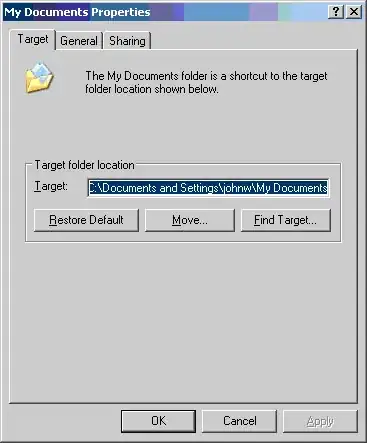
  • You can change (and physically move) the My Documents folder automatically by opening the Properties dialogue for it and changing the target directory.

    In Vista and up:
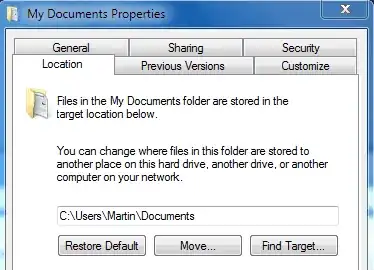
    enter image description here

    In XP and down:

    enter image description here

  • You can also move it manually by editing the Personal value in the registry key

    HKCU\Software\Microsoft\Windows\CurrentVersion\Explorer\User Shell Folders

    You need not edit the corresponding value in …\Explorer\Shell Folders. You need to reboot or restart Explorer for Windows to pick up the change anyway, and when you do, Explorer will update the value in Shell Folders from the one in User Shell Folders.

    You will need to manually move the actual folder to the new location.

While you’re at it, you may as well move the other folders such as My Pictures, My Videos, Favorites, etc.

Miscellaneous

When you save a game, you are essentially saving a file just like saving a document in Word or a picture in MSPaint. As such, savegames are usually stored in the My Documents now, but some save them in the Application Data folder with the game's settings.
Vomit IT - Chunky Mess Style
  • 40,038
  • 27
  • 84
  • 117
Synetech
  • 68,243
  • 36
  • 223
  • 356
  • 1
    I don’t know what happened to the edit I made yesterday; the sodding thing has sublimated into thin air. *sigh* This is the best I could do to re-create it from memory. – Synetech Jun 06 '12 at 05:35
  • 1
    How exactly does this answer the question? If a program is writing its settings to Documents (rather than `%AppData%`, as you correctly note it should), it will continue to do so even after the Documents folder is moved to a new location. – Indrek Jun 06 '12 at 11:11
  • @Indrek, did you read the question? The OA clearly asked **Is there any way to keep programs from using the My Documents?** I explained how user-directories work and the difference between the user's root directory and the *My documents* folder and how to separate program settings from user documents. Based on your comment to Ken's answer (which is a brief version of what I said), you may want to have a read of my expanded answer because it addresses your question. – Synetech Jun 06 '12 at 14:09
  • I did read the question, and I don't see how your answer will prevent programs from using the Documents folder (which, yes, is what the OP asked for). Moving the Documents folder to a new location simply means that programs will dump their settings and other files to the new location as well. It does not, from what I can see, allow one to separate user documents from program settings. – Indrek Jun 06 '12 at 14:38
  • You are still misunderstanding. The OP asked how to prevent programs from putting their settings in *My Documents*, but programs **do not** put their settings in *My Documents*, they put them in *AppData*. Both of these folders are stored in `%userprofile%`. I explained the difference and showed how to separate the two. But, I already explained all this nice and clearly in the answer, so repeating it again in a comment is a waste of time. – Synetech Jun 06 '12 at 14:49
  • I'm not misunderstanding. Re-read the question, the comments under it, and my comments under this answer. The problem is that programs often **do** put their settings and other files in the Documents folder, rather than `%AppData%`. This is a major annoyance and no amount of moving shell folders around is going to help against that. – Indrek Jun 06 '12 at 15:10
  • When you say "Documents folder", are you referring to the one aliased as "My Documents". He said *every program*, so I don't think he is referring to the *My Documents* folder, but its parent because there are not many programs that put stuff in there by default (other than savegames which makes sense since you are essentially saving a file by saving a game), and if there is one that puts actual settings and such in there, then that is not following the proper convention, so you need to contact the dev to tell them to fix it. – Synetech Jun 06 '12 at 15:26
  • 1
    When I say "Documents", of course I mean the one aliased as "My Documents", and, I believe, so does the OP. I don't see how that could be ambiguous. "Every program" may have been just an exaggeration. At any rate, I think it's clear that the OP's problem is that his documents are getting mixed up with program-created files - settings, sample files, templates, logs, and so on; savegames, too, belong in a different location - in what should be reserved for user files, not that his documents and program-created files reside in two completely separate folders under the same parent folder. – Indrek Jun 06 '12 at 15:38
  • Either he is exaggerating a lot or is referring to `%userprofile%`, because like I said, while it does happen, it is rare for programs to store settings in `%userprofile%\` or `%userprofile%\documents\`. I added an explanation to that effect and suggested manually cleaning them up and/or contacting the dev since that is the only thing that can be done (besides symlinking, which again, Muntoo said would be too burdensome, indicating that he is either referring to `%userprofile%`, or is using lots & lots of abnormal programs by terrible devs—in which case the answer would be to stop using them). – Synetech Jun 06 '12 at 15:41
  • 1
    Try not to fixate on the word "settings" so much. As I explained, that's just one example of what programs dump in the Documents folder. And as has been mentioned repeatedly, this isn't rare. It may be for you, in which case you can consider yourself lucky. But if all programs behaved as well as you seem to assume they do, I don't see why the OP would be bothered by an AppData folder in his user directory, especially considering that it's hidden by default. – Indrek Jun 06 '12 at 15:49
  • I have used countless programs and have spent hours cleaning out my AppData folder, but my Documents folder has rarely ever needed to be cleaned out (maybe one in every few dozen or so programs). The fact is that most of the files that go in there belong in there because they are *content* that the user has created. Some programs store the settings along with the content, but the way you describe it, you make it sound like 90% of programs store junk in it which simply is not true. – Synetech Jun 06 '12 at 16:00
  • I've asked Muntoo to clarify because I have no reason to assume that you have more information about his issue and/or are better at inferring what he is talking about based on the information present. So until he answers, I am done with this and will consider my answer to be accurate and helpful. – Synetech Jun 06 '12 at 16:02
  • Fair enough. Personally I think the information provided is pretty unambiguous, and I don't see why you're having such a hard time believing that other people may have had different experiences with software than you, but there you go. However, if you're right and the OP did just want to move his Documents folder out of his user folder, then I'll be happy to upvote your (and Ken's) answer as accurate and helpful (assuming, of course, that this question isn't a duplicate, which it very well might be). PS. "I have used countless programs" - see how easy it is to exaggerate? – Indrek Jun 06 '12 at 16:31
  • 1
    I hope my edit clarifies things. – Mateen Ulhaq Jun 08 '12 at 02:44
  • @muntoo, actually it just raises the question as to why you accepted Ken’s answer? – Synetech Jun 08 '12 at 02:51
  • @Synetech It accomplishes the goal *partly*, and I was expecting worse. – Mateen Ulhaq Jun 08 '12 at 02:52
1

Here's my solution for now:

  1. Create a new folder in your User folder called Docs.
  2. Create hardlinks within this folder to the folders in Documents that you actually want to see.
  3. Only ever store your documents in those folders.
  4. Add the Docs folder to the Quick Access menu.

This achieves:

  • No tomfoolery with moving the Documents folder, which can have various unintended effects. Your documents remain truly stored in Documents.
  • However, you only ever need to access the Docs folder, where you don't see all the rubbish. And you can access it easily and quickly.
  • The system sees your files in the Docs folder as if they really are there. So, e.g. you could cloud-sync this folder.

You can create hardlinks with the LinkShellExtension.


The ideal solution would be a clever program that intercepts attempts to write to this folder (or to read where it is, from the Registry) and redirects to somewhere else for blacklisted programs. However I am yet to discover this program.

0

Quick and dirty solution: just hide the application folders in Documents. I tried that for my game folders and such and the games seem to be running okay. But still, make a restore point before attempting this, just to be on the safe side.