0

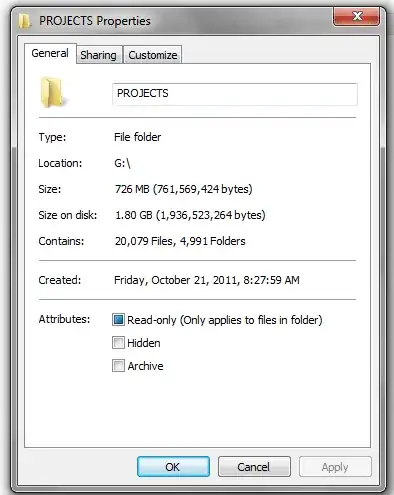
I have an Encrypted USB pin drive. I need to change permissions in the folder and file in such a way that they are no read-only. I use Windows 7 and when I click Properties, for that drive I see a checkbox that is selected by default. If I un-check it, click Apply and then Save it seems that the new settings take place only to open the Properties again to see that the Read-Only setting is still set by default. And yes, when I click Apply I am asked if i want to apply to the directory and all files, which I do confirm.

What am I missing and how can I change this?enter image description here
usabilitest
  • 111
  • 3
  • When you are editing these settings do you have the drive unlocked? – DiscoveryOV Jun 19 '12 at 03:38
  • Yes, I have to login before I can even access the drive. – usabilitest Jun 19 '12 at 03:53
  • 1
    Was it read only before you encrypted it? – DiscoveryOV Jun 19 '12 at 03:55
  • possible duplicate of [Unable to Change Windows Vista Read-Only Folder Attribute](http://superuser.com/questions/383952/unable-to-change-windows-vista-read-only-folder-attribute) – Bob Jun 19 '12 at 15:12
  • Also see [All folders in all drives are set to read only on Windows XP and can't be changed](http://superuser.com/questions/182384/all-folders-in-all-drives-are-set-to-read-only-on-windows-xp-and-cant-be-change), [Folder keeps changing back to read-only. What permissions setup causes this in Windows?](http://superuser.com/questions/131119/folder-keeps-changing-back-to-read-only-what-permissions-setup-causes-this-in-w) – Bob Jun 19 '12 at 15:15
  • Also see [Windows XP fails to uncheck the Read-only attribute from folder (and subfolders)](http://superuser.com/questions/345027/windows-xp-fails-to-uncheck-the-read-only-attribute-from-folder-and-subfolders), [All folders are Read-Only (Windows)](http://superuser.com/questions/7989/all-folders-are-read-only-windows) – Bob Jun 19 '12 at 15:16

2 Answers2

0

That partial read-only setting appears on pretty much every folder that contains a desktop.ini file, as I understand it. You will see the same thing on your hard drive.

It just means that (at least) one file in that folder is read-only, most likely desktop.ini.

0

The "read-only" check box is referring to the read-only file attribute. That is the reason you can not apply it on a directory, only on the files in a directory. Therefore on a directory you will never see the read-only checkbox in checked state that is only possible on files. This flag is also set if any file contained in the directory is marked as read-only.

BTW: Some USB sticks have an hardware read-only switch. That may be an alternative that can not be simply removed by software.

Ramhound
  • 41,734
  • 35
  • 103
  • 130
Robert
  • 7,667
  • 3
  • 33
  • 51