49

I would like to have two mice connected to my computer, and have one mouse left-handed, another right-handed. And not needing to change any settings for using any of them.

I've googled for this and did not find some information, but nothing helpful. Somebody suggested to have 2 accounts, some other suggested a short-cut that changes mouse buttons over. I did not like any of that. And I remember, I saw somebody using their laptop with right-handed touch-pad and left-handed mouse. At the same time.

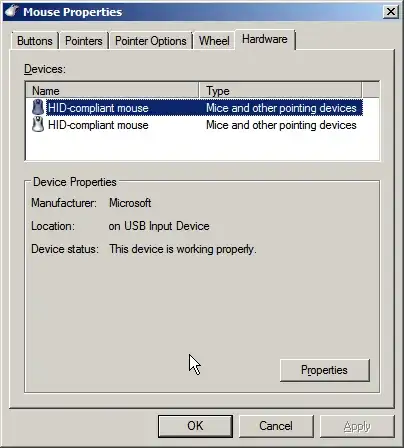
Both of my mouse are plain vanilla USB, with no drivers, tried finding drivers for any of the mouse did not get me anywhere. This is how mouse configuration looks like: enter image description here
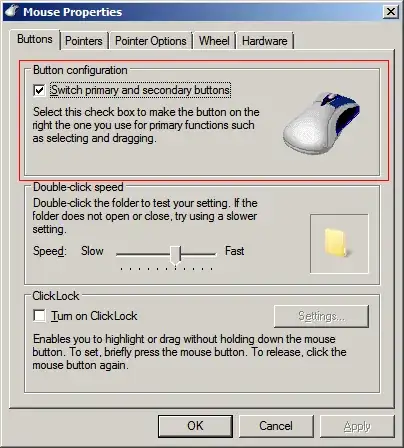
enter image description here

There is no option for different mouse to be configured different. I think I need to install some mouse drivers/software that allow different configuration. Is there anything like this availble??

Many thanks in advance!

p.s. Using Windows 7 Pro, one mouse is Fujitsu, another Sandsrom.

Update: I'm not going to use both mice at the same time. One at a time, but both connected all the time. I would like to switch hands to avoid CTS. Also to stop co-workers swearing on my left-handed mouse, when they try to show me something on my screen. They will ask about 2 mice instead

trailmax
  • 596
  • 1
  • 5
  • 14
  • 6
    why exactly do you want to do it? what do you expect to happen when you move one mouse to right and other to left? – tumchaaditya Jun 21 '12 at 09:17
  • I would like to switch hands for mouse without any delay or extra click. Not going to use them at the same time. – trailmax Jun 21 '12 at 09:23
  • 3
    Windows does support several mouses at the same time, when moved at the same time the move of the pointer is a sum of both mice movement (so ideally moving to different directions causes no cursor movement). I remember having similar configuration, although mice were logitechs and were using their driver software. – Ahe Jun 21 '12 at 10:52
  • @Ahe I'm not going to use both mice at the same time. One at a time, but both connected all the time. – trailmax Jun 21 '12 at 11:24
  • I use both hands without switch mouse setting. If you are out of option, maybe just try to get used with it;-) – Codism Jun 22 '12 at 21:46
  • 1
    What would you do with $200,000.00? .... Two mice at the same time.... – ZnArK Jun 27 '12 at 17:46
  • 6
    @ZnArK Interesting fact, on Linux (X11) you can have two mice at the same time, with completely different settings (e.g., even acceleration can be different). You can even have two independent *cursors*, one for each mouse, if you'd like. Even better news is that you can download a Debian CD for free, and have $200k left over! – derobert Jun 27 '12 at 18:26
  • @derobert Nice pointer... see what I did there? Really though, thanks for the tip. – ZnArK Jun 27 '12 at 18:31
  • I just use a wireless mouse..... want to use it left-handed? take right hand, grab mouse, place mouse in left hand... 4. Profit!! Reverse the first few steps to return to right-handed use. No, the buttons don't 'flip', but it's just muscle memory to use "right-handed" mouse with left hand. Also... I've found that if you stop (or minimize) using the mouse, your CTS will fade. People have typed for decades, no CTS...the mouse shows up? ... CTS abounds. Learn keyboard shortcuts. No CTS! (4. Profit!!) – lornix Jun 28 '12 at 04:02
  • @lornix I was swapping wireless mouse for a long time and the brain gets messed-up about right-hand-left-hand button clicks. Also, I do use shortcuts and prefer keyboard. But believe me, there are applications that don't really support keyboard navigation and at the moment I have to use one for job. – trailmax Jun 28 '12 at 08:37
  • 2
    Duplicate question : [Using two mice in Windows 7 (dual mouse, dual cursor)](http://superuser.com/questions/29432/using-two-mice-in-windows-7-dual-mouse-dual-cursor). – harrymc Jun 29 '12 at 19:13
  • @harrymc good point. Thanks for the link. But most of the answers there out of date or not applicable. – trailmax Jul 02 '12 at 08:56

7 Answers7

43

This looks like a job for AutoHotkey! Rather than reinvent the wheel myself, user gwarble over at the AutoHotkey Forums has already created an application that does exactly what you want:

EitherMouse

  • Multiple mice, individual settings...
  • New features means EitherMouse isn't just for lefties anymore!
  • Leave 2 mice on a PC and automatically swap buttons on the secondary mouse.
  • This allows a user to leave a left-handed and a right-handed mouse always connected and ready to use, or...
  • Useful for a multiple user or public workstation with both left and right handed users. The active mouse is detected and buttons are assigned accordingly and immediately.
  • Individual settings for multiple mice besides swapping buttons, like cursor, speed, etc.
  • New experimental MultiCursor mode keeps each mouse's location separate!
  • Easily swap mouse buttons from system tray if only one mouse is desired.
  • Tray icon points to active mouse.
Jaime Santa Cruz
  • 310
  • 1
  • 3
  • 13
iglvzx
  • 23,459
  • 13
  • 85
  • 122
  • 1
    wow! that's awesome nifty tool! Even allows 2 cursors at the same time! Sounds like an answer for my troubles. But before closing the question, I'll wait couple more days for possible other replies. – trailmax Jun 26 '12 at 09:06
  • 2
    I just got it to work with 2 mice and a touch pad! – bygrace Oct 31 '13 at 13:59
  • I just got it working with two Marble Mouse Tracbkballs. It was a little tricky getting the Scrolling to work right. I had to (with each Trackball) go into the Settings (wrench icon) > Mouse Control Panel and adjust things in the driver control panel. When you launch that control panel EitherMouse will show a msg "LEFT [or right] mouse detected" allowing you to set control panel setting for THAT mouse. – Clay Nichols Nov 03 '14 at 14:49
  • 1
    Thanks for the recommendation, same scenario for me, wired mouse and trackball which kept resetting speed - not any more! – akaAlso Feb 12 '19 at 20:00
  • 1
    not sure what's changed since this was posted, but Chrome gives a big red warning about malware when trying to visit the EitherMouse page... – Ryan Dlugosz Aug 17 '20 at 13:51
4

I do exactly this to avoid repetitive strain on my wrists. It works in windows 7 if the mice are different brands and you install the manufacturer's software for one of them. Then you use the generic windows control panel to assign mouse settings, then use the manufacturer specific software to change settings for one mouse only. You will have two mice with different button configurations controlling one cursor. It works with very basic mice, too. For example, I did it with a Dell cheapo mouse and a low end Microsoft mouse, using the MS mouse software (probably coded for higher end mice, but works on all of them apparently).

David
  • 41
  • 1
2

If you use two mice that use two different drivers, both mice might possibly work with a single cursor. As I understand, this is actually your case, but your problem may be that you have the same driver for both mice.

An AutoIt free solution is in Two mice = two cursors in AutoIt.
Dating from 2007, I have no idea how it performs today.

A commercial product is Pluralinput Basic, 28.95€ and still in beta testing.

harrymc
  • 455,459
  • 31
  • 526
  • 924
2

I would think that you would need two different major branded mice, as a vanilla mouse would use the default HID-compliant driver as shown. Rather with two different mice (let's say a Microsoft mouse and a Logitech mouse), the drivers would be different enough to allow the different settings on each.

I would not think it will work with any vanilla no-name mouse. I'm not sure if that software referenced here would work, but it may be worth a try.

slafat01
  • 300
  • 1
  • 5
  • 2
    Hmmm... Isn't this included in my answer ? – harrymc Jun 29 '12 at 19:50
  • Maybe slafat01 just took more than four minutes to finish typing their own answer because they were doing a bit of research in the middle. – Synetech Jun 30 '12 at 04:01
  • Yeah, I have seen this done with 2 completely different mice, and it worked fine by the drivers. But this is not an option here, no intentions of updating mice to anything branded. By the way, software option works great for me - saves driver fiddling -) – trailmax Jul 02 '12 at 08:47
-1

I can't believe the uninformed answers for the question of using two mice, one for left hand, and the other for the right hand.

There is an EXTREMELY easy way to do this. You need to use Logitech mice, and install Logitech Setpoint software. In that software you can configure each of your mice differently. This mean that for each mouse you have, you can click "swap or switch buttons", and left and right buttons will be swapped just for that specific mouse. You can also adjust the pointer speed and pointer acceleration independently for each mouse.

Logitech mice and the Setpoint software are simply THE BEST software for anyone who wishes to have the ability to have completely different settings for each of their mice (and keyboards).

-1

I just wanted to add that after some fiddling, I've got lucky in the past when I had one mouse with a special driver (Contour Perfit Ergonomic mouse), and the other just a plain normal cheap mouse.

I think if you do things in the right order - something like reversing the mouse buttons first in the basic driver, then plugging in the Contour mouse and using the 3rd party mouse settings interface to manually set the functions of the Primary and Secondary buttons, those changes only apply to the one mouse, and then both can function as expected, with the index finger making a "primary click".

Unfortunately I've tried to get the same thing going on Windows 10 and wasn't able to get it to work so far, which is why I ended up here. I'll go try AutoHotKey and Eithermouse and come back and give it a +1 if it works.

Starman
  • 111
  • 3
  • Read over ["Why do I need 50 reputation to comment"](https://meta.stackexchange.com/questions/214173/why-do-i-need-50-reputation-to-comment-what-can-i-do-instead) to ensure you understand how you can start commenting. – Vomit IT - Chunky Mess Style Oct 16 '17 at 13:39
-3

I know it's not that practical but if your running 7, you can get a free MS Virtual machine that will run XP. Then you can have a different mouse setup for the virtual machine and Windows 7. Once the VM is running you can easily switch between the OS and the VM using key commands, or size the VM (that runs in a window).

http://www.microsoft.com/windows/virtual-pc/download.aspx

It's a cool freebie from MS and it's good to play around with stuff in a VM as you can always roll back (not save the session).

Richard
  • 121
  • 1
  • 2