12

I am working in Open Office Writer 3.3.0 and I have come across something a bit odd. When I write a semi-mathematical formula my "-" gets replaced by a "–", a slightly longer dash, and I cannot seem to turn it off in the autocorrect. I am not sure how to. the dash "-" does not appear in the autocorrect table of any language, whereas double-dash "--" does.

Any ideas how to disable this?

Sier Bahnn
  • 131
  • 1
  • 4

2 Answers2

16

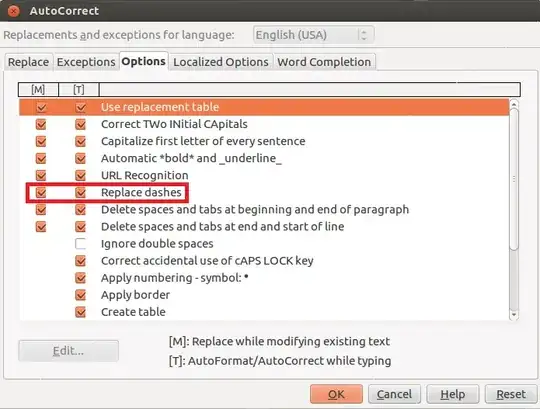
It doesn't appear in the Replace list, because it is an option on its own.

To disable it, go to

Tools -> AutoCorrect Options... -> Options

and uncheck Replace dashes.

screenshot

Dennis
  • 48,917
  • 12
  • 130
  • 149
2

I suggest a temporary solution to avoid this whenever it happens. Press 'Ctrl+Z' to undo changing the 'dash'

Indika
  • 21
  • 1