9

On 2-page view, I want to see the pages from right to left, like so:
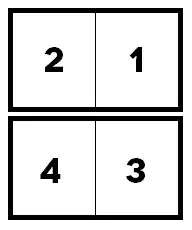
enter image description here

instead of

enter image description here

This has something to do with right-to-left languages.

I found a few suggested solutions that didn't work (one that involved setting odd and even page numbers, and another one involving page breaks).

Any ideas on how I can solve this?

Ellesa
  • 10,895
  • 2
  • 38
  • 52
sky4444
  • 91
  • 1
  • 1
  • 2

3 Answers3

19

Word 2010: Word options > Advanced > Show document content > Document view (choose Right-to-Left)

50-3
  • 3,939
  • 4
  • 21
  • 28
Hamid
  • 191
  • 1
  • 2
  • 2
    Found it 3 lines from the bottom in `קובץ/אפשרויות/מתקדם/הצגת תוכן מסמך/תצוגת מסמך` – pery mimon May 26 '19 at 07:02
3

On Word 2007:

  1. Click the office symbol (top left) - at the bottom of the new window click 'Word Options' next to 'Exit Word'.
  2. Under the 'Popular' tab click 'Language Settings'.
  3. Under 'Primary Editing Language' select a language that orders pages by the style you want, for example Hebrew or Arabic for the first option according to your drawing, English for the second option.
Dave
  • 25,297
  • 10
  • 57
  • 69
Barak
  • 31
  • 2
-1

For 2022 users, this is fixed by changing the primary Office language in the office settings.

  • 1
    Question was about Office 2007 not Office 365. The ability to install language packs for Office 2007 is difference compared to Office 365. This answer should contained information on Office 2007. Instructions for Office 365 in my opinion cannot answer this specific question about Office 2007 – Ramhound Oct 24 '22 at 14:31