4

I have installed XAMPP and aptana.
But when I run my php file it shows me a text format of it.
(I've started XAMPP in the background)
What did I do wrong?

Edit:
Now I think I found the problem, aptana opens the file with the port 8020 and not 80, how can I change that? (to 80)

funerr
  • 177
  • 1
  • 1
  • 6
  • How do you have Aptana configured for PHP? We need more details. Is the page being opened in an external browser (e.g. Firefox)? Is the PHP file hosted on the XAMPP server (e.g. `xampp/htdocs/...`)? – iglvzx Jul 10 '12 at 16:58
  • I have a project in the xampp/htdocs directory and aptana opens the file in the editor via Firefox. – funerr Jul 10 '12 at 17:00
  • Can you access your local XAMPP server outside of Aptana? **Apache** needs to be running. What happens when you go to `localhost` or `127.0.0.1` in your browser? – iglvzx Jul 10 '12 at 17:03
  • @iglvzx Yes I can. – funerr Jul 10 '12 at 17:04
  • (If I downlaoded "Aptana Studio 3.2.0 standalone" will it be ok or do I need any more plugins?) – funerr Jul 10 '12 at 17:10
  • I think the standalone version is fine. I haven't used Aptana in awhile, but I remember it working the way you intended. Let me see how one of my projects was set up. – iglvzx Jul 10 '12 at 17:14
  • let us [continue this discussion in chat](http://chat.stackexchange.com/rooms/4064/discussion-between-iglvzx-and-agam360) – iglvzx Jul 10 '12 at 17:16
  • @iglvzx, I opened the chat, i'll open it for a few hours, try to catch me there. – funerr Jul 10 '12 at 19:13

2 Answers2

7

This is probably not the ideal setup, but this is what I've used:

Setup:

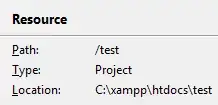
  1. Place your project in your XAMPP directory, e.g. xampp\htdocs\<project>:

    resource

  2. Make sure that Apache is running and accessible via your browser:

    xampp control panel

    localhost

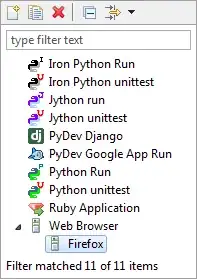
  3. Go to Run > Run Configurations... and create/edit a browser under Web Browser:

    browser

  4. Add the Browser Executable, set Server to Use base URL (e.g. http://localhost/), and select Append project name:

    server


Demonstration:

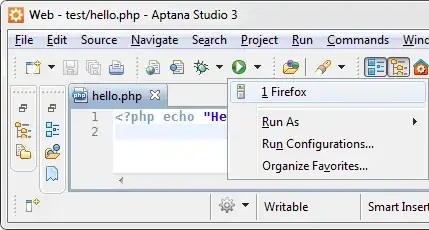
Now you can open the current page on your XAMPP server by clicking the Run icon dropdown icon and selecting the browser:

run

hello

iglvzx
  • 23,459
  • 13
  • 85
  • 122
  • No, It still outputs the contents of the php file... and it alerts(when I hit the run button: "The selection can not be lanced"). – funerr Jul 10 '12 at 19:12
  • @iglvzx Hello. Is there a way to automatically set the project to copy itself in the xampp folder? How can i do that? Thanks! – BugShotGG Jan 03 '13 at 00:37
1

I had the same problem on my system , so I tried to adjust my Xampp like it is shown but It didn't work for me. I tried to adjust it little more and found the problem.

In my case when I type my localhost in the "Use base URL:" I type it like the example above "Use base URL: http://localhost/" but like I said it didn't work for me. The browser opened a blank page.

So I went back and checked the configurations I have made in Xampp.

The Apache port 80 was used by another program , so I changed it to 8080. I went back end tried the following -> "Use base URL: http://localhost:8080/

And it worked.

kenorb
  • 24,736
  • 27
  • 129
  • 199
Mkey5
  • 11
  • 1