4

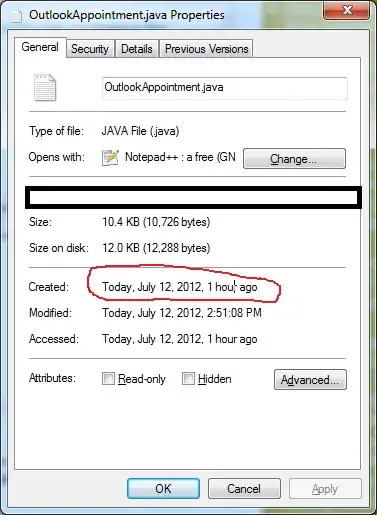
I'm trying to figure out exactly when I created a file. Windows 7 thinks I don't know how to subtract two times, and tells me it was created "1 hour ago." I need a little more detail than this, but I can't seem to find a setting to toggle this "feature" off.

Example below:

enter image description here

Oliver Salzburg
  • 86,445
  • 63
  • 260
  • 306
corsiKa
  • 971
  • 2
  • 10
  • 27

4 Answers4

5

You can also enable the Date Created column in Explorer:

enter image description here

Synetech
  • 68,243
  • 36
  • 223
  • 356
  • This is great. Obviously it'd be nice to have it in my prompt, but this eliminates the need to open the prompt at all. Can't believe I didn't think of this. – corsiKa Jul 12 '12 at 21:22
  • Which prompt? The command-prompt? If you want the created date to be displayed in the command-prompt by default instead of the modified date, then you can [create] the `dircmd` environment variable (or just set it temporarily with the `set` command): `dircmd=/TC` – Synetech Jul 12 '12 at 21:26
  • Prompt is the wrong word. I meant the dialog in the screenshot above. – corsiKa Jul 12 '12 at 21:27
  • Ah, okay. Unfortunately in Windows Vista and up, they "simplified" a lot of aspects of the UI (for who knows what reason). As such, they just don't show the information that people want like they did in XP (the [*Properties* dialog in XP](http://www.anti-forensics.com/wp-content/uploads/2009/02/lastaccess1.png) *does* show the full timestamp). – Synetech Jul 12 '12 at 21:32
  • [ClassicShell](http://classicshell.sourceforge.net/features.html) is a shell-extension for Windows 7 that reverts a lot of functionality to that of XP, but unfortunately this is not currently one of them, though you could [request it](http://sourceforge.net/tracker/?group_id=290975&atid=1230791). – Synetech Jul 12 '12 at 21:35
  • @Synetech On a slightly unrelated note, do you know of any programs or extensions that enable/restore the old (XP) Disk Defrag interface? – Matt Jul 13 '12 at 06:52
  • No, but the [XP defragger](http://www.serverwatch.com/img/working.jpg) was actually a licensed copy of [Executive Diskeeper 6](http://www.serverwatch.com/img/working.jpg), so you may be able to get a copy of that. though [newer versions](http://img862.imageshack.us/img862/8827/v1509510x64.jpg) are also different. – Synetech Jul 13 '12 at 17:47
2

Found this interesting question on the subject: Windows 7, file properties, date modified, how do you show seconds?

In my opinion, extending the properties window with something like SKTimeStamp is easier than opening the shell every time (see the bottom 2 screenshots in their google code site).

tutuDajuju
  • 312
  • 1
  • 3
  • 14
  • I suppose I could get a shell extension. I definitely wouldn't want to open the command prompt every time I want to see the create time... Still frustrating to see a regression for the sake of "usability" – corsiKa Jul 12 '12 at 21:34
1

You always have the option of using the dir /T command in the command prompt. Shows exact time and dates.

Chad Harrison
  • 6,069
  • 13
  • 44
  • 60
0

I found XDir, a command line utility. http://download.cnet.com/XDir/3000-2248_4-10508433.html . You can decide what file properties are listed.

e.g.

XDir L:\luajit-2.0\src* "/Form=*f *O *o *d *t"

that shows a filename , creation date and modification date exactly

L:\luajit-2.0\src\lib_base.c 31/05/2015 12:20:46 31/05/2015 12:20:46
L:\luajit-2.0\src\lib_bit.c 31/05/2015 12:20:46 31/05/2015 12:20:46
L:\luajit-2.0\src\lib_debug.c 31/05/2015 12:20:46 31/05/2015 12:20:46
L:\luajit-2.0\src\lib_ffi.c 31/05/2015 12:20:46 31/05/2015 12:20:46
L:\luajit-2.0\src\lib_init.c 31/05/2015 12:20:46 31/05/2015 12:20:46
L:\luajit-2.0\src\lib_io.c 31/05/2015 12:20:48 31/05/2015 12:20:48
L:\luajit-2.0\src\lib_jit.c 31/05/2015 12:20:48 31/05/2015 12:20:48
L:\luajit-2.0\src\lib_math.c 31/05/2015 12:20:48 31/05/2015 12:20:48
L:\luajit-2.0\src\lib_os.c 31/05/2015 12:20:48 31/05/2015 12:20:48
L:\luajit-2.0\src\lib_package.c 31/05/2015 12:20:48 31/05/2015 12:20:48
L:\luajit-2.0\src\lib_string.c 31/05/2015 12:20:48 31/05/2015 12:20:48
L:\luajit-2.0\src\lib_table.c 31/05/2015 12:20:48 31/05/2015 12:20:48
L:\luajit-2.0\src\lj.supp 31/05/2015 12:20:48 31/05/2015 12:20:48
L:\luajit-2.0\src\ljamalg.c 31/05/2015 12:21:00 31/05/2015 12:21:00
L:\luajit-2.0\src\lj_alloc.c 31/05/2015 12:20:48 31/05/2015 12:20:48
L:\luajit-2.0\src\lj_alloc.h 31/05/2015 12:20:48 31/05/2015 12:20:48
L:\luajit-2.0\src\lj_api.c 31/05/2015 12:20:48 31/05/2015 12:20:48
L:\luajit-2.0\src\lj_arch.h 31/05/2015 12:20:48 31/05/2015 12:20:48
Aftershock
  • 655
  • 1
  • 5
  • 8