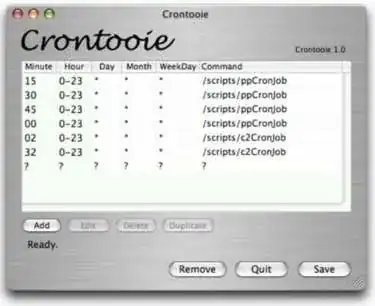
Is there any easy way to schedule repeated jobs in Mac OS X? I know I could use cron, but I'm looking for a more user friendly way to do it, a GUI for schedules, something like this.
Asked
Active
Viewed 5.8k times
47


-
[Lingon](http://www.peterborgapps.com/lingon/) has been updated! Rejoice! – octern Jun 15 '13 at 15:02
9 Answers
49
You can schedule jobs via iCal. Create an event. Edit the event, and you'll see "Run Script" and "Open File" as options as alarms.

Richard Hoskins
- 12,245
- 10
- 49
- 52
-
+1 for mentioning this question at http://superuser.com/questions/102979/how-can-i-schedule-a-daily-task-with-automator-on-os-x-10-6 :-) – Arjan Jan 31 '10 at 19:10
-
7
-
It may support the feature under ML because the event has an option for "Open File", so I presume that allows you to run custom script. But I can't, because I set up my iCal to sync with Google Calendar, and Google simply revert the notification back to default. – Antony Sep 23 '12 at 15:02
14
Well, there's CronniX, Maintidget, Macaroni and MacJanitor.
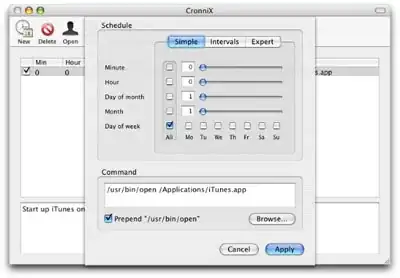
Have you tried using one of the launchd instead of cron? Apparently, Apple doesn't use cron anymore.
- Lingon (abandoned, but supposedly works on Leopard and Snow Leopard)
- Launchd Editor
- launchctl


-
3
-
1Lingon has been updated! Rejoice! Especially good because all of the programs linked in this post are discontinued, dead links, or more than 3 years out of date. – octern Jun 15 '13 at 14:59
10
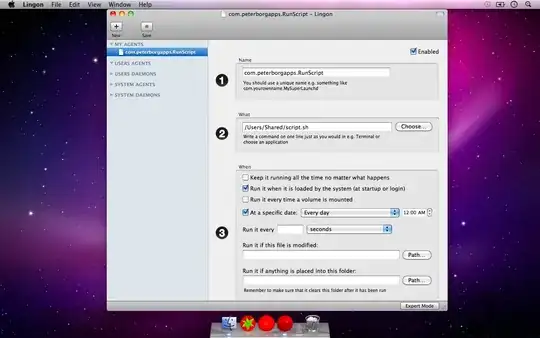
Lingon is a GUI for creating and working with launchd. It's no longer being worked on, but works well for creating and editing Launch Agents and if you are on Leopard or Snow Leopard it's the suggested method over cron.

-
1
-
2[Lingon X](http://www.peterborgapps.com/lingon/) is now available for Mountain Lion. – orome Feb 10 '13 at 21:00
6
This solution does use crontab but makes it user-friendly by using the Automator
Adding a calendar event tends to clog up iCal for me. I'm using a combination of Automator and crontab.
On the Automator part, I'm recording each action I need to perform as an app (Automator > File > New > Application Template) and save it to a convenient location (File > Save as). Make sure you save it as an Application and not Workflow.
Then it's just a case of adding a cronjob for it:
0 * * * * open /path/to/the/save/automator/app
Friendly would be nice, but right now I'm just looking for something that will run an application at a specified time on specified days -- or even every day -- under Snow Leopard, which ignores my old cron file.


Paul Ardeleanu
- 161
- 1
- 4
-
1The OP wants something more user-friendly than `cron`, and you suggest... `cron`? – Daniel Beck Oct 29 '10 at 11:33
-
1Mea culpa! I was only trying to provide my solution to this problem. – Paul Ardeleanu Oct 29 '10 at 11:53
-
2It is conceivable that the OP thought cron was difficult, so showing that it is a one-liner may be informative. – rocketsarefast Jun 22 '13 at 19:08
2
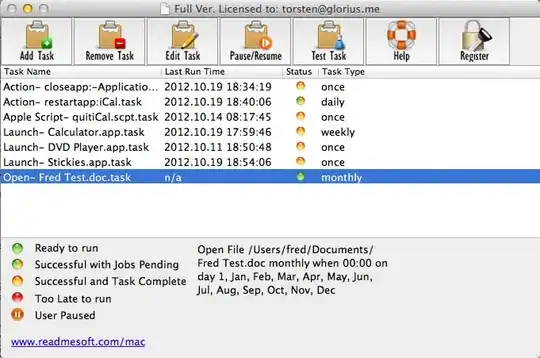
You could try Auto Scheduled Task for Mac http://www.readmesoft.com/mac
Run an application, open a file, or apple script, automator workflow by schedule
It's a GUI tool and easy to use:

user2098299
- 3
- 2

Rubyhog
- 21
- 1
-
Just tried this one, worked fine :) The UI is not very modern, but I don't really care in this case. – BoD May 04 '14 at 16:18


1
There is also Scheduler for Mac at www.macscheduler.net. I am the developer of it. :) User feedback is appreciated. And one more thing... It's free.

Joao Varela
- 11
- 1
-
2Welcome to Super User! Please read: [How do I recommend software in my answers?](http://meta.superuser.com/questions/5329/how-do-i-recommend-software-in-my-answers) – slhck Sep 14 '13 at 09:36
-
None of these tools work. I have S3tools installed for backup to Amazon. It works from command line, but it's not an "application". A couple of commands work just fine for me, but there's no way of using the same thing in GUI, including your tool. – PKHunter Oct 01 '15 at 22:15
0
For those who might read this today (11/24/19)
Lingon still works!!! And it's NOT been abandoned. Works for Hight Sierra, Mojave and Catalina

Allen S
- 11
-
Why would anyone downvote such a helpful comment? It's dated, refers to the relevant OS, and includes a link. – kd4ttc Dec 06 '19 at 16:02