3

Here's my setup:

I'm developing a website on a mac. I created a virtual host, so I can open up my browser, type http://cpp and it will point to the right directory.

I want to test this website out in IE. So I fired up Windows 7 in a vm (Virtual Box). Obviously, typing in http://cpp in IE will not work.

What do I need to do in order to view this virtual host from Windows 7?

NOTE: The fact that it is a virtual host is important. I have scripts in there that refer to the document root. That is, the site is hosted at ~/Sites/cpp, but typing in http://localhost/cpp will break my scripts.


Here's the output from ipconfig:
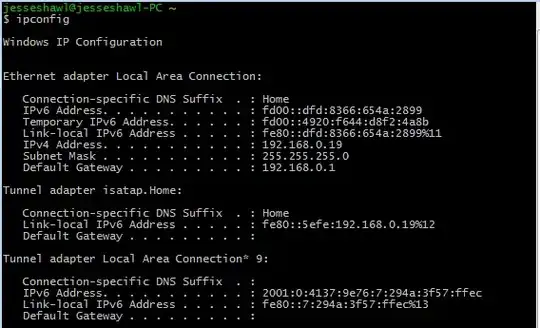
enter image description here

Here's the screenshot of my network settings:

enter image description here

jshawl
  • 339
  • 4
  • 13
  • 1
    Did you try adding an entry to your Windows hosts file that points cpp to the host's IP, and is the host visible from inside the VM (i.e. did you bridge the networks?)? –  Jul 22 '12 at 05:47
  • The network is bridged. I know how to add the host such that cpp maps to 10.0.2.2 but how to I get it to access the vhost? – jshawl Jul 22 '12 at 05:51
  • Well, if you did it all correctly, you should be able to go to `http://cpp` (or `http://cpp.local`) from Internet Explorer. –  Jul 22 '12 at 05:56
  • Still not working out. Would you mind taking a look at the output of my ifconfig and the network settings? : https://www.dropbox.com/sh/t78qg1y2jgfoe3g/UwAOF8CsPu – jshawl Jul 22 '12 at 07:10
  • Can you add a screenshot of the `hosts` file from Windows, please? –  Jul 22 '12 at 17:58
  • This is the screenshot of the hosts file from windows. – jshawl Jul 23 '12 at 02:17

1 Answers1

0

SOLVED! Just needed to run ipconfig when in NAT mode. Saw that inet address was 10.0.2.2 (Apparently this is the norm for mac HOST IP addresses)

Edited my windows host file such that 10.0.2.2 pointed to cpp.

jshawl
  • 339
  • 4
  • 13