7

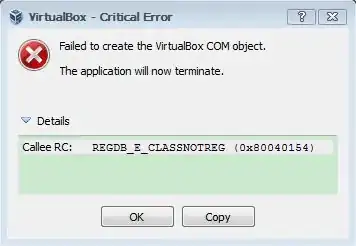
Virtual box critical Error

I wonder what cause this error, I just run VirtualBox after installation, I tried re-installing, repairing, upgrading version, downgrading version. But this error keeps coming up.

Oliver Salzburg
  • 86,445
  • 63
  • 260
  • 306
thuyein
  • 490
  • 1
  • 4
  • 13
  • This error will also occurs if the Windows Environment Variable VBOX_USER_HOME is improperly set. –  Sep 13 '15 at 16:35
  • In my case I needed to open Virtual Box as an administrator. Right-click on the shortcut to open it, select "Run as administrator". – James T Snell Mar 16 '16 at 18:10

3 Answers3

5

According to this article, this can be fixed like so:

  1. Open a standard command line ( Run > cmd )
  2. Run: cd C:\Program Files\Oracle\VirtualBox
  3. Run: VBoxSVC /ReRegServer
  4. Run: regsvr32 VBoxC.dll

Make sure to run the Command Prompt as an Administrator.

But I find it confusing that this happens directly after installation. You may want to report this issue on the VirtualBox Bugtracker.

Oliver Salzburg
  • 86,445
  • 63
  • 260
  • 306
  • Thank you for your help, but I can't do step 3, and when i do step 4 it give me the following message "The module "VBoxC.dll" was loaded but the call to DllRegisterServer failed with error code 0x80070005" . And i don't know why but i can't access www.virtualbox.org any page from this domain. – thuyein Jul 28 '12 at 10:25
  • @TitanZack: Why can't you do step 3? – Oliver Salzburg Jul 28 '12 at 12:40
  • I can't do that because cmd says VBoxSVC is not recognized as a command. By the way do you have any idea why i can't access www.virtualbox.org and any of it's subdomain? – thuyein Jul 28 '12 at 14:32
  • @TitanZack: Try `VBoxSVC.exe`. No idea about the connection problem. Site works fine here. – Oliver Salzburg Jul 28 '12 at 14:52
  • I don't have that file. – thuyein Jul 29 '12 at 14:38
  • @TitanZack: That's weird, but also explains a lot :) That file is supposed to be the wrapper for the VirtualBox service. If it doesn't exist, that's bad. Usually this should be solved by reinstalling, but you've already tried that. I'd tell you to report this issue on their forums, but their domain doesn't work for you... Sorry, I'm clueless at this point. Maybe bring it up in [chat] :) – Oliver Salzburg Jul 29 '12 at 14:46
  • The problem for accessing the www.virtualbox.org has been solved. I used www.hidemyass.com as web proxy to access www.virtualbox.org and it worked fine. But can you explain me what the file is supposed to function? – thuyein Jul 29 '12 at 14:52
  • @TitanZack: The file will run the VirtualBox service in the background. When you start VirtualBox, it will try to communicate with that service. But it can't. That's why you get that error. And it's no surprise that the service does not function if the file does not exist :\ – Oliver Salzburg Jul 29 '12 at 14:53
  • Thank you for answering my questions and watching for my problems. I can't do anything about that virtual box. I have tried other products like vmware, they too kept prompting errors. But I won't give up. Thank you from the bottom of my heart. – thuyein Jul 29 '12 at 15:10
  • @TitanZack: It is possible that the real issue is somewhere else if other software is also giving you trouble. If other software is giving you issues as well, feel free to open additional questions about those issues and reference this one so people know it's a bigger issue. Good luck :) – Oliver Salzburg Jul 29 '12 at 15:12
  • I can't ask questions from now on because "Sorry, we are no longer accepting questions from this account. See http://goo.gl/C1Kwu to learn more." shows up. – thuyein Jul 29 '12 at 15:19
  • let us [continue this discussion in chat](http://chat.stackexchange.com/rooms/4296/discussion-between-oliver-salzburg-and-titan-zack) – Oliver Salzburg Jul 29 '12 at 15:44
  • chat.stackexchange.com is taking very long to load, i can't access. And is there any way to make my account to be able to post questions again? – thuyein Jul 29 '12 at 16:41
  • @TitanZack: You won't be able to post new answers until you've fixed your previous ones. Another user offered the suggestion that your computer may actually be infected with malware, which is now causing your reported issues. You seem to have experimented with a known trojan only recently. This could have caused tremendous outfall. Please make sure you're system is clean and running properly, then [improve your questions](http://superuser.com/faq#howtoask) so you can resolve any remaining issues :) – Oliver Salzburg Jul 29 '12 at 17:04
2

I have the same problem after de+reinstall VirtualBox.

Good hint, Oliver Salzburg! It didn't work for me under Win10, but brought me closer to the solution:

  • Open start menu, right click on the VirtualBox link
  • Click on open file path - explorer opens
  • Right click on VirtualBox link, then settings
  • Under compatibility click settings for all users button
  • Check execute program as administrator
  • ok-click all windows

'Strings' may vary due to translation.

Surprisingly (for me), execute program as administrator even makes a difference when using an admin account. This is also important for Oliver's solution (as I learned today after >15 years Windows experience.

FLYpe
  • 21
  • 1
0

This error occurred with my win 7 64 bit too.

I came to a conclusion that this problem occurred due to installation of youwave for android on my pc.

They both have some conflicts so only any one can be installed at a time.

Yash
  • 1