21

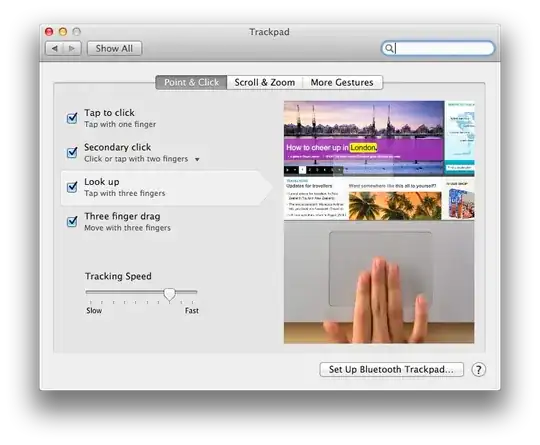
Ever since Lion I've been using Better Touch Tool in order to have the three finger tap gesture trigger a middle click. Now, in Mountain Lion, Apple has changed the in-line dictionary definition gesture from three finger double tap to three finger tap. I am finding that sometimes I get middle click and sometimes I get a dictionary definition. How can I disable Apple's dictionary definition gesture?

Edit: sometimes I am getting both a middle click and a dictionary definition.

knpwrs
  • 1,393
  • 3
  • 15
  • 27
  • http://apple.stackexchange.com/questions/57537/how-to-disable-three-finger-tap-word-lookup –  Jul 28 '12 at 03:45
  • Disabling "Look up" feature disables Three-finger-tap gesture in Better Touch Tool - have you found any workaround? – Pavel Alexeev Oct 02 '12 at 10:03
  • Yeah, I just kept three finger tap as lookup and made three finger click to be middle click. It takes some getting used to but its bearable. – knpwrs Oct 03 '12 at 13:01

1 Answers1

28

A similar question was posted on AskDifferent.

From the accepted answer by Daniel Lawson:

In System Preferences under Trackpad then Point & Click, uncheck Look up.

enter image description here