67

Possible Duplicate:
Multiple chrome.exe in Task Manager

In Windows Task Manager it seems that I have multiple Chrome processes running, even though I only have one Chrome window open.

How is this possible? I always thought each open program represented one process.

Piper
  • 910
  • 2
  • 7
  • 15
  • Is it one **tab** (as per the title) or one **window** (as per the body)? – ChrisF Aug 14 '12 at 14:53
  • It was one window like the body. – Piper Aug 14 '12 at 17:52
  • 1
    So why does it say "one tab" in the title? – ChrisF Aug 14 '12 at 18:05
  • 3
    Background Extension services!! – Vishwanath Dalvi Aug 14 '12 at 18:07
  • Sorry about that, just edited it :) – Piper Aug 14 '12 at 20:19
  • 1
    Because if one of something is good, then lots of it must be better! ;) – user541686 Aug 14 '12 at 20:47
  • If only I had a penny for every time this question was asked... – Mayank Aug 15 '12 at 14:34
  • Multi process is useful because even a tab *(or extension)* is crashed *(or stops responding)*, the remaining processes *(tabs, extensions)* still works. – Santosh Kumar Aug 16 '12 at 02:25
  • Although it is *usually* one process to one application, applications have full right to use as many processes as they want. That's even more promenant on Linux systems, where threads are processes, and where a lot of multitasking is done through `fork` and `exec`. – Linuxios Aug 16 '12 at 18:50
  • Why does Chrome have ~15 processes open using ~400mb, even when I don't have it open? Is it some sort of "ready-to-launch" thing that should make launch quicker? Generally my Chrome is running pretty slow these days (the last year), except if I'm in incognito mode. I've tried disabling all plugins, but that doesn't affect it, so I just had this no-basis notion that it had something to do with bad processes that were stuck, even after restarting the computer. – Aske B. Aug 23 '15 at 20:54
  • Also, I've had Chrome (the entire browser window) be stuck multiple times the last few months. Usually when one plugin goes crazy (usually Unity, which I know isn't officially supported anymore), but sometimes also simple websites like imdb or this one. And after I wait a minute, all sites run smoothly again. – Aske B. Aug 23 '15 at 20:58

5 Answers5

72

You can read the details here: http://blog.chromium.org/2008/09/multi-process-architecture.html

Google Chrome takes advantage of these properties and puts web apps and plug-ins in separate processes from the browser itself. This means that a rendering engine crash in one web app won't affect the browser or other web apps. It means the OS can run web apps in parallel to increase their responsiveness, and it means the browser itself won't lock up if a particular web app or plug-in stops responding. It also means we can run the rendering engine processes in a restrictive sandbox that helps limit the damage if an exploit does occur.

Basically, each tab has one process unless the tabs are from the same domain. The renderer has a process for itself. Each plug-in will have one and so will each extension that is active.

Jeff Atwood
  • 23,972
  • 30
  • 99
  • 120
  • 6
    In addition, many of the background extensions also have their own processes. You can see all the chrome processes by going to the chrome tools (Wrench menu)->Tools->Task Manager. – Liron Aug 15 '12 at 09:26
30

These separate processes are called SANDBOXING. This allows A process to crash, but keeps other processes from crashing a system (or Chrome)

C2940680
  • 785
  • 4
  • 8
28

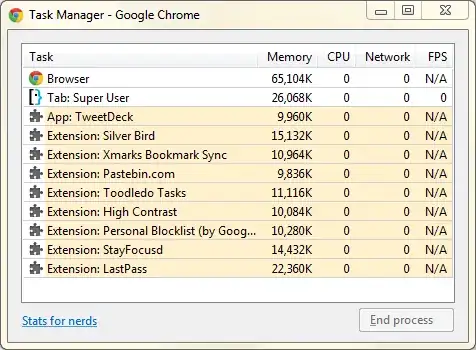
You can see which process does what on:

Wrench Menu->View Background Pages

Which looks like this:

enter image description here

James Mertz
  • 26,224
  • 41
  • 111
  • 163
Etherealone
  • 184
  • 1
  • 14
20

Don't forget to read the Chrome introduction comic that covers this among other design decisions: Page 4 from comic

deizel.
  • 383
  • 3
  • 8
6

Google Chrome use separate process for each tab. Using interprocess communication you can manage multiple processes as one application.

Using multiple process can help an applications to be more robust and better use system resources.

See:

amotzg
  • 959
  • 6
  • 14
  • 2
    "More robust", definitely. "Better use system resources" -- not so sure about that. Doesn't the multiprocess model use a fair bit more memory? – LarsH Aug 14 '12 at 20:23
  • 5
    if by *"Better use system resources"* you mean *"way more resources"* you are correct. –  Aug 14 '12 at 20:42