14

I just completed a fresh install of Windows 8 Pro as it was released to MSDN. Installation went without a hitch however I can't find out where to enter the correct product key for the copy I have.

Clicking on the Activate this Computer in Activity Centre displays the following screen, but no option to change the product key:
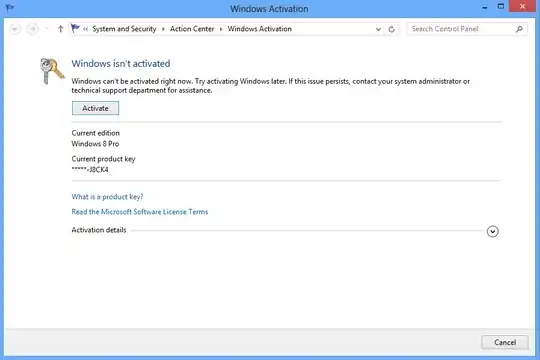
Windows 8 Activation Screen

BinaryMisfit
  • 20,643
  • 10
  • 67
  • 76

3 Answers3

18

Just follow these steps to add/change product key using Command Prompt and slmgr.vbs:

  1. Launch Command Prompt as an Administrator.

  2. At the command prompt, type in slmgr.vbs -ipk(insert your product key here) and click Enter.

  3. To activate windows, type in slmgr.vbs -ato and click Enter.

All information form this Source

Canadian Luke
  • 24,199
  • 39
  • 117
  • 171
avirk
  • 15,689
  • 16
  • 59
  • 104
12

The command to display the GUI for changing the product key is slui 3 (you need to run the cmd.exe as an administrator).

Zaroth
  • 492
  • 3
  • 17
b0w_bender
  • 121
  • 2
  • 4
    Welcome to Superuser. I edited your answer, please refrain from posting rants and such, please check the FAQ, too. Feel free to edit your question again if you want to add something. – Baarn Aug 28 '12 at 20:22
  • That's a much more convenient way to do this, thanks! – Zaroth May 29 '15 at 09:00
0

You can also go to System (Win+Break) and click the "Change product key" link at the bottom. This works in both Windows 7 and 8.

Cameron
  • 307
  • 1
  • 2
  • 10