2

I am running fedora and I would like a tool to automatically rename files on my ext3 fedora partition so that I can transfer files with incompatible names flawlessly. Any advice on how to proceed ? Thanks in advance.

Edit: I know there is a nice GUI tool for this purpose named ext2ntfs-compatibilator, but it doens't seem to be 64 bits compatible.

B2F
  • 192
  • 8
  • Could you give some examples please? – terdon Aug 22 '12 at 15:58
  • Like name a text file njkn??'_è' and try to copy to a ntfs or fat32 disk and it just won't do -__- ... Anything with \/:*?"<>| actually – B2F Aug 22 '12 at 16:01
  • 1
    NTFS doesn't care about most characters. You can use any UTF-16 code point except `NUL` (`U+0000`) and `/` (slash). The Win32 subsystem, as normally used by Windows (there's a POSIX subsystem for Windows), has restrictions of `NUL` and `/\:*?"<>|`. Please don't mix NTFS with the Win32 subsystem. – Bob Aug 22 '12 at 16:38

1 Answers1

1

Right, first of all do not use special characters in file names, it just complicates matters :).

Have a look at my answer here.

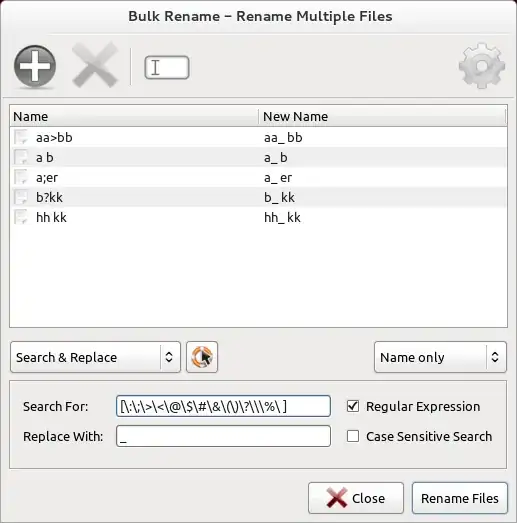
For a GUI way try thunar's bulk rename feature:

$ yum install thunar
$ Thunar --bulk-rename
  1. Add the files you want to rename

  2. Choose "Search and Replace"

  3. Paste the regex from my linked answer ([\:\;\>\<\@\$\#\&\(\)\?\\\%\ ])into the "Search For" field.

  4. Write "_" into the "Replace With" field

  5. Click on "Rename Files"

Thunar Bulk Rename Screenshot

terdon
  • 52,568
  • 14
  • 124
  • 170
  • Thanks, its almost duplicate. But my question is more fedora and user interface oriented... I have seen one GUI tool for that but forgot the name. If I don't get a more user friendly option I'll give it a try. – B2F Aug 22 '12 at 16:17
  • Found it : ext2ntfs-compatibilator (http://code.google.com/p/ext2ntfs-compatibilator/downloads/list) the problem is it doesn't seem to be 64 bits compatible... So I am looking for an alternative. – B2F Aug 22 '12 at 16:26
  • @ZenMaster I updated my answer to include a GUI way. Also, there is nothing specific to fedora about what you are trying to do. The CLI solution I gave will work for any *nix using BASH. – terdon Aug 22 '12 at 16:30
  • The solution you provided renames only the first character, not all! – sebix Nov 15 '15 at 17:21
  • @sebix yes, I don't know how to make the replacement global with this program. If you have perl-rename (which you do on Debian based systems like Debian itself, Ubuntu or Mint), just use `rename 's/[\:\;\>\<\@\$\#\&\(\)\?\\\%\ ]/_/g' file1 file2 file3 fileN`. If you don't have perl rename, do `for i in file1 file2 fileN; do mv "$i" "${i//[\:\;\>\<\@\$\#\&\(\)\?\\\%\ ]/_}"; done`. – terdon Nov 15 '15 at 18:24