8

I spilled some water on the left side of my Microsoft 4000 Ergonomic Keyboard causing several keys to malfunction. Most started working again after leaving the keyboard upside down in a warm-air clothes dryer for an hour.

I presume there is some lingering moisture which is causing the keypress errors. Should I be worried about permanent damage and what can I do to get the remaining keys back?

Here is a list of broken/malfunctioning keys, in case it helps to pinpoint a solution:

z, c (prints x), Right Shift, 7, 8, 9, 0
Delete, Page Up, Num-4, Num-5, Num-6, Num-(, Num-), Num-=
Journeyman Geek
  • 127,463
  • 52
  • 260
  • 430
Petrus Theron
  • 315
  • 2
  • 12

3 Answers3

10

When it comes to Microsoft Natural keyboard this is unfortunately quite a common experience, i just lost a second keyboard to a small water spill. Interestingly enough almost exactly the same keys stopped working.

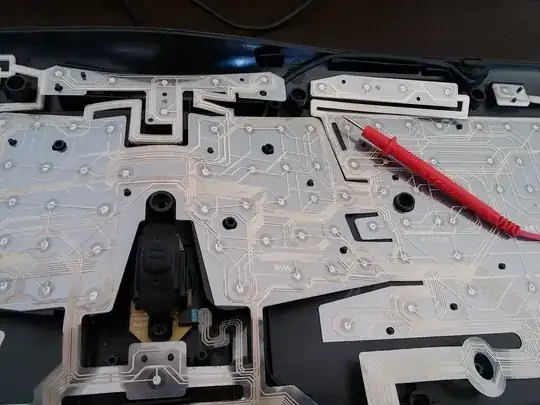
The keyboard is a membrane keyboard. There are three sheets of plastic, with middle one having small circle cutout, through which bottom and top layer may contact when the key is pressed. When you spill water on the keyboard around middle section it will actually follow the incline, and go down on top of the membrane without entering it. Then it will pool in the place pointed out on the picture where incline ends.
Water pooling spot

Then water will enter the membrane from the side. On the membrane you have conducting lines, that are sort of printed on, sadly seems like water basically dissolves those. On the second picture you can see the spot where I took of first two leyers of membrane to show the bottom one. The gray lines, actually are no longer conducting (I checked with a multi-meter)

Damaged paths

So the only way to fix it would be actually to use some wire glue or conductive silver and fix up the connection manually. I will try that next but it will require some serious precision work.

I suppose the best course of action if you do spill water on your keyboard would be to immediately unplug it, flip it upside down, to limit water contact with membrane, and then stuck it in a plastic bag with rice / silica gel hoping that the permanent damage has not occurred yet.

Sebastian K
  • 211
  • 2
  • 5
  • Any luck fixing the conductive tracks ? – vucalur Sep 16 '18 at 11:38
  • I tried but I did not manage to get it working with my fat fingers. – Sebastian K Sep 18 '18 at 00:44
  • 1
    Perhaps you've researched this: Is there an option to buy replacement sheets? I'd rather have my keyboard repaired, than buy a new one - I'm into reducing trash output. – vucalur Sep 18 '18 at 08:36
  • Yeah, me too. Sadly I could not find anything. I have seen posts that people got replacement keyboards from MS. I ended buying a new one. Will use old one to replace worn out keys one day :) – Sebastian K Sep 18 '18 at 15:08
  • 2
    I won't call a keyboard "ergonomic" if it cannot resist some coffee. – Alex Cohn Mar 22 '20 at 21:28
  • I fixed mine with a conductive paint - powdered silver in glue and toluene solvent. (The specific brand was EL-2, but I guess it's not worldwide product.) It worked well for about 10 months, until it started pressing multiple letters together (2+4 and F4+F6). My guess is the paint peeled off slightly and the dust shorted other tracks. Further repairs didn't work yet, but I will keep cleaning it. – akwky May 26 '21 at 09:06
6

Seal the keyboard in a plastic bag with a handful of uncooked rice for a day or two. The rice should absorb any moisture thats left. If the keyboard continues to malfunction, the water has probably damaged the circuitry and it will have to be replaced.

Keltari
  • 71,875
  • 26
  • 179
  • 229
  • 1
    Silica Gel would be a better option but not as cheap. – Moab Sep 04 '12 at 13:56
  • At about $10 for eight pounds (marketed as the "crystal" cat litter), silica gel is actually pretty comparable to rice! And you can still use it as cat litter afterward. – Jamie Hanrahan Jan 09 '17 at 23:27
1

If it is indeed plain, clean water (and not coffee or soda pop) then you're in luck -- likely after drying out it will work again.

Unplug the keyboard and attempt to shake/tap/blot out as much water as possible, then leave the keyboard leaning against something at about a 45 degree angle with the keys facing down for several hours, blotting up any moisture that appears. Then place in a slightly warm (not hot) location for at least 24 hours. (It may take 3-4 days in some cases.)

If after 3-4 days the keyboard is not working (you may have to "limber it up" by working the keys a bit) then it's probably toast.

Daniel R Hicks
  • 6,143
  • 3
  • 27
  • 50