16

Since I installed Windows 8 Preview on my personal computer, during the installation of some programs and drivers (Windows 7 ones) it started to pop me a message warning that .NET Framework 3.5 was needed:
Enter image description here

I could use "Install this feature", start to download some dependencies (300 MB) and that's it, but I don't want to have to download it every time I want to enable this feature on every machine that I install Windows 8.

Is there is some way to install .NET 3.5 on Windows 8 without having to download the entire Framework from Microsoft?

Peter Mortensen
  • 12,090
  • 23
  • 70
  • 90
Diogo
  • 30,192
  • 65
  • 150
  • 222
  • Is that actually what happens when you click it? In 7 and 2008 adding the "Features" or "Roles" didn't require an Internet connection to add (just to update, after adding). Including their in-built .NET version (3.5). – Ƭᴇcʜιᴇ007 Sep 03 '12 at 18:53
  • Yes, it downloads entire Framework from internet, I just checked here without internet and the service timed out. – Diogo Sep 03 '12 at 18:59
  • Wow, that's lame... then WHY is it still in the Image? :/ – Ƭᴇcʜιᴇ007 Sep 03 '12 at 19:00
  • [Reference.](http://www.yethz.com/win-8/enable-netframework-3-5-in-windows-8-without-using-windows-update/2499/) – Diogo Sep 03 '12 at 19:02
  • I wonder if the "included" .Net 4.5 does it too then? Bizarre choices over at MS. :) Also, maybe you should reference your source in your answer (them's the rules ain't they)? :) – Ƭᴇcʜιᴇ007 Sep 03 '12 at 19:07

1 Answers1

23

Yes, there is an easy way, but you must have installation media for Windows 8 (could be a DVD or even a mounted .ISO with a Windows 8 installation) and make sure the media is for the correct version of Windows (x32 or x64). Otherwise, the command line will fail (not harmful, just annoying):

  • Run a command prompt (cmd) with elevated rights ('as Administrator').
  • Run the following command:

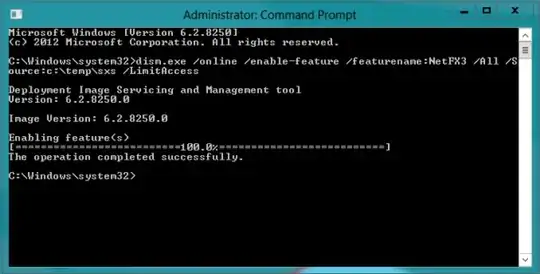
dism.exe /online /enable-feature /featurename:NetFX3 /All /Source:E:\sources\sxs /LimitAccess

where "E:\sources\sxs" is the sxs path of your Windows 8 installation media.

Enter image description here

  • That's it, .NET 3.5 is installed on your machine. Reboot and everything that requires .NET 3.5 will work.
Peter Mortensen
  • 12,090
  • 23
  • 70
  • 90
Diogo
  • 30,192
  • 65
  • 150
  • 222
  • 1
    prompt me : __The limitaccsess option is not recognized in this context.__ Dism.exe /online /enable-feature /featurename:NetFX3 /Source:I:\Sources\sxs **i run that without limit-access switch, and execute successfully.** – saber tabatabaee yazdi Dec 22 '12 at 09:07
  • 2
    *The `limitaccsess` option is not recognized in this context.* You can't spell `limitaccess`. – ta.speot.is Jul 03 '13 at 12:14