2

not sure this is the right place but I found a similar question here, so probably it is.

I'm working on some presentations which contain text in two different languages. These languages are interleaved in the same text-box. These is because I'm talking Italian but I have to use some English terms.

Is there a way for changing in a fast way the language of a single word?

Currently I'm doing the following:

  1. select the word
  2. Tools -> Language...
  3. select the language
  4. confirm

This can be really long when in the same slide I have several words in English.

Event better would be having a spell checker that automatically understands the language.

Maverik
  • 161
  • 7

1 Answers1

1

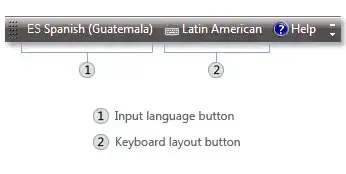
For this you can install another language in the Windows itself, after that you will have a floating bar and by just clicking on it you will be able to switch languages.

To install another language and keyboard layout in Windows XP, follow these steps:

  1. In the Windows XP standard Start menu, click Start, and then click Control Panel.

  2. In the Windows XP classic Start menu, click Start, click Settings, and then click Control Panel.

  3. Double-click Regional and Language Options.

  4. Click the Languages tab, and then click Details under "Text Services and Input Languages".

  5. Click Add under "Installed Services", and then click the language you want to add and the keyboard layout you want to use for that language.

  6. To configure the settings for the Language bar, click Language Bar under "Preferences".

You can use it with the following key-commands:
alt+shift : Switch IME modes (between "EN" and "JP" mode, for example) See here screenshot of the language bar

Note: These instructions should also work with Windows 7.

Links:

Ankit
  • 4,716
  • 2
  • 23
  • 32
  • They actually don't work in Windows 7 because the language packs were not in every version of Windows 7. – Ramhound Sep 06 '12 at 16:03
  • Language packs were made available later for some editions as updates. http://support.microsoft.com/kb/972813 from question its known that the lang is available. – Ankit Sep 06 '12 at 16:14
  • @Lamb I didn't specified that but I'm not under windows. However it seems that this will change the language of the entire slide, not just a word. Please correct me if I'm wrong. – Maverik Sep 06 '12 at 16:30
  • @lucaghera Question was tagged MS-powerpoint so I assumed that its windows. No, it will not change the language of whole slide, instead it will provide you ability to switch b/w typing lang easily. – Ankit Sep 06 '12 at 16:39
  • see the edited answer. – Ankit Sep 06 '12 at 16:59