I assigned keyboard shortcut Cmd-. to "Zoom" a window for all applications, it works fine except for Mozilla Thunderbird, I guess that is because Thunderbird has a menu item View -> Zoom -> Zoom in (out, reset, etc.). How to assign a keyboard shortcut to do that? Thanks.
Asked
Active
Viewed 495 times
2

mattw
- 123
- 3
2 Answers
0
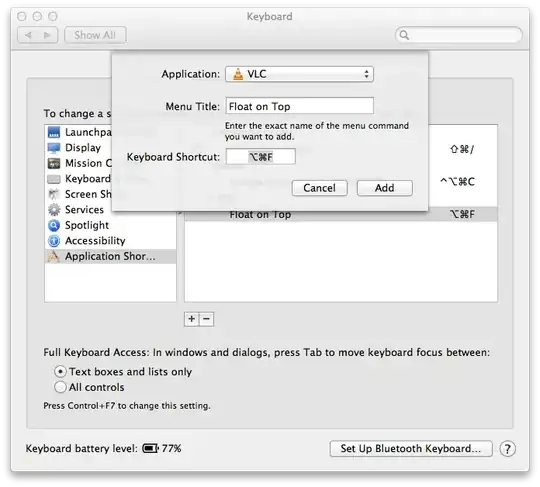
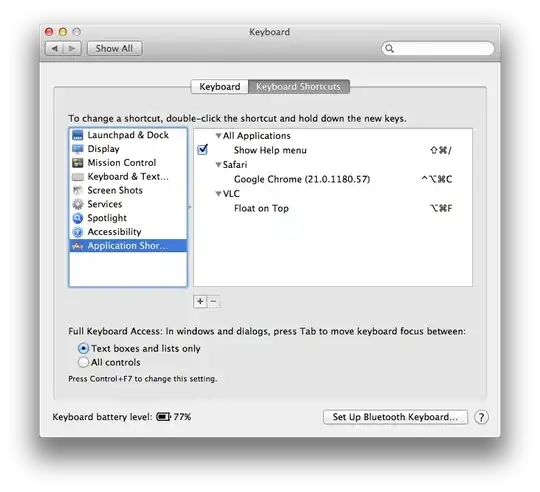
In System Preferences > Keyboard. Click the Keyboard Shortcuts tab. In the left hand pane, at the bottom, there is a "Application Shortcuts" item. Choose that, and you'll see a new pane on the right and a "+ / -" control. You'll need to click the "+" and choose Thunderbird as the application, and then type in the exact menu item you'll want to activate with the defined keyboard shortcut.
Here's an example I use for VLC:

camflan
- 186
- 4
-
Thanks for the detailed step, my question was about shortcut for nested menu item, @Lri answered that quite well. – mattw Sep 13 '12 at 02:15
0
You could specify nested menu titles like >Window>Zoom on 10.7, but it stopped working on 10.8.
You could also use an application like Moom or BetterSnapTool or assign a shortcut to an AppleScript that clicks a zoom button.


-
I assigned `Ctrl+Cmd+.` to `>Window>Zoom` for Thunderbird and I see it appears in the right menu item, however it does not work either in 10.7.4. I see enough information to solve this in other way. Thank you! – mattw Sep 13 '12 at 02:12