Possible Duplicate:
How do I reduce the desktop icon size in Windows 7?
In Windows 7, you can use Ctrl + the mouse wheel to change your icon size on your desktop.
How do you do this on a laptop without any scroll wheel?
Possible Duplicate:
How do I reduce the desktop icon size in Windows 7?
In Windows 7, you can use Ctrl + the mouse wheel to change your icon size on your desktop.
How do you do this on a laptop without any scroll wheel?


Right click on an empty part of the desktop, and then choose the Personalize command from the shortcut menu. When the Personalization window appears, click the Window Color icon.
This will open the Windows Color and Appearance dialog box.
From the Item drop-down menu select Icon.
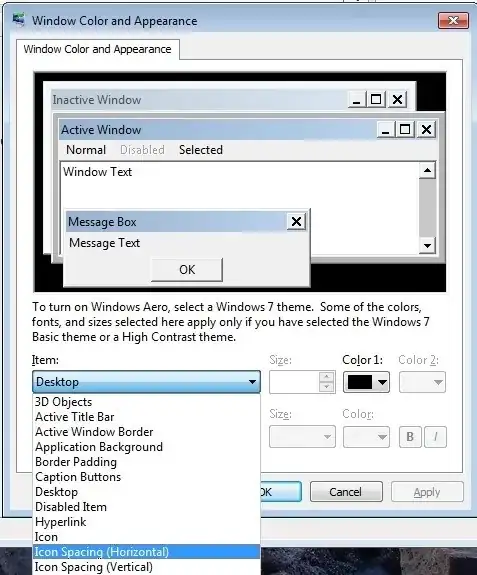
Now you can adjust the icon size exactly to your likings and apply the new settings.
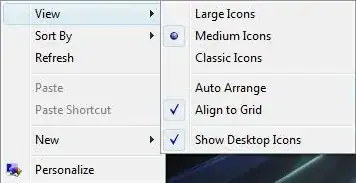
It is far more customizable than just the three options from the View menu. You can also adjust the horizontal and vertical icon spacing there.
You can still do it through the right click menu, but you can only pick from three choices instead of the many in-between options:

Start menu → Run → regedit.
Find the following key:
HKEY_CURRENT_USER\Control Panel\Desktop\WindowMetrics
Modify "Shell Icon Size". The smaller the number, the smaller the icons. You'll have to reboot to see the effect.

Technically this is not the exact answer to your question but if you want to reduce the size of desktop icons, you can try the following: Most laptops allow treating simultaneous click of left and right mouse buttons as a middle click. On my laptop, I was able to use this feature to resize the icons on the desktop. (Ctrl + left + right + trackpad scroll up/down).
